By using this site, you agree to the Privacy Policy and Terms of Use.
Accept
DGM NewsDGM News
  • Home
  • About dgmnews.com
  • Contact
  • Disclaimer
  • Privacy Policy
  • American Hartford Gold Review
  • Contribute
Reading: Discover the Art of Simplicity with VisualGPT’s AI Photo to Sketch and Image Editor
Share
Notification Show More
Font ResizerAa
Font ResizerAa
DGM NewsDGM News
  • Home
  • About dgmnews.com
  • Contact
  • Disclaimer
  • Privacy Policy
  • American Hartford Gold Review
  • Contribute
  • Home
  • About dgmnews.com
  • Contact
  • Disclaimer
  • Privacy Policy
  • American Hartford Gold Review
  • Contribute
Follow US
  • Advertise
Home » Blog » Discover the Art of Simplicity with VisualGPT’s AI Photo to Sketch and Image Editor
Technology

Discover the Art of Simplicity with VisualGPT’s AI Photo to Sketch and Image Editor

Meta Max Agency
Last updated: November 21, 2025 4:29 pm
By Meta Max Agency
6 Min Read
Share
Discover the Art of Simplicity with VisualGPT’s AI Photo to Sketch and Image Editor
SHARE

In an era where every image competes for attention, turning an ordinary photo into a sketch can make it stand out effortlessly. VisualGPT’s AI Photo to Sketch and Image Editor bring that transformation within everyone’s reach. Whether you are an artist, a content creator, or someone who simply enjoys personalizing images, these tools make digital creativity simple, intuitive, and accessible to all.
Contents
  • The Beauty of Turning Photos into Drawings
  • Why VisualGPT Stands Out
  • How to Use VisualGPT’s AI Photo to Sketch
    • Step 1: Upload a Photo
    • Step 2: Select a Sketch Mode
    • Step 3: Generate the Sketch
  • Enhancing Your Sketches with Image Editor
  • Creative Applications and Inspiration
  • A Modern Way to Reimagine Traditional Art
  • Conclusion

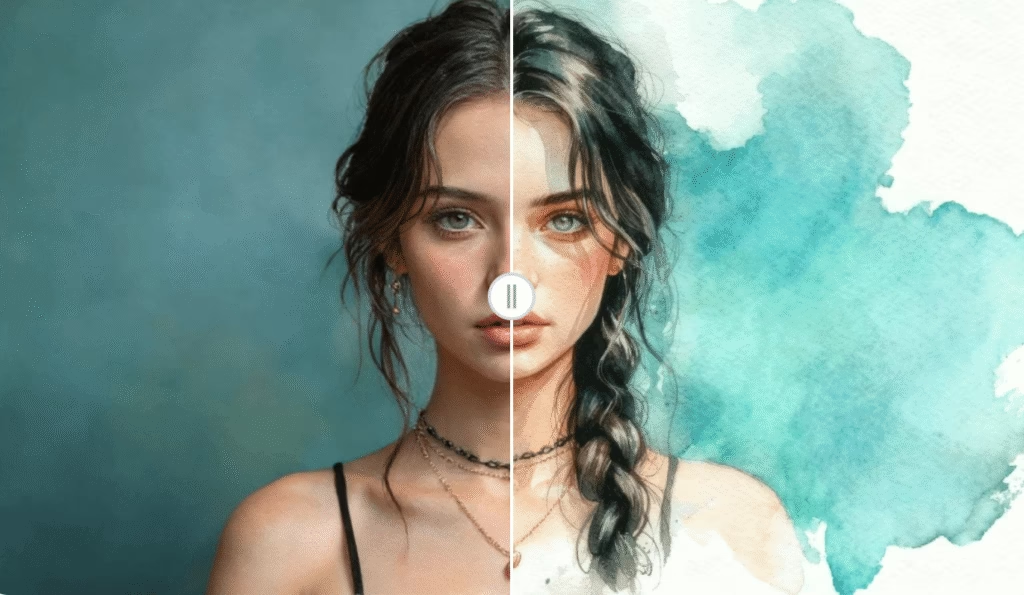
(Watercolor Sketch by VisualGPT)

The Beauty of Turning Photos into Drawings

There is something timeless about a hand-drawn sketch. It captures emotion, light, and personality in a way that photographs sometimes cannot. However, not everyone has the time or skill to draw by hand. This is where VisualGPT’s AI Photo to Sketch changes the game. It takes your digital photo and recreates it with the look and feel of a real drawing — preserving depth, contrast, and expression.

The tool analyzes every line, curve, and shadow in your photo, converting it into a refined pencil-style or charcoal sketch. The result is not just a stylized image but a creative reinterpretation of your original photo that looks handcrafted.

Why VisualGPT Stands Out

While there are many image filters available online, VisualGPT offers something beyond a quick visual effect. Its Photo to Sketch converter applies a level of precision that makes the transformation look natural. Textures remain smooth, outlines stay sharp, and every element retains balance — from hair strands in a portrait to fine architectural details in a landscape.

The platform’s no-login, free-access design also makes it approachable for everyone. You can start experimenting the moment you land on the page. This simplicity allows professionals and casual users alike to focus on creativity rather than setup.

How to Use VisualGPT’s AI Photo to Sketch

The process is fast and effortless, even for beginners.

Step 1: Upload a Photo

Choose any photo you want to turn into a sketch — a portrait, a pet picture, or a scenic moment. The tool works equally well across different subjects.

Step 2: Select a Sketch Mode

Experiment with various styles such as light pencil drawing, classic graphite, or textured shading to find the tone that best suits your image.

Step 3: Generate the Sketch

Within seconds, VisualGPT produces a refined sketch version of your photo. The output maintains a balance of artistic feel and photo realism, giving you a result ready to print, share, or edit further.

Enhancing Your Sketches with Image Editor

Once your sketch is created, you might want to adjust it slightly — perhaps brighten the contrast, clean up some edges, or add a soft tint. For that, Image Editor provides the perfect finishing touch. Found at Image Editor, it offers a complete set of editing tools right in your browser.

You can fine-tune your VisualGPT sketch by:

  • Adjusting the brightness and shadows for a more balanced tone
  • Removing any unwanted backgrounds for a minimalist look
  • Sharpening fine details to highlight pencil textures
  • Cropping or resizing for printing or web display

Both tools share one core principle: effortless creativity. VisualGPT provides the artistic transformation, while Image Editor ensures that the final version meets your aesthetic expectations.

Creative Applications and Inspiration

The possibilities for combining these two tools are nearly endless. Students can use them to turn personal photos into sketch-style illustrations for projects. Photographers can offer clients artistic sketch renditions as part of their portfolio. Designers can create posters or book covers with a handcrafted appeal. Even small business owners can use sketch visuals for product branding or social media campaigns that stand out visually.

Because both platforms are web-based and free, there are no technical or financial barriers to experimentation. You can produce multiple sketches, refine them instantly, and choose the version that best captures your intended mood.

A Modern Way to Reimagine Traditional Art

Traditional sketching has always been about observation, patience, and detail. While technology cannot replace the emotional touch of hand drawing, VisualGPT’s AI Photo to Sketch gives everyone a way to experience that art form through a modern lens. It bridges the gap between photography and illustration, letting users reinterpret their photos in a creative, artistic manner.

Pairing this with Image Editor adds the freedom to polish and personalize the result, allowing you to create something that feels truly your own.

Conclusion

In a world that moves fast, creativity should never feel complicated. VisualGPT’s AI Photo to Sketch and Image Editor make artistic transformation effortless — from photo upload to polished sketch. They combine precision, accessibility, and aesthetic quality, helping users express creativity without needing complex tools or artistic training.

Whether you are transforming personal memories, designing for work, or exploring digital art, VisualGPT’s sketch converter gives you a new way to see your photos. Try it today and experience how easily technology can bring art to life.

Visit VisualGPT’s AI Photo to Sketch (https://visualgpt.io/photo-to-sketch) to start creating your sketch, and refine it with Image Editor (https://imageeditor.online/) for the perfect finish.


Looking for an Anonymous Story Viewer? Here are 6 Options Compared
What’s Changing the Engineering Field Today?
AI and the Future of Work: How Automation is Shaping Industries
How to Download Videos Easily Using VidMate: A Simple Guide for Beginners
The Rise of Sustainable Transportation: Trends and Considerations for Modern Commuters
Share This Article
Facebook Email Print
ByMeta Max Agency
Rai Umar is a contributor at DGM News, covering SEO innovation, digital growth strategies, and emerging online business trends. With real-world experience and a results-driven mindset, he delivers actionable insights that help readers thrive in the evolving digital landscape.
Previous Article https://lusterdust.com/ Top Products to Try from Cake
Next Article Navigating Australia’s Digital Cryptocurrency Landscape

Stay Connected

PinterestPin
InstagramFollow
TelegramFollow
TumblrFollow
Advertisement
EMAIL US contactdgmnews@gmail.com

Latest News

AI Video Tools
How AI Video Tools Help Small Teams Turn Ideas Into Short Videos
Technology
How to Choose the Right Subwoofer Size: 8" vs 10" vs 12" vs 15"
How to Choose the Right Subwoofer Size: 8″ vs 10″ vs 12″ vs 15″
Technology
Single-Piston Compression and Vacuum Tech
Single-Piston Compression and Vacuum Tech: Key Features
Technology
Studiobricks vs. Competitors
Studiobricks vs. Competitors: The Best Soundproof Booths for Ultimate Acoustics
Technology
//

We influence 20 million users and is the number one business and technology news network on the planet

Advertisement

Support

  • Home
  • About dgmnews.com
  • Contact
  • Disclaimer
  • Privacy Policy
  • American Hartford Gold Review
  • Contribute
Advertisement
Copyright 2026 — Dgmnews.com. All rights reserved. - bj88 - nhà cái uy tín - hi88 - 789win - https://thienhabet.vegas/ - fv88- 88CLB - 88CLB - 8KBET - vlxx - Bet88 - Bet88 - hi88com - King88 - hitclub - https://bj88n.net/ - https://58win.living/- https://ok365vn.dev/- 555win - 99WIN - 78Win - 8KBET - 8kbet - ABCVIP - 8kbet - Hubet - 32win - ww88 - bong88 - https://j88.toys/ - Gk88 - 8kbet - 88vv - Costplus Drug - nổ hũ đổi thưởng - 555win - bắn cá đổi thưởng - xo88 - sunwin- sunwin - sunwin - https://sv388moinhat.com - https://okwinn.vip - hi88 - 8kbet - 8kbet - NOHU90 - tỷ lệ nhà cái - tài xỉu online - QQ88 - ok9 - nohu - https://xx88.xyz/ - MM88 - s666 - sunwin - GO99 - 79KING - SODO66 - https://1hitclub.com/ - King88 - SHBET - http://new8838.net - https://88aa.shop/ - XX88 - 8day - nohu - GO88 - sunwin - https://c168.shop/ - https://f8bet.io/ - situs toto - SODO66 - tài xỉu - u888 - abc8 - au88 - KJC - J88 - qq88 - NEW88 - https://abcvip.sh/ - https://good88best.cam/ - Tải go88 - https://xx88.se.net/ - hitclub - ww88 - https://gg88.shop/ - 777G - Fun88 Thai - pg88.study - WW88 - https://hcmfo3club.net/ - https://researchandmmarket.com/ - X88 - NOHULIVE - TR88 - http://sv388group.com/ - FB88 - 89BET - https://8kbet.party/ - Topway - go88 - TR88 - SODO - OK9 - OKFUN - SODO66 - SODO66 - MM88 - crickex - 9ph - 23win - https://hb88a.pro/ - 86bet - 8kbet - OPEN88.COM - OK9 COM - https://bags168.com/ - https://79king79.biz/ - https://bong88a.vip/ - https://go8.monster/ - 88aa - SC88 - XX88- MM88- KJC - go88 - https://fo88.in.net/ - https://lodeonline.io/ - 789WIN - HM88 - xổ số 66 - LUCK8 - https://xx88.boston/ - LLWIN - UY88 - Link Sunwin - https://kjc88.io/ - https://kjc.bike/ - https://kjc.bike/ - Socolive - bl555 - https://www.8kbet01.com/ - luongsontv - 123ga - 8kbet - zo88 - 33win - 8KBET - sc88 - https://789bethv.com/ - https://78wintx.com/ - GO99 - kubet - hello88 - 789win - 555win - https://8kbet.best/ - https://8kbeta.org/ - TT88 - Nohu90 - https://s666.today/ - new88 - 78win - https://78win.jpn.com/ - 78win - Tg88 - GO99 - kubet - hello88 - 789win - 555win - https://8kbet.best/ - https://8kbeta.org/ - https://s666.today/ - TT88 - Nohu90 - Lixi88 - 789win - ok8386 - https://fly88.co.com/ - go88 - Fun88 Thai - gemwin - GO99 - hit club - sx88 - kp88 - ea88 - ALO8 - hit club - go88 - hitclub - FUN88 - https://gamebaidoithuong.is/ - xoso66 - https://86bet.shop/ - 86bet - https://dacsanhuengon.com - TT88 - Nohu90 - Nohu90 - FLY88 - https://78wincom.net/ - 78win - f168 - F168 - fly88 - Socolive - ok8386.com - Go8 - Jun88 - https://shbet.group/ - MB66 - lô đề online - SHBET - Trang Chủ ok8386 - cm88 - xoso66 - Jun88 - MB66 - 78win - Fun88 World Cup - B52 - XX88 - xổ số 66 - luck8 - 789club - luck8 - Luck8 - TT88 - RR88 - 79king - https://tg88.stream/ - GO88 - tài xỉu - 8kbet
Welcome Back!

Sign in to your account

Username or Email Address
Password

Lost your password?