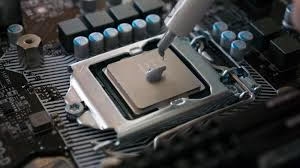
Purpose and Placement of Thermal Grease
The CPU acts as the central processing unit of a computer and generates substantial heat during normal operation. Thermal grease is essential for directing this heat efficiently into the heat sink. If the CPU overheats, the system may experience crashes, forced reboots, or blue screen errors. For this reason, thermal conductivity between the CPU and the heat sink is extremely important, making thermal grease a key component of any cooling solution.
Thermal grease improves heat transfer by filling microscopic gaps caused by surface imperfections on both the CPU and heat sink. It also enhances mechanical contact between the two surfaces. Due to its slight adhesive properties, thermal grease can help keep the heat sink in place even if the mounting hardware becomes slightly loose over time.
Impact of Thermal Grease Thickness
In theory, a thinner thermal grease layer delivers better heat dissipation, as long as it completely fills the surface gaps. Thicker layers increase thermal resistance and reduce cooling efficiency, making precise application critical.
Common Thermal Grease Application Methods
There is no single universal rule for applying thermal grease, but several principles should always be followed: even coverage, minimal thickness, absence of air bubbles, and no contamination. One method involves placing a small dot of grease at the center of the CPU/GPU and allowing the pressure from the heat sink to spread it. This works well for small contact surfaces. Another method involves manually spreading the grease across the entire surface, which is better for larger processors but requires careful handling to avoid air pockets.
Knowing how to apply thermal paste to cpu correctly plays a crucial role in maintaining efficient thermal performance.
Correct SOP for Thermal Grease Application
- Clean both the CPU surface and heat sink base using high-purity acetone and a lint-free cloth. Avoid touching these areas with bare hands. Alcohol may be used if acetone is unavailable.
- Identify the heat sink contact area and place a small amount of thermal grease at the center of that area.
- Use a finger covered with a plastic bag to spread the grease evenly across the heat sink base. Never apply grease directly with uncovered fingers.
- Remove excess grease with a lint-free cloth. The treated area should appear slightly discolored, indicating filled surface gaps.
- Using a clean blade or similar tool, place a small amount of thermal grease in one corner of the CPU core.
- Spread the grease evenly over the entire CPU core. The layer should be very thin—approximately the thickness of a sheet of paper.
- Carefully position the heat sink onto the CPU without sliding or twisting, ensuring uniform grease thickness.
Thermal Grease Replacement Interval
Thermal grease is composed of silicone oil, metal powder, and fillers. Since it does not evaporate, it generally does not require reapplication for two to three years, assuming the cooling assembly remains intact.