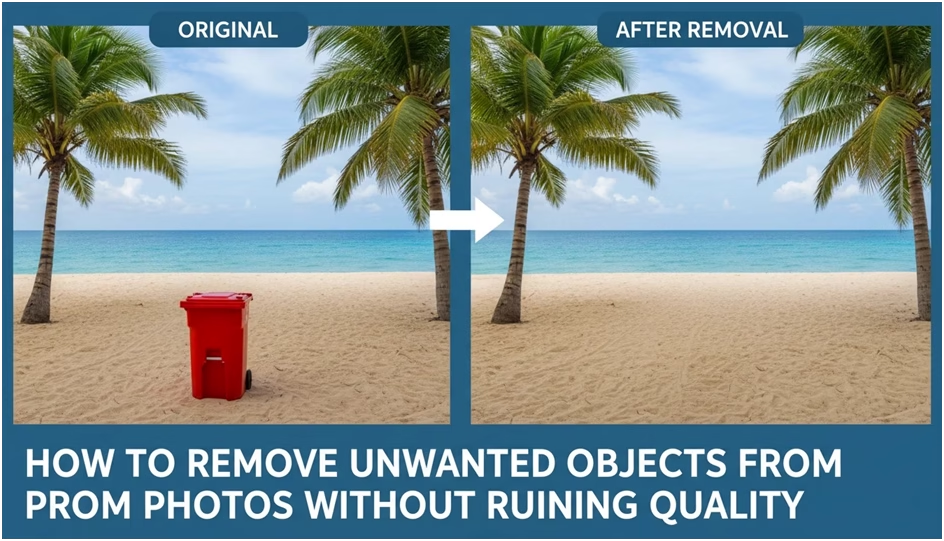
Unwanted objects in photos usually reveal themselves after the moment has passed. A person stepping into the frame, a sign on the wall, or a random object on the floor can quietly pull attention away from what actually matters. These details do not always ruin a photo, but they change how it feels. Once noticed, they are hard to ignore.
For a long time, removing these distractions meant choosing between spending too much time editing or accepting visible damage to the image. Blurry patches, repeated textures, or strange lighting shifts were common side effects. Today, expectations are different. People want edits that feel invisible, where the image still looks like a natural photograph rather than a corrected one.
Why image quality often suffers during object removal
Most quality loss happens when an edit ignores context. Removing an object is not only about the empty space it leaves behind. That space carries texture, light, shadow, and depth information that needs to make sense within the scene.
A simple example is a photo taken indoors. Removing a small object from the floor may seem easy until the reflection of a window or the direction of light is disrupted. Outdoors, the problem becomes even more obvious. Grass, sand, or clouds all contain subtle variations that cannot be replaced with a flat patch.
When these elements are mishandled, the image starts to look artificial. Viewers may not know what was edited, but they feel that something is off. This is especially noticeable when images are reused for different purposes, such as social media posts, product pages, or printed materials.
How modern AI methods keep photos realistic
Newer approaches focus on understanding the scene rather than copying nearby pixels. Instead of guessing blindly, the system analyzes patterns, depth, and lighting to rebuild the missing area in a way that fits naturally. This makes it possible to remove objects from photo files while keeping surfaces and edges intact.
A background wall remains consistent, fabric keeps its texture, and shadows stay believable. This shift changes how people work with images. A creator can clean up photos quickly without worrying that the edit will be visible at full resolution. A small business can reuse existing visuals instead of organizing new shoots just to avoid minor distractions.
Platforms such as phototune.ai are built around this idea of reconstruction rather than concealment, focusing on edits that respect the original image instead of forcing perfection.
Common object removal scenarios and quality risks
| Scenario | Typical Issue | Quality Risk |
| Travel photos | People in the background | Broken textures or repeated patterns |
| Product images | Dust, labels, reflections | Loss of sharpness or flat surfaces |
| Real estate photos | Cables, signs, clutter | Inconsistent lighting or shadows |
| Event photos | Random objects on tables | Smudged details near faces or hands |
These cases show why careful reconstruction matters. The more complex the scene, the easier it is to damage the image if the edit is too aggressive or too simple.
A practical way to remove objects without damaging the image
The actual process does not need to be complicated, but it does need to be deliberate. Start by uploading a high-resolution version of the photo rather than a compressed copy. Select only the object that needs to be removed, keeping the selection tight but not cutting into important details.
Once the system processes the image, review the result at full size. Small imperfections are easier to spot when zoomed in. If the surrounding texture looks inconsistent, a second pass often improves the blend. Saving the final image in a high-quality format helps preserve the natural look, especially if the photo will be reused later.
The key is patience, not speed. Clean edits come from understanding that removing an object is really about rebuilding what should have been there all along.
Removing unwanted objects no longer has to mean sacrificing realism. When done thoughtfully, the edit disappears, and the image keeps its original character while losing the distractions that never belonged there in the first place.