In today’s digital landscape, video content dominates online platforms. From social media to business websites, motion-based visuals attract more attention than static images. This shift has made image to video AI one of the most valuable technologies for content creators, marketers, and everyday users. With image to video tools, anyone can transform simple pictures into engaging motion videos without advanced editing skills.
This article explains how image to video ai works, why it is becoming popular, and how you can easily convert images into videos using this powerful technology.
What Is Image to Video AI?
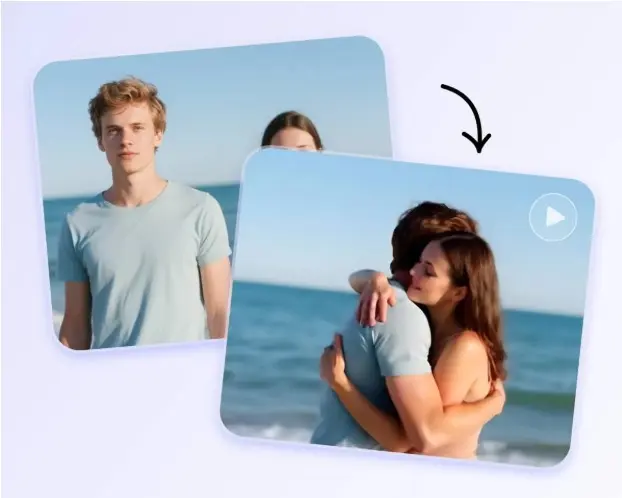
Image to video AI is a form of artificial intelligence that converts still images into animated or motion-based videos. The AI analyzes the structure of an image and predicts how movement should occur within the scene. It then creates multiple frames that simulate motion and combines them into a video.
Unlike traditional video editing, which requires manual animation and timeline adjustments, image to video tools automate the entire process. Users simply upload an image, select motion or style options, and let the AI generate the video automatically.
How Image to Video AI Works
The technology behind image to video AI relies on deep learning models trained on massive datasets of images and videos. These models learn how motion, depth, and lighting behave in real environments.
The process generally follows these steps:
- Image Analysis – The AI identifies objects, background elements, and depth layers within the image.
- Motion Prediction – It estimates how parts of the image should move, such as camera zoom, background flow, or object motion.
- Frame Generation – New frames are created between the original image to simulate continuous movement.
- Video Rendering – The frames are combined into a smooth motion video.
This automated workflow makes image to video conversion fast, efficient, and accessible to everyone.
Why Image to Video AI Is So Popular
Several factors have contributed to the rise of image to video AI:
1. Simplicity
Users no longer need professional editing software. A basic image upload is enough to create a video.
2. Time Savings
Traditional video creation can take hours. With image to video tools, results appear in minutes.
3. Cost Efficiency
There is no need to hire video editors or animators. AI handles the animation automatically.
4. High Engagement
Videos created from images receive more attention and interaction than static visuals.
5. Creative Possibilities
Users can experiment with motion styles, depth effects, and cinematic transitions.
Common Uses of Image to Video AI
Social Media Content
Creators use image to video AI to turn photos into short clips for stories, reels, and posts.
Marketing and Advertising
Businesses transform product images into motion videos to promote services and products.
Education and Training
Teachers animate diagrams and visuals for better understanding and engagement.
Photography Enhancement
Old or meaningful photos can be converted into animated memories.
Digital Art and Storytelling
Artists use image to video tools to bring illustrations and designs to life.
Image to Video AI vs Traditional Video Editing
| Feature | Image to Video AI | Traditional Editing |
| Speed | Very fast | Slow |
| Skill Level | Beginner-friendly | Advanced |
| Cost | Low | High |
| Automation | Fully automated | Manual |
| Accessibility | Online tools | Professional software |
This comparison highlights why image to video AI is becoming a preferred method for video creation.
How to Convert Images into Motion Videos Easily
Converting images into videos using image to video AI is simple and follows a basic process:
Step 1: Choose Your Image
Select a clear, high-resolution image. Simple backgrounds often work best.
Step 2: Upload to the Tool
Upload your image into an image to video generator interface.
Step 3: Select Motion Style
Choose how you want the image to move, such as zoom, pan, or animated background.
Step 4: Generate the Video
Click generate and let the image to video AI process your image.
Step 5: Download or Edit
After processing, download the video or make small adjustments if available.
This step-by-step process allows even beginners to create motion videos with ease.
Best Practices for Better Results
To achieve high-quality results from image to video tools:
- Use high-resolution images
- Avoid blurry or low-quality photos
- Choose images with clear subjects
- Use simple and clean backgrounds
- Experiment with different motion styles
These tips help the AI generate smoother and more natural movement.
Challenges of Image to Video AI
Although powerful, image to video AI still has limitations:
- Motion can look artificial in complex scenes
- Detailed facial expressions may not animate perfectly
- Limited control over fine details
- Quality depends on the original image
However, AI technology is improving rapidly, and these issues are becoming less noticeable over time.
The Future of Image to Video AI
The future of image to video AI looks promising. With continuous improvements in machine learning, upcoming tools are expected to provide:
- More realistic motion and lighting
- Better facial and object animation
- Longer video generation
- Automatic sound and voice features
- Cinematic visual effects
As video content demand grows, image to video technology will play an important role in digital communication.
SEO Benefits of Image to Video Content
From an SEO perspective, videos created using image to video AI can:
- Increase user engagement
- Improve time spent on page
- Boost content sharing
- Enhance website ranking signals
Adding motion videos to blogs and landing pages helps improve overall performance and visibility.
Conclusion
Image to video AI is transforming how people create visual content. By converting still images into animated videos, it eliminates the need for advanced editing skills and expensive software. With simple uploads and automated motion generation, anyone can create engaging videos using image to video tools.
As artificial intelligence continues to evolve, converting images into motion videos will become even easier, more realistic, and more creative. For marketers, educators, artists, and everyday users, image to video AI offers a powerful and efficient way to bring images to life.