

With the decline of the DVD industry, more and more vendors remove relevant DVD features from their devices, which brings great trouble to people still in favor of DVDs. Are you looking for ways to play a DVD on your computer without a DVD drive? You need to rip a DVD! Follow us to explore ways to rip a DVD!
Why Need to Rip a DVD
Backup: Backup is essential in today’s digital world, and the same is true for DVDs. Creating a digital backup can prevent accidents like DVD loss or damage.
Portability: Ripping the DVD content to portable devices is much more flexible compared to taking DVD discs everywhere.
DVD Drive-Free: With DVD sales falling rapidly, some Mac providers removed the DVD drive features on the latest MacBook Pro, considering the economic benefits. That’s the need to know how to rip a DVD on a Mac to have a successful playing on Mac.
Access: As we know, there are regional copyright restrictions and DRM protections for DVD discs, which means sometimes you can’t play the same DVD on other regions’ DVD players. Therefore, you need to rip the DVD to USB to play or playback the content freely.
Editing: When you rip a DVD, you can get its digital content, which enables you to edit and customize the digital files, such as creating playlists, adding subtitles, compilations or remixes, and you can even create another new DVD using professional tools like Tipard DVD Creator.
What’s worth attention to is that you should rip the DVD in compliance with local laws as there is copyright protection. You can only get a DVD copy for personal or legal use. Always respect its copyright and the work of its content creators.
How to Rip a DVD with the Best DVD Ripper
As it is of great importance to rip a DVD, here comes the question – how to rip a DVD? You should try Tipard DVD Ripper.
As the first choice for ripping a DVD, the Tipard DVD Ripper is really user-friendly for the following reasons:
- Its ripping speed is faster than most ripping software on the market.
- It has excellent format support, like MP4, MKV, and MOV, as much as possible.
- You can perform batch processing at the same time.
- As for the editing purpose we mentioned above, it performs perfectly as well, such as clip, crop, adding watermark, and adjusting video effects.
The shortcomings are that it doesn’t support Blu-ray, and you need to download extra Blu-ray ripping software like Tipard Blu-ray Converter.
Here are the steps about how to play a DVD on Windows 11/10/Mac:
Step 1: Download
Download Tipard DVD Ripper from Tipard’s official website. Launch it after installation.
Step 2: Load DVD
Put your targeted DVD into the computer’s DVD drive. Then, click the “Load DVD” option.
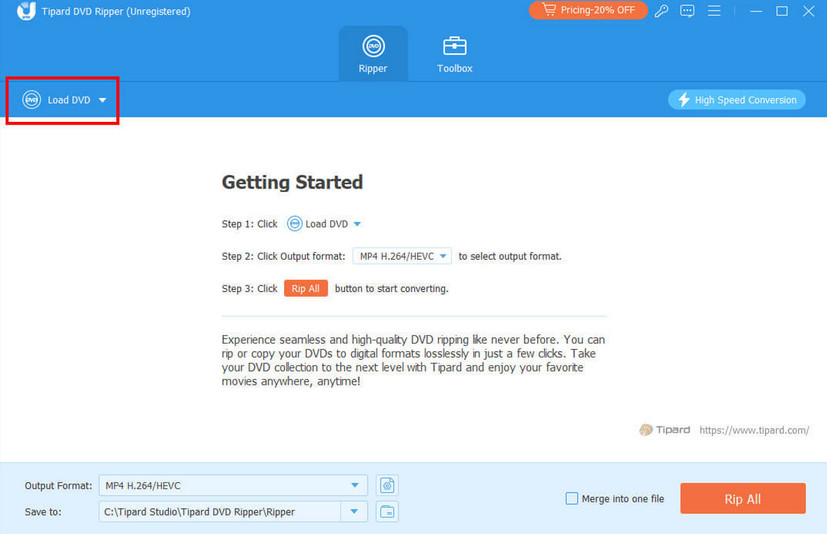
Step 3: Choose the Output Format
You can choose your favorite video output format.
How to rip a DVD to MP4? Here, you can realize it. You can convert DVD to MP4, MOV, MKV, or other popular formats using the “Output Format” option.
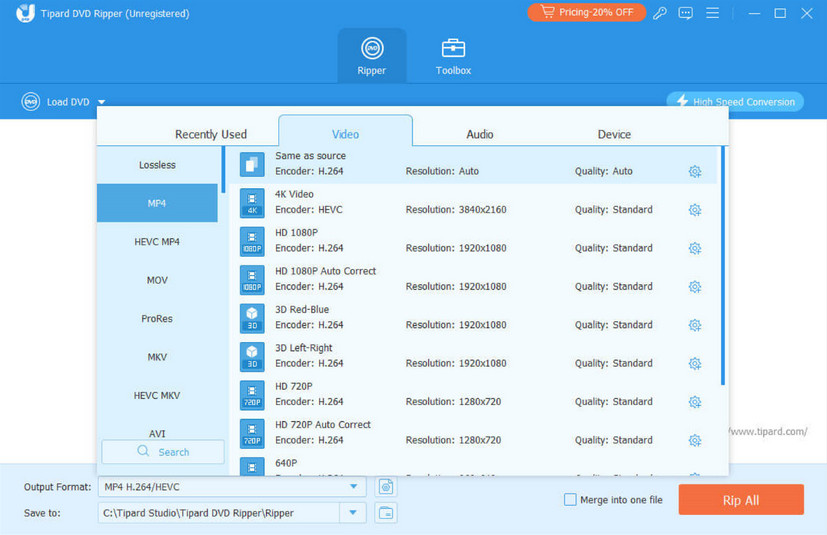
Step 4: Rip
After selection, click “Rip All” at the bottom-right corner to start the ripping process.
3 More Free DVD Rippers You Can Refer to
Besides Tipard DVD Ripper, there are also some well-performed software programs worth trying.
HandBrake
HandBrake is an open-source DVD ripper that is free to users. It can
- Run on all well-known systems like Windows, Mac, and Linux;
- Process multiple DVD files at the same time;
However, it seems that the operation is complicated. It can’t bypass copy protection as well.
How to rip a DVD with HandBrake? Follow the steps below:
Step 1: Open Source
Download and launch HandBrake on your computer. Upload your DVD by selecting the “Open Source” option and drag and drop your file to the middle of the right page.
Step 2: Choose Format
Go to the “Format” section and choose the format you like. Then, go to the “Save As” option to choose a saving path.
Step 3: Start Code
Click “Start Encode” on the top to launch the process. It takes a really long time.
MakeMKV
MakeMKV is also a free DVD ripper that can easily convert DVDs to MKV.
- It is easy to get started.
- It is completely free.
- You can rip encrypted discs using it.
But you should note that the MKV files are large in size, which means it will take a lot of time and storage space to get them.
Here are the simple steps about how to rip a copy-protected DVD with MakeMKV:
Step 1: Download
Download “MakeMKV” to your computer and run it after installation.
Step 2: Open DVD Disk
Put your DVD into the computer’s DVD drive. Then, click the DVD pattern to open the DVD disk.
Step 3: Make MKV
Select your hard drive after clicking “Output folder”. Then, click “Make MKV” to start.
VLC
Besides being a well-known media player, VLC is also a perfect DVD ripper. It can also meet the basic needs of ripping a DVD. However, one thing to be clear about upfront is that this tool cannot bypass DVD encryption.
Here are the steps about how to rip a DVD with VLC:
Step 1: Download
Download VLC Media Player. Then, insert the DVD you want to rip into the computer’s drive.
Step 2: Convert/Save
Click the “Media” menu, choose “Convert/Save” and “Disc” then. Complete relevant settings and then hit “Convert/Save”.
Step 3: Start Converting
Press the “Start” button on the convert dialog.
Conclusion
To conclude, this article mainly introduced why there is a need to rip a DVD and how to rip a DVD. As for the 4 DVD ripping software, we have analyzed their pros and cons in detail for your reference. You can select freely if needed.
Technology Perspective
Technology continues to transform industries through artificial intelligence, cloud computing, automation, cybersecurity, digital platforms, and data-driven decision making. As organizations increasingly adopt digital solutions, understanding emerging technologies becomes essential for businesses, professionals, and consumers. DGM News regularly covers these developments through expert analysis, technology news, and educational resources.
Innovation Outlook
Rapid advances in artificial intelligence, automation, machine learning, cloud infrastructure, and digital transformation continue reshaping global industries. Monitoring these developments helps organizations adapt to changing technologies, improve efficiency, and prepare for future innovation.
Did you know?
Artificial Intelligence is expected to influence nearly every major industry over the coming decade, from healthcare and finance to transportation, manufacturing, education, and entertainment.
AI, Machine Learning, Deep Learning and Generative AI Explained
Google AI Updates
About DGM News
DGM News is an independent digital publication delivering the latest Technology News, AI News, and FinTech News. We provide expert insights on startups, innovation, cybersecurity, software, business, gadgets, cloud computing, artificial intelligence, and emerging technologies. Our mission is to publish informative, accurate, and regularly updated content that helps readers stay informed in today's rapidly evolving digital landscape.
Since our editorial focus includes technology, artificial intelligence, and financial technology, we continuously expand our coverage as new innovations emerge.
Editorial Standards
Every article published on DGM News undergoes editorial review before publication. We prioritize factual accuracy, clarity, transparency, and reader value while following responsible digital publishing practices.
Research Methodology
Our editorial team researches publicly available information from official announcements, technical documentation, research publications, developer resources, reputable industry reports, and trusted public sources whenever applicable. Information is reviewed to improve clarity and accuracy before publication.
Fact-Checking Policy
We make reasonable efforts to verify factual information before publishing. Articles are reviewed for accuracy, consistency, and relevance. If significant developments occur after publication, content may be revised to reflect updated information.
Update Policy
Technology evolves rapidly. Articles may be reviewed and updated periodically to reflect software releases, AI developments, security advisories, regulatory updates, product launches, and other important industry changes.
Source Verification
Whenever possible, DGM News reviews information using official company announcements, technical documentation, research publications, government resources, publicly available reports, and reputable industry references before updating articles.
Editorial Independence
DGM News maintains editorial independence in all publishing decisions. Editorial content is produced independently and is intended to provide balanced, informative, and reader-focused coverage without influence from advertisers or commercial partnerships.
AI Usage Disclosure
Artificial intelligence tools may assist with research organization, grammar improvement, formatting, or editorial workflows. Every article is reviewed by human editors before publication to help maintain quality, clarity, and factual accuracy.
Corrections Policy
Accuracy is important to us. If readers identify outdated information or factual inaccuracies, they are encouraged to contact our editorial team. Verified corrections are reviewed and incorporated whenever appropriate.
Reader Feedback
Reader feedback helps improve our journalism. We welcome suggestions, corrections, and constructive feedback through our Contact page to continuously improve the quality of our reporting.
Last Editorial Review
This article follows the DGM News editorial review process and may be updated periodically as new information becomes available.
Why Trust DGM News?
DGM News is committed to publishing technology journalism that emphasizes accuracy, transparency, editorial independence, and regularly updated information. Our editorial process is designed to provide readers with reliable coverage of technology, AI, fintech, startups, and digital innovation.
DGM News Resources
Topics We Cover
Artificial Intelligence • AI Tools • Machine Learning • FinTech • Cybersecurity • Cloud Computing • Programming • Software Development • Gadgets • Mobile Technology • Business Technology • Startups • Digital Marketing • Blockchain • Cryptocurrency • Science • Innovation • Consumer Technology • Enterprise Technology • Automation
