The Architecture of Digital Supremacy
Imagine deciding to open your own restaurant. In the early stages, while you are testing the concept and cooking for a small circle of regular guests, it is quite enough to rent a spot at a food market or share a kitchen with another small business. This is cost-effective and lowers your initial expenses. However, there comes a time when the business begins to grow. Queues start forming, the menu expands, and suddenly you face a situation where neighboring chefs occupy your stoves, and the capacity of the shared power grid is insufficient to turn on all the ovens at the same time. At this moment, you realize: to move forward and serve hundreds of guests without delay, you need an entirely separate building where every single detail belongs to you alone.
The exact same thing happens in the world of internet technologies. When your website, application, or database outgrows the limits of standard shared hosting and even flexible VDS, you require uncompromising independence. This precise task is addressed by the service detailed on the dedicated server rental page of DeltaHost — placing a separate physical computer in a modern data center at your full and exclusive disposal. In this article, we will break down in detail how this segment is structured, in which real-life situations it becomes a lifesaver for business, and which parameters you need to look out for.
The ABCs of Server Technologies: Breaking Down Basic Terms
Before we dive into the subtleties of choosing configurations, let’s break down the key concepts together so that you feel confident when talking to any technical specialist. The IT field is full of acronyms, but behind them lie completely logical and understandable things.
- Dedicated Server: This is a real, physical computer (a system unit designed in a special server form factor) that is installed into a technological rack inside a secured data center. Unlike shared hosting, there are no “neighbors” here. All disks, processors, and network channels work exclusively for your tasks.
- IPMI (Intelligent Platform Management Interface): Imagine having the ability to virtually walk up to a computer located on the other side of the planet, press its power button, insert a flash drive, or access the BIOS, even if the operating system itself is completely frozen. IPMI is an independent management chip that grants you 100% remote control over the hardware 24/7.
- Traffic and Port Speed: A port is the width of the network internet channel leading to your server (for example, a 1 Gbps port can be compared to a wide, multi-lane highway), while traffic is the volume of data that your users download and upload through this “highway” over the course of a month.
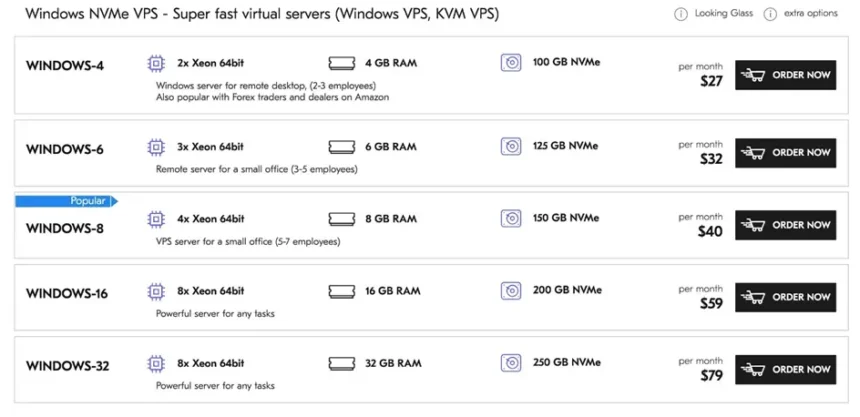
example of pricing on the DeltaHost website, 2026
To make a comparison, shared hosting is like a bed in a multi-bed hostel room, VDS is an isolated apartment in a high-rise building, and the service for which the international market uses terms like server for rent or rent dedicated server is akin to owning a luxury private mansion where you are free to rebuild walls and change the layout at your own discretion.
Modern Application Scenarios: When It’s Time to Move to Dedicated Hardware
Let’s look at a real-life situation faced by many successful entrepreneurs. Imagine you own a large chain of retail stores, and all your accounting, inventory management at warehouses, and CRM system for managers operate through a single online platform. At the beginning of the working day, hundreds of employees simultaneously log into the system, process receipts, update stock levels, and upload invoices.
If all this critical infrastructure is hosted on a shared server, even the slightest failure due to external factors will paralyze the operation of the entire network. Downtime losses in just one hour can amount to enormous sums. It is precisely to protect against such risks that corporate clients choose to rent physical hardware. A dedicated platform guarantees a stable and predictable system response time because external internet storms or other people’s websites cannot affect your isolated resources in any way.

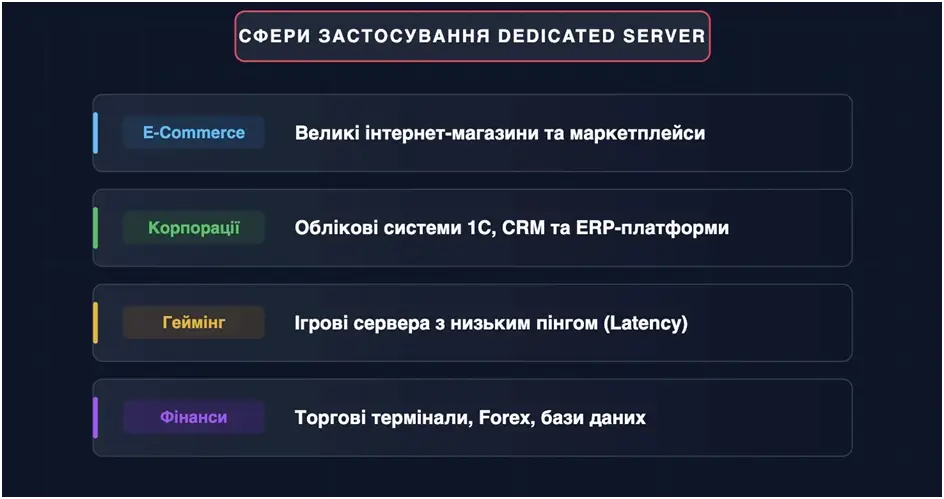
Let’s compare how different hosting types behave under real working conditions:
- Database Processing: On a virtual server, disk read and write speeds depend on the activity of other clients. On a dedicated physical server, the entire disk subsystem executes only your requests, which speeds up the generation of heavy reports by several times.
- Scalability and Security: Any virtual environment has software limits imposed by the hypervisor. A physical server allows you to utilize CPU instructions directly, providing the maximum level of cryptographic protection for your commercial data.
Technical Parameters in Simple Terms: What Do Cores and Memory Affect?
When you open the list of available configurations, a table with technical specifications appears before you. To help you make an informed choice and avoid overpaying, let’s break down simply and clearly what each node is responsible for.
Number of Processor Cores (CPU Cores)
The processor is the brain of the machine, and its cores represent the number of “employees” who perform tasks simultaneously. Let’s imagine a checkout counter in a supermarket. If you have a 4-core processor, it means four cashiers are working in your store. They will quickly handle the flow of customers. But if thousands of customers come to you at the exact same time (for example, during a major online sale), four people will not be enough, and a queue will form (manifested as page loading delays). For heavy websites, video processing, or gaming platforms, companies choose processors with 8, 16, or even 32 cores, which is equivalent to opening a huge hypermarket with dozens of checkout lanes.
Random Access Memory (RAM)
If the processor is a cashier, then the RAM is the size of their desk. The larger the cashier’s desk, the more documents, products, and orders they can lay out in front of them for simultaneous processing without having to pack them back into the warehouse (the slow hard drive) every single time. If there is not enough RAM (for example, just 8 or 16 GB for a heavily loaded project), the server will constantly access disk memory, which instantly slows down the entire system. Modern business-class configurations offer from 32 to 512 GB of RAM, allowing you to keep all active processes in ultra-fast access.
Disk Architecture (NVMe SSD)
Disk capacity determines how many terabytes of information you can store. However, its speed is far more critical. Using modern NVMe drives instead of outdated mechanical HDDs is like replacing a mail coach with a jet aircraft. Products are instantly delivered to users, and databases process thousands of search queries per second.
Geography, Pricing, and Rental Conditions
Pricing in the server rental market is transparent and directly tied to two factors: the power of the chosen hardware and the geographical location of the data center. The physical distance from the server to your end users directly affects the so-called “ping” — the time it takes for a signal to travel from the client’s computer to the website.
If your business is targeted at an international audience or American partners, choosing a dedicated server usa service becomes the ideal solution. Placing equipment in US data centers ensures excellent connectivity with global backbone networks. At the same time, the cost of entry-level server rentals (such as reliable 4-core Intel Xeon configurations with 32 GB RAM) starts on average from $53 to $93 per month. If you require powerful multi-processor systems with terabytes of storage for backups, the cost can reach $300 to $450 per month.
Let’s compare the geographical features of placement:
- US Location: Provides minimum ping for users in North America and is ideal for international startups, but the latency will be slightly higher for users in Eastern Europe.
- Ukraine / Europe Location: Guarantees lightning-fast page loading for the local market, strict compliance with regional data protection regulations, and optimal costs for communication channels.
What Knowledge is Required to Manage a Server?
— **It might seem to you that managing your own physical server is a task exclusively for certified IT gurus.** There is a grain of truth in this: the basic rental format (unmanaged) implies that the provider company gives you working hardware and clean root access, while you take on the operating system installation, web server configuration (Nginx/Apache), protection against network attacks, and database deployment. This requires solid knowledge of Linux/Windows system administration and working with the command line.
However, progress does not stand still, and today you don’t have to hire an expensive full-time system administrator. Leading providers like DeltaHost offer two excellent alternative paths for those who want to focus exclusively on growing their business rather than studying server consoles:
- Free Control Panels: When ordering, you can have a user-friendly panel installed for free (such as Hestia CP), which turns server management into a clear visual interface. Creating a new website, adding a mailbox, or setting up a database can be done in a few mouse clicks, just like on basic hosting.
- Package Administration: You can utilize the services of the data center’s in-house engineers. Any complex task — from migrating a website without interrupting its operation to fine-tuning optimization for high loads — can be performed by qualified specialists with payment based on actual working time (for example, a fixed rate for every 15 minutes of administrator work).
Conclusion: An Investment in Digital Stability
As you evaluate the development prospects of your online business, answer this question for yourself: are you ready to risk the stability of your project for the sake of imaginary savings on resources? Moving to dedicated capacities is not just an expense item; it is a strategic decision that elevates the security, speed, and authority of your company in the digital space to a fundamentally new level.
Choose a configuration with a small margin for the future, trust your infrastructure to proven market leaders with 24/7 support and a strict SLA, and your website will always delight visitors with instant performance in any, even the most non-standard real-life situations.