You take a perfect product shot, upload it to Instagram, and — suddenly — the logo is cropped off or the main subject is squeezed into a box that’s too small. Marketing teams spend hours resizing and re-editing the same images for different platforms. Brands see engagement dip when visuals don’t fit. Reshooting isn’t always possible, and clumsy manual edits rarely look professional.
- Pokecut’s AI Image Extender: Expand Photos Without Losing Quality
- Pokecut Uncrop AI: Restore and Recover Cropped Content
- AI Image Extender vs. Uncrop AI – Which One Should You Use?
- Step-by-Step: Expanding or Uncropping Your Photos Online
- Pro Tips for Natural, Professional-Looking Results
- Real-World Scenarios – Who Benefits Most
- Quick Takeaway – Expand and Uncrop Smarter
That’s the problem Pokecut is designed to solve. Its AI Image Extender intelligently expands the canvas of a photo without stretching pixels, while Uncrop AI restores parts of an image that were cropped or never captured. Instead of copy-pasting backgrounds by hand, these tools generate edges that blend naturally with the original scene.
In the next few minutes you’ll see what each tool does, when to use which, and how to turn a too-tight or mis-sized photo into a perfect fit for any platform — no Photoshop, no design skills, just fast, professional results.
Pokecut’s AI Image Extender: Expand Photos Without Losing Quality
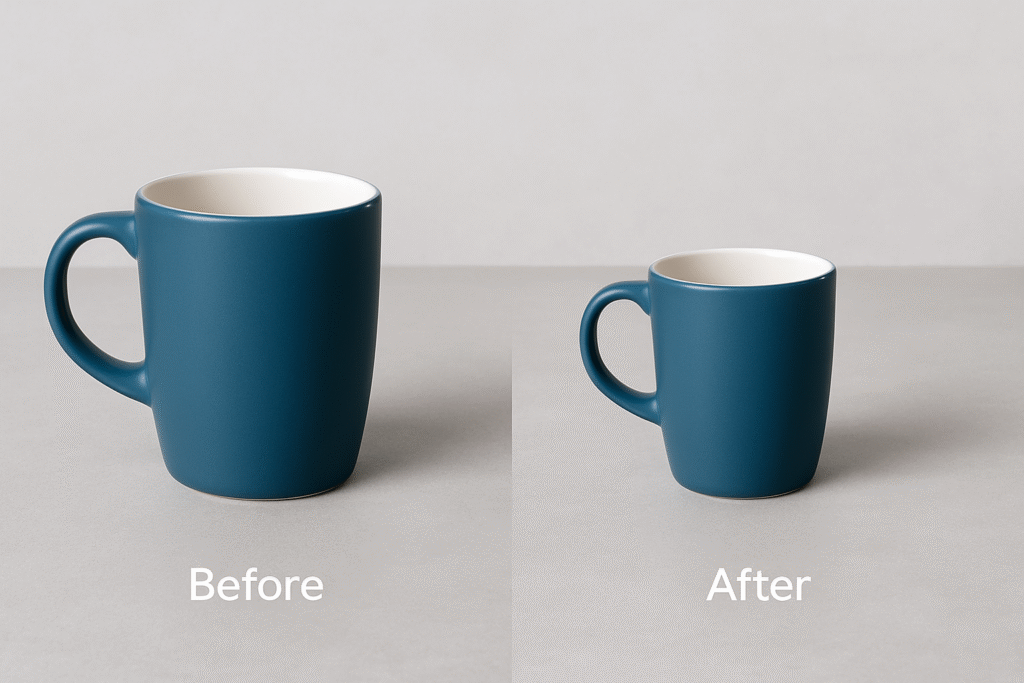
When you need a photo to be wider, taller or fit a new aspect ratio, most tools simply stretch pixels or paste in a generic background. The result looks fake and unprofessional. Pokecut’s AI Image Extender takes a different approach. It analyses the content of your image, predicts what should appear beyond the original edges and generates new background that blends naturally with the scene.
This makes it ideal for e-commerce sellers who want product shots that fill marketplace frames, marketers preparing banners in multiple sizes, or social media managers adapting visuals for different feeds. You can choose from preset ratios like 1:1, 9:16, 3:4 or 5:4, or enter your own dimensions. In seconds the tool extends your photo seamlessly — no advanced editing skills needed.
Tip: After extending, you can run the image through Pokecut’s AI Photo Enhancer to boost colours and details for an even more polished look.
Pokecut Uncrop AI: Restore and Recover Cropped Content
Sometimes the issue isn’t needing more canvas — it’s that a crucial part of your photo is missing. Maybe the photographer cropped too tightly, a social media template cut off someone’s face, or you only have a partial scan of an old print. Traditional software can’t conjure up what isn’t there, and cloning tools often leave obvious repeats.
Pokecut’s Uncrop AI tackles this challenge by intelligently predicting and recreating the missing parts of an image. It analyses context, textures and patterns around the cropped area and fills it in with realistic details, so the final picture looks complete instead of patched together. In seconds you can restore the original composition of a portrait, extend the horizon of a travel shot, or bring back the edges of a product photo without needing a reshoot — saving both time and money.
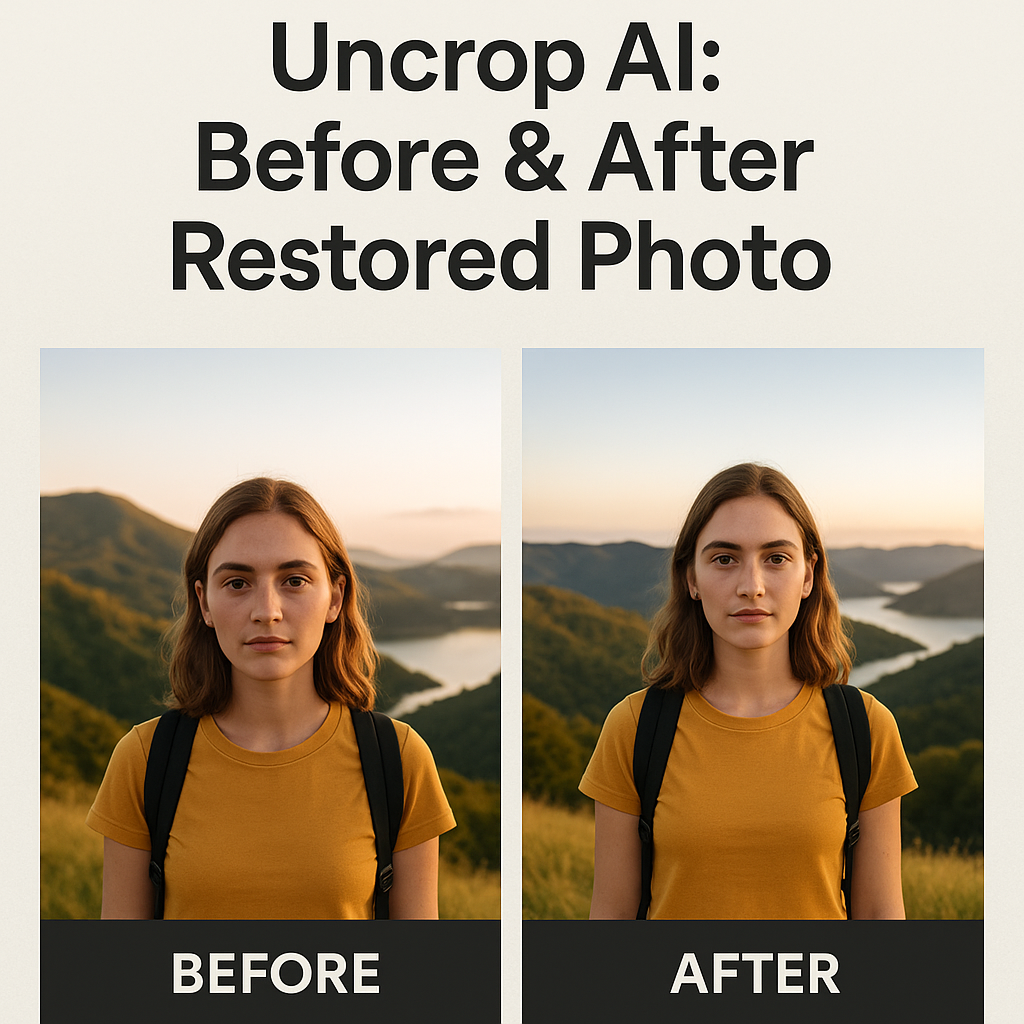
AI Image Extender vs. Uncrop AI – Which One Should You Use?
Pokecut gives you two powerful ways to make a photo bigger: one extends the canvas, the other recovers what’s missing. Knowing when to use each saves you time and produces more natural results.
| Feature | AI Image Extender | Uncrop AI |
|---|---|---|
| Main Purpose | Extend the edges of an image to new dimensions without stretching pixels | Recreate missing parts of a cropped or incomplete photo |
| Best For | Adapting images to new ratios, creating banner versions, adding background space | Restoring original composition of portraits, filling in cropped scenery, avoiding reshoots |
| Output | Larger canvas with seamless background | Completed, realistic image with reconstructed details |
Quick rule of thumb:
Need extra space or a new size? Go straight to AI Image Extender.
Missing content or cropped edges? Start with Uncrop AI, then (if needed) use the Extender to adjust dimensions.
Once you know which tool fits your need, here’s how to use it step by step.
Step-by-Step: Expanding or Uncropping Your Photos Online
Step 1: Upload your image.
Open Pokecut in your browser and upload the photo you want to extend or uncrop. Tip: The higher the quality of the original, the more natural the AI’s output will be.
Step 2: Choose the right tool and size.
Select AI Image Extender if you need extra space or a new aspect ratio. Choose Uncrop AI if parts of the subject are missing and you want to restore them. Pick from preset ratios like 1:1, 9:16, 3:4 or enter your own dimensions for a custom fit.
Step 3: Preview and adjust.
Pokecut processes your image in seconds and shows a before/after preview. Drag the frame to adjust the extended area and tweak any available settings until it looks right.
Step 4: Download your new image.
Click download to save your expanded or uncropped photo as JPG or PNG. It’s ready for social posts, product pages or presentations — no Photoshop required.
With this simple workflow you can adapt, restore and resize images in minutes, producing clean, natural-looking results.
Pro Tips for Natural, Professional-Looking Results
Even with powerful AI, a few smart choices make extended or uncropped images look truly seamless:
- Start with the highest-quality file you have. Clear originals give the algorithms more detail to work with.
- Match the background style. Include enough background in your crop for the AI to analyse, keeping patterns, lighting and colours consistent.
- Use presets wisely. Built-in ratios are quick, but you can always customise dimensions for a perfect fit to banners, ads or social posts.
- Don’t overdo the expansion. Extending far beyond the original image may look unnatural; smaller, controlled steps usually yield better results.
- Enhance after expansion. Once you’ve uncropped or extended an image, run it through AI Photo Enhancer to boost colours and details for an even more polished result.
These tips take seconds to apply but dramatically improve the realism of your results, helping you produce images that look like they were shot that way in the first place.
Real-World Scenarios – Who Benefits Most
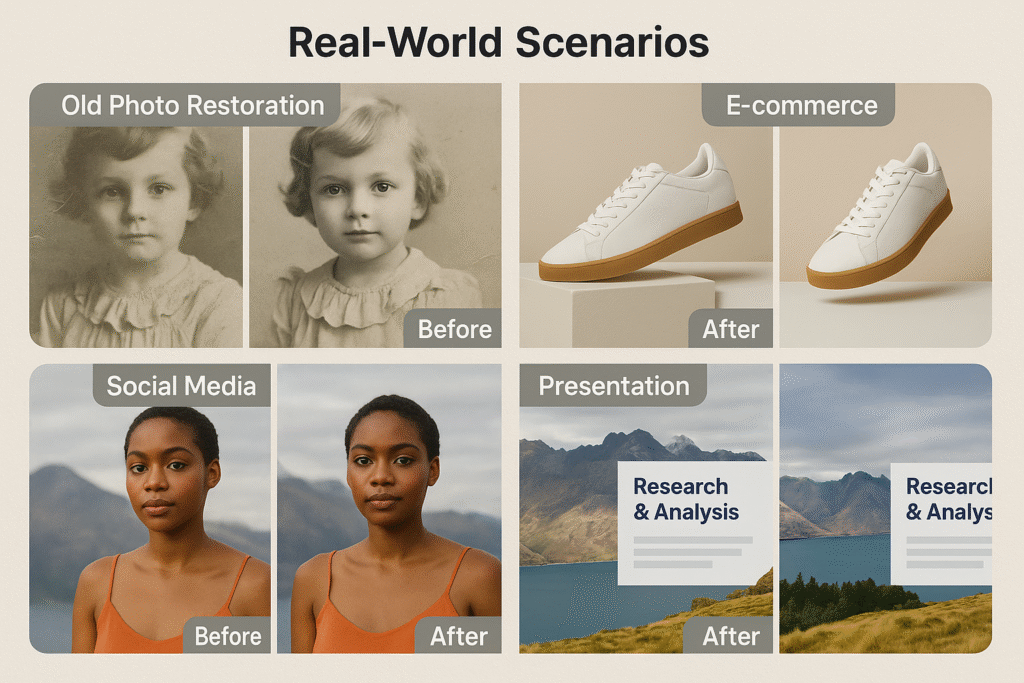
Seeing these tools in action makes their value clearer. Here are some typical ways people are using AI Image Extender and Uncrop AI to save time and improve results:
- E-commerce sellers: Fill out cropped product photos so they meet Amazon, Shopify or Etsy frame requirements in seconds without a reshoot.
- Social media managers: Quickly adapt one photo into multiple sizes for Instagram, Facebook or TikTok. Use AI Image Extender to add breathing room for text overlays, or Uncrop AI to bring back parts lost to template cropping.
- Photographers and designers: Recover original composition from a tightly cropped portrait, extend a travel shot’s horizon for a panoramic look, or fit a client’s image to a print layout without compromise.
- Marketing and presentation teams: Extend slides, banners or campaign visuals to match different aspect ratios while keeping branding consistent — no Photoshop needed.
Each scenario shows how the same two tools solve different but related problems. Instead of opening heavy software or hiring a retoucher, you get platform-ready images in minutes.
Quick Takeaway – Expand and Uncrop Smarter
Fitting images to the right size or recovering missing parts no longer has to be slow or frustrating. With just a few clicks you can expand a photo’s canvas, restore what was cropped out and produce visuals that look like they were shot that way in the first place.
If you need extra space or a new aspect ratio, start with AI Image Extender. If your photo feels incomplete because important details were cut off, use Uncrop AI to bring them back. Combine both steps when needed and you’ll have platform-ready, professional images in minutes — no Photoshop, no retakes.
Modern AI tools make it faster, cheaper and easier than ever to create eye-catching photos that build trust and engagement. Grab one of your cropped or mis-sized images right now, run it through the right tool, and see how much better it looks.