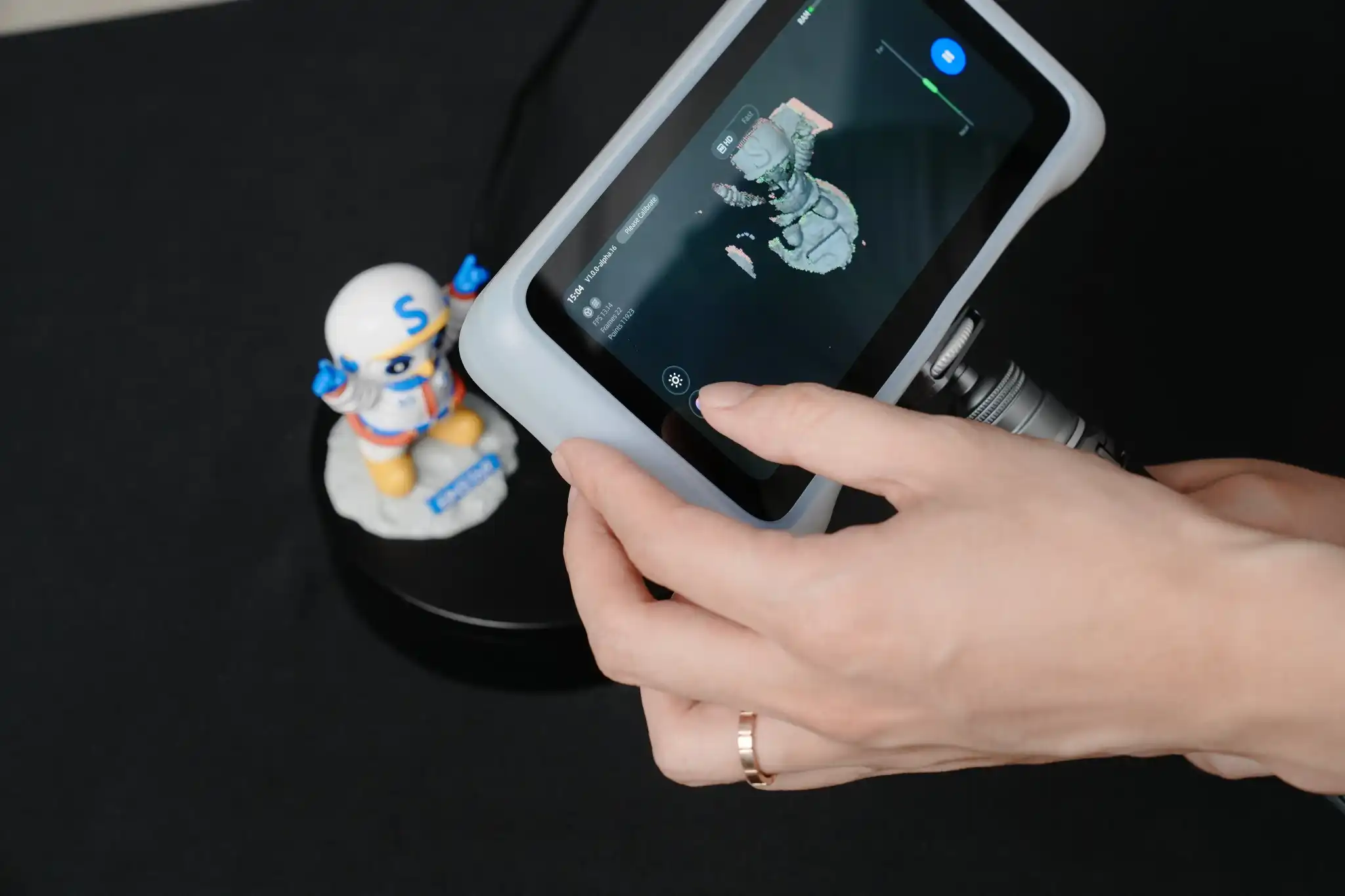
Not long ago, creating a 3D printable model required advanced design skills and countless hours spent in CAD software. Today, things have changed dramatically. Whether you’re a product designer, engineer, hobbyist, or small business owner, modern scanning technology allows you to capture real-world objects and transform them into digital files much faster than traditional modeling methods. This is where a 3d scanner for 3d printing becomes incredibly valuable.
- Why Traditional 3D Modeling Isn’t Always the Best Option
- How the Scanning-to-Printing Workflow Works
- Step 1: Scan the Object
- Step 2: Generate a Digital Model
- Step 3: Edit if Necessary
- Step 4: Prepare for Printing
- Step 5: Print the Final Object
- Industries Benefiting from 3D Scanning and Printing
- What Makes a Good 3D Scanner for 3D Printing?
- Common Challenges and How Scanners Solve Them
- Why Small Businesses Are Adopting Scanning Technology
- Looking Ahead: The Future of Digital Manufacturing
- Final Thoughts
- FAQs
Instead of designing every object from scratch, users can scan an existing item, make adjustments if needed, and prepare it for printing. The result is a faster workflow, improved accuracy, and fewer design bottlenecks. As 3D printing continues to grow across industries, the connection between scanning and printing is becoming stronger than ever.
Why Traditional 3D Modeling Isn’t Always the Best Option
Design software remains an important part of the manufacturing and prototyping process. However, building a digital model manually can be challenging, especially when dealing with complex shapes.
Imagine trying to recreate:
- A custom machine component
- A detailed sculpture
- A handcrafted product
- A replacement part with irregular geometry
Measuring every curve and dimension manually takes time and often introduces errors. A 3D printer scanner eliminates much of this effort by capturing the object directly and converting it into digital data that can be refined and printed. For many users, this means spending less time modeling and more time creating.
How the Scanning-to-Printing Workflow Works
Many people assume scanning and printing are separate technologies, but they actually complement each other extremely well.
A typical workflow looks like this:
Step 1: Scan the Object
The scanner captures the object’s geometry and surface details from multiple angles.
Step 2: Generate a Digital Model
Specialized software converts the captured data into a usable 3D file.
Step 3: Edit if Necessary
Users can modify dimensions, repair imperfections, or customize specific features.
Step 4: Prepare for Printing
The file is exported into a format compatible with slicing software.
Step 5: Print the Final Object
The model is sent to a 3D printer for production. This streamlined process has helped businesses reduce development times while improving design flexibility.
Industries Benefiting from 3D Scanning and Printing
The combination of scanning and additive manufacturing is creating opportunities across numerous sectors.
Manufacturing
Manufacturers often need replacement parts that are no longer available from suppliers. Scanning existing components makes it possible to recreate them quickly.
Product Development
Design teams use scanned prototypes to accelerate product iterations and testing cycles.
Automotive
Vehicle restoration specialists frequently scan rare parts before reproducing them through 3D printing.
Healthcare
Custom prosthetics, orthotics, and medical models can be created based on precise scanned data.
Education
Students gain practical experience by learning how digital capture and additive manufacturing work together. These applications continue expanding as scanning technology becomes more accessible.
What Makes a Good 3D Scanner for 3D Printing?
Not every scanner is optimized for printing workflows. When evaluating options, several factors deserve attention.
High Capture Accuracy
The quality of the final print depends heavily on the quality of the scan. Accurate data reduces the need for extensive corrections later.
User-Friendly Software
Efficient software can dramatically simplify model cleanup and preparation.
Reliable Tracking
Stable tracking helps maintain accuracy while scanning larger or more complex objects.
Fast Data Processing
The quicker scanned data can be converted into usable files, the faster projects move forward. Many users appreciate solutions from EINSTAR because they combine professional-level capabilities with a workflow that remains approachable for newer users entering the world of digital manufacturing.
Common Challenges and How Scanners Solve Them
Many people enter 3D printing expecting the printer itself to be the biggest challenge. In reality, obtaining a high-quality digital model often proves more difficult.
Here are some common problems:
Limited Design Experience
Not everyone has extensive CAD knowledge. Scanning allows users to start with a real object rather than a blank screen.
Complex Geometries
Organic shapes, curves, and detailed surfaces can be difficult to model manually. Scanners capture these details far more efficiently.
Time Constraints
Businesses operating on tight deadlines cannot always afford lengthy modeling processes. Scanning helps reduce development cycles significantly.
Customization Needs
Existing objects can be scanned, modified, and reprinted to meet specific requirements. This flexibility creates new opportunities for customization and rapid prototyping.
Why Small Businesses Are Adopting Scanning Technology
Large manufacturers were among the first to invest in 3D scanning systems. However, modern hardware has made the technology accessible to smaller organizations as well.
Small businesses use scanning to:
- Produce custom products
- Create prototypes
- Reverse engineer components
- Improve repair processes
- Reduce design costs
The ability to digitize physical objects quickly can provide a meaningful competitive advantage in markets where speed and flexibility matter.
Looking Ahead: The Future of Digital Manufacturing
The relationship between scanning and printing is expected to become even more integrated in the coming years. Advancements in artificial intelligence, machine learning, and automated data processing are making scanning systems smarter and more efficient. Future workflows may require even less manual intervention, allowing users to move from a physical object to a printed product faster than ever before. As adoption continues to grow, modern 3d printer scanner technology and tools such as those developed by EINSTAR are helping make advanced manufacturing more accessible to a broader audience, from hobbyists and educators to engineers and commercial manufacturers.
Final Thoughts
A 3D scanner for 3D printing is no longer a tool reserved for specialized industries. It has become an essential part of modern digital manufacturing, helping users transform physical objects into printable digital models with greater speed and accuracy.
Whether the goal is reverse engineering, product development, customization, or rapid prototyping, scanning technology simplifies the journey from concept to creation. As scanning hardware and software continue improving, the role of the 3D printer scanner will only become more important in shaping the future of design and manufacturing.
FAQs
What is a 3D scanner for 3D printing?
A 3D scanner for 3D printing captures the shape and dimensions of a physical object and converts them into a digital model that can be edited and printed.
Can scanned objects be printed immediately?
In some cases, yes. However, many scans require minor cleanup or adjustments before being prepared for printing.
Is a 3D printer scanner useful for beginners?
Absolutely. Modern scanners often include intuitive software that makes the scanning process accessible even to users with limited technical experience.
How accurate are modern 3D scanners?
Accuracy varies by model, but many modern scanners provide highly detailed data suitable for professional prototyping, engineering, and manufacturing applications.
Why is EINSTAR often considered by users entering 3D scanning?
Many users choose EINSTAR because its solutions aim to balance usability, performance, and accessibility, making advanced scanning technology easier to adopt.