We have all been there. You find the perfect photo—a cherished memory from an old phone, a screenshot of an important document, or a product image for your online store—but when you open it, the quality is disappointing. It’s blurry, pixelated, too dark, or filled with digital noise. In our visually-driven world, a poor-quality image can undermine your message, whether for personal nostalgia or professional branding.
For years, the solution seemed to require expensive software and a steep learning curve in programs like Adobe Photoshop. But those days are over. Today, thanks to artificial intelligence, anyone can achieve professional-grade results in seconds. So, if you’ve ever wondered how to enhance image quality without breaking a sweat, the answer lies in powerful, easy-to-use online tools.
This guide will walk you through the simple process of transforming your low-quality visuals into sharp, clear, and stunning images. We’ll explore the technology behind the magic and show you how to get started instantly.
The Simple 4-Step Process to a Perfect Photo
The days of manually adjusting contrast, sharpness, and noise levels are long gone. Modern AI-powered platforms have streamlined the process into just a few clicks. Let’s break down how you can how to enhance image quality using an intuitive online tool.
Step 1: Import Your Image
The journey to a better image begins with a simple upload. Whether the photo is on your computer, smartphone, or tablet, the process is the same. You don’t need to worry about compatibility, either. The best enhancement tools support a wide range of file formats, including the most common ones like JPEG, PNG, BMP, and TIFF. Just select your file, and you’re ready for the next step.
Step 2: Start the AI Analysis
This is where the real magic begins. Once your image is uploaded, the tool doesn’t just stretch it to make it bigger (which would only make the blurriness more visible). Instead, it initiates a deep analysis of the image. Sophisticated algorithms scan the photo pixel by pixel to identify specific issues: Where is the lack of sharpness? Is there visual noise (that grainy look) obscuring details? Is the resolution too low for printing or modern screens? This diagnostic phase is crucial for an effective fix.
Step 3: Optimize with One Click
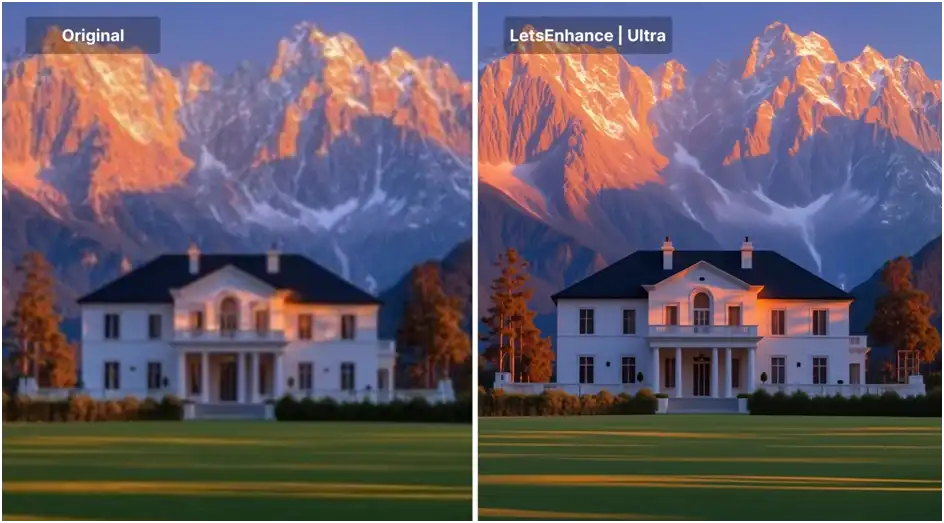
After the analysis is complete, the technology goes to work. With a single click, the AI automatically applies a series of complex corrections. It intelligently increases resolution by generating new pixels that match the image’s content—a process known as super-resolution. It corrects colors, balances brightness, and sharpens details that were previously lost. What used to take an hour in Photoshop now happens in mere seconds. You don’t need to understand concepts like “unsharp mask” or “curves” to get a flawless result.
Step 4: Download Your Enhanced Image
In just a few moments, your new, high-quality image is ready. You can preview it to see the incredible transformation. The final result is a crisp, clear, and vibrant visual, ready to be shared on social media, printed in large format, or used in a professional presentation.
Beyond the Click: The Technology That Powers the Magic
While the process is incredibly simple for the user, the technology humming in the background is nothing short of revolutionary. It’s easy to take for granted, but the leap from a pixelated mess to a sharp photo is a triumph of modern computer science. Understanding it can help you appreciate why these tools are so effective.
For decades, enlarging an image meant using a technique called interpolation. Programs would simply guess the color of new pixels by averaging the colors of the existing ones. The result? A blurry, soft image that looked like someone had stretched it like a rubber band. This is the “traditional” method found in basic editing software.
Today’s online enhancers use a different approach: Deep Learning. Think of it this way:
- Training: The AI has been “trained” on millions upon millions of high-quality images. It has learned what a sharp edge looks like, what skin texture should be, and how the sky transitions from one shade of blue to another -1.
- Recognition: When you upload a blurry photo of a face, the AI doesn’t just see random pixels. It recognizes patterns: “This is an eye,” “This is hair.” It understands the content of the image.
- Reconstruction: Based on its training, the AI then reconstructs the detail. For a blurry face, it adds realistic skin texture and sharpens the edges of the eyes and mouth. For a low-resolution cityscape, it reconstructs the straight lines of windows and the texture of brickwork. It doesn’t just enlarge the image; it intelligently fills in the missing information to create a genuinely higher-resolution version.
This technology, often referred to as Super-Resolution, is what makes it possible to turn an old, tiny vacation snapshot into a photo worthy of being printed and framed.
When Does Image Enhancement Make the Biggest Difference?
The versatility of these tools means they are invaluable in countless situations, both personal and professional. Here are some common scenarios where enhancing an image can truly make a difference.
1. Rescuing Personal Memories
We all have a box of old photos or a hard drive full of images from early digital cameras. These photos are often low-resolution, grainy, or faded. AI enhancement can breathe new life into them. You can restore a blurry photo of your grandparents’ wedding, sharpen a beloved pet’s portrait from 2005, and finally print those memories in beautiful quality for your photo album.
2. Polishing E-Commerce Product Photos
In online retail, your product image is your salesperson. If a photo is pixelated or unclear, customers can’t trust the quality of the item. Whether you’re a large business or a small Etsy seller, enhancing your product visuals ensures that textures, colors, and details are crystal clear. This builds trust and can significantly boost conversion rates. An AI tool can instantly upscale supplier images or sharpen photos taken with a standard smartphone, making them look professional and zoom-friendly.
3. Creating Professional Social Media Content
Social media platforms are highly visual, and low-quality images can harm your brand’s credibility. Whether it’s an Instagram post, a Facebook cover photo, or a LinkedIn banner, you need your visuals to pop. An image enhancer can clean up screenshots for tutorials, sharpen graphics for ads, and ensure your photos look vibrant and crisp, no matter what device your audience is using.
4. Preparing Images for Print
An image that looks fine on a computer screen might appear blurry and pixelated when printed on a large poster, flyer, or canvas. This is because printers require a much higher resolution (typically 300 DPI) than screens. If your digital image lacks the necessary pixel count, AI upscaling can bridge the gap, generating the detail needed for a sharp, professional-looking print, whether it’s an A4 flyer or an A0 poster.
Why Choose an Online Tool for the Job?
While desktop software like Photoshop remains a powerful option, online AI tools offer distinct advantages that make them the superior choice for most users.
- Accessibility: You can access these tools from any device with an internet connection—your work PC, home laptop, or even your smartphone. There is no need to install heavy, expensive software.
- Speed: What takes a professional minutes or hours to do manually, an AI tool accomplishes in seconds. The automation handles everything: sharpness, color, resolution, and noise reduction in one go.
- Cost-Effectiveness: Many online tools offer free tiers or very affordable subscription models, making professional-grade enhancement accessible to everyone, not just design professionals.
- Ease of Use: There is virtually no learning curve. The interface is designed for anyone to use, removing the intimidation factor associated with complex editing suites.
In conclusion, a poor-quality photo no longer has to be a dead end. With the power of AI, enhancing your images is now a simple, fast, and accessible process for everyone. You no longer need to be a Photoshop expert to achieve stunning results. Whether you are preserving precious memories or building a professional brand, the ability to how to enhance image quality with just a few clicks is a game-changer.
Don’t let another blurry photo hold you back. Experience the transformation for yourself and see your visuals in a whole new light.