Most AI image tools love to say “free,” then let new users generate two or three images before the paywall appears. For students, hobbyists, and first-time creators, that feels like a trap: create an account, test a few prompts, run out of credits, then get asked for a card.
- I. Why “Free” Usually Disappoints AI Beginners
- II. The Kimg AI Free-Credit Hook Explained
- III. How to Use the Free Credits Like a Smart Tester
- IV. What Models Can Beginners Try on Kimg AI?
- V. A Practical 210-Image Testing Plan
- VI. Turning Free Images Into Free Video Tests
- VII. Where the Free Plan Ends — and Why That Still Helps
- Conclusion
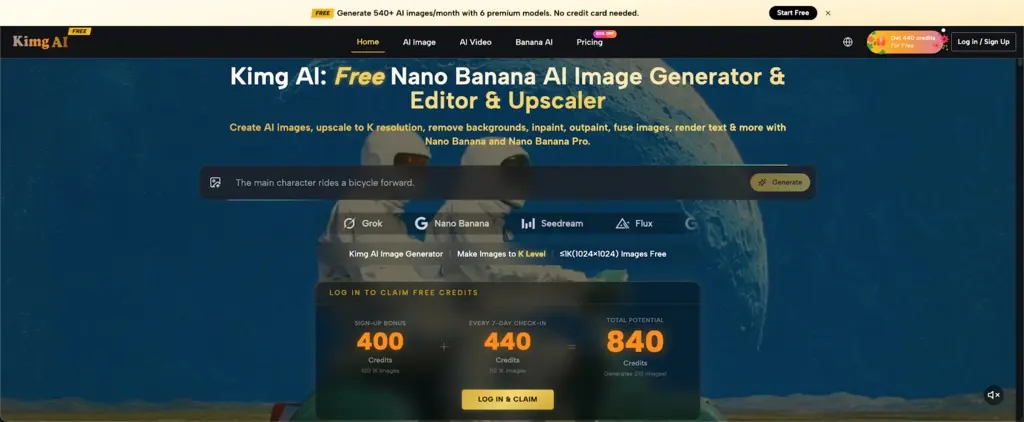
That is why Kimg AI feels different. The homepage shows a clear free-credit setup: a 400-credit sign-up bonus, plus 440 credits after a full 7-day check-in cycle. Together, that gives new users 840 credits, enough for 210 free 1K image generations. No guesswork. No hidden math. Just a smarter way to test premium AI models before spending anything.
I. Why “Free” Usually Disappoints AI Beginners
- A few images are not enough to learn
AI image generation is trial and error. One prompt may give the right mood but the wrong face. Another may fix the style but ruin the lighting. A tiny free trial does not give beginners enough room to learn.
- Credit-card walls kill curiosity
Many users simply want to test a model before making a decision. When a site asks for payment details too early, students and casual users often leave. The risk feels bigger than the reward.
- Model-hopping is part of the process
One model may be better for portraits. Another may handle text, product shots, or anime looks better. A useful free plan should let users compare models, not force them into one narrow test.
II. The Kimg AI Free-Credit Hook Explained
- Sign up and get 400 credits
The key offer is simple: Kimg AI gives new users 400 credits after sign-up. According to the homepage, that equals 100 free 1K images. For a beginner, that is already enough to test prompts, compare styles, and create a small batch of usable images.
- Check in for 7 days and get 440 more credits
The second hook is the weekly check-in reward. A full 7-day check-in cycle gives 440 credits, which equals 110 more 1K images. This turns the site into a habit: open it, claim the reward, keep building a credit stash.
- First-week total: 840 credits
Put the two rewards together and the math is clear: 400 credits plus 440 credits equals 840 credits. That is enough for 210 free 1K images. For people searching for Nano Banana Pro free unlimited, this is the safer angle: not unlimited on the free tier, but enough free credits to test seriously without paying first.
III. How to Use the Free Credits Like a Smart Tester
- Start with low-risk 1K generations
Free users should focus on 1K images first. The site makes clear that free image generation is up to 1K, while 2K and 4K options are tied to paid plans. That makes 1K the best place to test ideas without wasting credits.
- Build prompt sets, not random prompts
Instead of typing one-off ideas, create three prompt groups: portraits, product shots, and social media visuals. Run each group through different models. This quickly shows which model fits each use case.
- Save the best prompts for later
When a prompt works, save it. A good prompt can be reused with small changes: different colors, camera angles, backgrounds, or character details. This makes free credits last longer and improves results faster.
IV. What Models Can Beginners Try on Kimg AI?
- Nano Banana for realistic image edits
Nano Banana is useful for photo-style edits, reference-based work, and consistent visual changes. The image maker page notes that Nano Banana can support multiple reference images, which helps when a user wants stronger character or style consistency.
- Nano Banana Pro for premium-level testing
The second anchor belongs here: Nano Banana Pro is one of the headline models listed on the image page. It is positioned for high-quality image creation and editing, including stronger text rendering, background work, inpainting, outpainting, and image fusion. For students and beginners, the free-credit pool gives a way to test its output before considering a paid plan.
- Seedream, Flux, GPT, and Grok Image for comparison
Kimg AI also lists other popular models, including Seedream, Flux, GPT image options, and Grok image tools. This matters because no single model wins every task. A poster, logo mockup, anime avatar, and product photo may each need a different engine.

V. A Practical 210-Image Testing Plan
- Use 60 images for prompt learning
Spend the first 60 1K generations on prompt basics. Test short prompts, detailed prompts, negative-style instructions, lighting words, camera angles, and composition terms. This stage is about learning what each model understands.
- Use 80 images for model comparison
Pick five strong prompts and test them across Nano Banana, Seedream, Flux, GPT-style image generation, and Grok Image where available. Keep the subject the same. This makes it easier to judge which model gives the best faces, hands, text, colors, and backgrounds.
- Use 70 images for real output
After the testing stage, spend the remaining images on actual assets: profile pictures, thumbnails, posters, study project visuals, product mockups, or short-form content covers. By this point, the prompts should be cleaner and the model choice should be smarter.
VI. Turning Free Images Into Free Video Tests
- Generate the image first
A good AI video often starts with a strong still image. Use the free image credits to create a character, product scene, or cinematic frame. The better the image, the easier it is to create a clean motion result.
- Try image-to-video with Veo 3
Kimg AI lists video models as part of its toolset, including Veo 3. The pricing page also shows video model options in the comparison table. For beginners, this creates a useful path: generate an image first, then test whether it can become a short video.
- Keep motion prompts simple
For first tests, avoid complicated action. Use simple movement like “slow camera push-in,” “hair moving in the wind,” or “soft product rotation.” Simple motion is easier to control and gives a better feel for how the video model behaves.
VII. Where the Free Plan Ends — and Why That Still Helps
- Free users should expect 1K output
The free offer is best understood as a serious test bench, not a full production suite. Free image generation is listed as up to 1K. Higher-resolution options such as 2K and 4K belong to paid plans.
- “Nano Banana Pro free unlimited” needs honest wording
Some users search for Nano Banana Pro free unlimited because they want unlimited access without payment. The honest answer is that Kimg AI offers a generous free-credit path for testing, while true unlimited access is tied to the Unlimited plan. That distinction builds trust.
- The value is zero-cost decision-making
The real win is not pretending everything is free forever. The win is getting enough free credits to decide what is worth paying for. That saves money, avoids blind subscriptions, and gives beginners confidence before upgrading.

Conclusion
Kimg AI is built around a simple but powerful idea: let users test before they pay. With 400 sign-up credits and 440 weekly check-in credits, a new user can unlock 840 credits and generate up to 210 free 1K images. After that, weekly check-ins can keep adding 440 credits, enough for another 110 free 1K images each week.
For students, AI beginners, and anyone tired of tiny free trials, this is the freemium hook done right. It gives enough room to compare Nano Banana, Seedream, Flux, GPT-style image tools, Grok Image, and even image-to-video options like Veo 3. It does not replace a paid plan for 4K work or truly unlimited use, but it gives users something better than a fake “free” button: real space to test, fail, improve, and create without putting a card on the table.