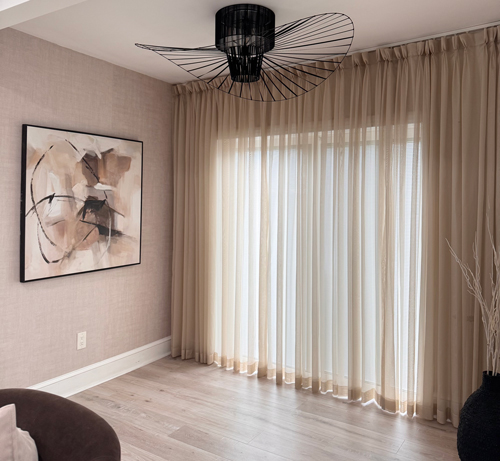
Sunlight is like a breath of fresh air for any space, especially the living room. Sunlight breathes life into the living room. However, you don’t want to let sunlight in unchecked, for that sheer curtains are the solution. The custom sheer curtains first and foremost let light through the living room windows, but they also soften it while enhancing the look of the room.
In case you are looking for windows treatment that improve the look of the living room while keeping the privacy and warmth, the following tips will allow you to select curtains that are beautifully designed, stylish, and fit perfectly in the room.
Tip 1: Consider Style and Function when Selecting Fabric Sheers
The fabric you select while customizing sheer curtains will determine how it will look and also style the room. Sheer curtain fabric have unique textures and patterns. Let’s look at the most popular ones.
Voile: Voile has a a special texture and feels. If you wish to have and airy and smooth look. Voile helps you achieve a clean look.
Polyester: A sheer made from polyester will have more resilience and can handle treat carefully. If your curtains are focus exposed to direct sun light, polyester curtains will be ideal for their resilience to sun and light weight for homes.
Chiffon: If your wish is to have a gentle and soft feel in your room, chiffon is your best bet. It will be gentle and warm.
Linen Blends: A sheer curtain made from linen blend will have a warm and relaxing feel. With breathable linen texture, they will last longer providing a more warm look & airy vibe to your room. Custom sheer linen curtains are welcome and widely used in living rooms, bedrooms and sunrooms, and also embroided floral sheer curtains are in trend in 2025.
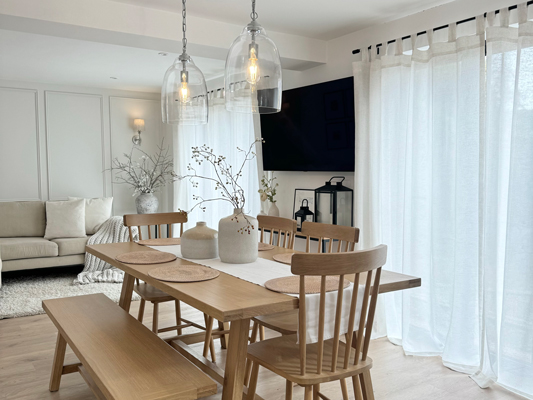
Function and aesthetics are best when considered together. If you have a living room that is frequently used (or used by pets), select a fabric that is either washable or is easy to clean, or not easy to snag. For sunlit rooms, go for sun-resistant treated polyester or heavy linen blends for your custom sheer curtains. These fabrics treated to resist fading will keep your living room furnishings fresh and will not require lots of maintenance.
Tip 2: Pick Colors and Patterns that Enhance Your Space
Custom sheer curtains aren’t just window covers, they also set the tone for your entire living room decor. The color you choose affects how the room feels and how much natural light it bounces around.
Classic neutrals like white, ivory, and light gray keep things bright while working with almost any scheme. They never really go out of style and can make a room feel bigger and calmer.
For those craving personality, bold colors like deep blue, emerald, or even blush can inject energy. Pairing these with neutral walls helps your curtains stand out without clashing.
Patterns matter, too. Right now, floral and geometric prints have found their way into trendy sheer curtains. Soft florals bring in a relaxing, organic feel, while stripes and sharp geometrics can give your space an instant style upgrade.
If you’re nervous about choosing, just have a look at your sofa or rugs. Curtain colors don’t have to match exactly, but they should blend well with major pieces and wall colors. Fabric swatches always help, hold up samples at different times of day to see how sunlight shifts the mood, and how they match with your home style.
Tip 3: Measure Correctly for a Tailored Look
Ill-fitting curtains can make even the priciest room feel unfinished. Start by measuring the width of your window and multiply by two to get the minimum curtain width for that full, flowing effect sheers do so well.
For length, decide on the style:
- Sill-length: Ends right at the windowsill for a crisp, practical look.
- Floating: Hangs about half an inch above the floor, tidy and easy to manage.
- Puddled: Pools slightly on the floor for a touch of drama and luxury.
Rod placement makes a big difference. Hanging your rod closer to the ceiling, well above the window frame, draws the eye up and makes ceilings seem higher, very useful trick! Floor-to-ceiling custom-fit sheer curtains instantly create a sense of space and polish.
Tip 4: Layer Sheer Curtains for Versatility and Privacy
Sheer curtains filter light, but if you live on a busy street or want options come movie night, layering is your secret weapon.
- Layer with blackout panels: Use a double rod or track to add blackout drapes behind sheers. You get gentle daylight with privacy by day, and total shade when needed.
- Pair with heavier curtains: Especially useful for large living rooms or family spaces, heavier fabrics add insulation and help reduce noise, while sheers soften the look.
- Add Roman shades or blinds: If changing light is a big deal, these work well with sheers so you can adjust both quickly.
Families, pet owners, and frequent entertainers benefit most from versatile window treatments. Quick changes from open and airy to cozy and private mean your living room works whatever the occasion—day or night.
Tip 5: Look for Quality Details and Custom Features
Quality is in the details, and small touches make custom sheer curtains a smart long-term investment. Check for:
- Even stitching and reinforced hems: These prevent fraying and keep edges crisp after repeated washes.
- Colorfast and UV-resistant fabrics: Especially for sunny spots, these features keep colors from fading and fibers from weakening.
- Eco-friendly materials: Sustainable sheer options, like organic cotton or recycled polyester, are widely available for those mindful of their environmental impact.
Custom features can turn simple curtains into something special. Choose the heading style that fits your home, for instance pleats, grommets, rod pockets, or ripplefold style. Each brings its own flair. Love pattern? Some stores offer a library of pattern designs, adding a personal touch without extra hassle, I am sure you will find one that suits your style.
Conclusion
Custom sheer curtains are more than just window dressing. They transform sunlight into a soft, inviting feature that shapes the look and mood of your living room. By choosing the right fabric, picking colors and patterns that fit your space, measuring with care, layering for function, and insisting on quality, you set yourself up for a room you’ll love spending time in.