

Running a small business in 2026 means competing against companies with 10x your headcount — and AI is the great equalizer. The best AI tools for small businesses in 2026 are no longer luxury add-ons reserved for Fortune 500 teams; they’re affordable, accessible, and genuinely transformative for lean operations trying to punch above their weight.
Whether you’re drowning in customer support emails, spending too many hours writing social media posts, or struggling to track leads without a dedicated sales team, there’s an AI solution built precisely for your situation. This guide cuts through the noise and shows you exactly which tools deliver real ROI — not just impressive demos.
We’ve evaluated over 40 platforms across pricing, ease of use, integration depth, and impact on key business metrics. Here’s what actually works.
Why Small Businesses Need AI in 2026
The competitive landscape has shifted dramatically. According to a 2025 McKinsey report, businesses that adopted AI-powered workflows saw an average 35% reduction in operational costs within the first year. For small business owners who traditionally compete on hustle rather than resources, that kind of efficiency gain is transformational.
Here’s the reality check: your larger competitors have already deployed AI. They’re using it to write product descriptions, qualify leads, answer customer questions at 2 a.m., and forecast inventory. If you’re not using comparable tools, you’re not just missing an opportunity — you’re actively falling behind.
The Cost of Not Using AI
A 2025 Salesforce State of Small Business report found that small business owners spend an average of 23 hours per week on administrative and repetitive tasks that could be automated. At even a modest valuation of your time, that’s thousands of dollars per month in lost productivity.
The tools in this guide collectively address those exact pain points — and most of them cost less than a single hour of consultant time per month.
- Automate repetitive tasks like data entry, scheduling, and follow-up emails
- Generate marketing content 10x faster without sacrificing quality
- Provide 24/7 customer support without hiring overnight staff
- Analyze sales data and surface actionable insights in real time
- Personalize customer experiences at scale
How We Selected the Best AI Tools
Not all AI tools are created equal, and many platforms promise the world while delivering a glorified autocomplete. Our evaluation framework was built around what small business owners actually need — not what looks impressive in a product demo.
Our Evaluation Criteria
| Criterion | What We Looked For |
| Pricing | Free tiers or plans under $100/month for small teams |
| Ease of Use | Setup under 30 minutes, no developer required |
| Integration | Connects with tools you already use (Google, Slack, Shopify, etc.) |
| Actual AI Quality | Real automation vs. superficial feature labeling |
| Support | Responsive help desk, documentation, onboarding |
| ROI Potential | Measurable time or cost savings within 90 days |
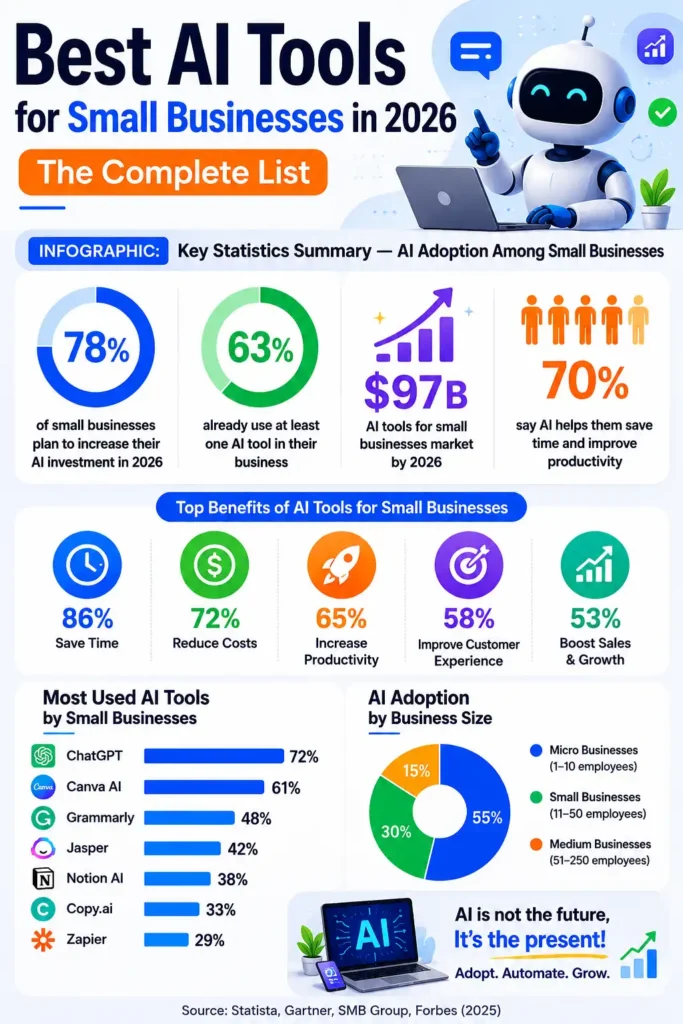
Best AI Tools for Small Businesses in 2026: The Complete List
Best AI Tools for Marketing
Marketing is where most small businesses see the fastest, most measurable ROI from AI. The tools below cover content creation, social media management, email marketing, and ad optimization — the four pillars of a modern small business marketing stack.
1. ImagineArt – Best All-in-One AI Creative Studio
Best for: AI image generation, AI video generation, ad creatives, short films, UGC content.
Pricing: Free plan available | Paid plans from $9/month
ImagineArt has quickly become the go-to creative platform for small businesses that need to produce professional visuals without hiring designers, videographers, or editors. What started as a text-to-image tool has grown into a full creative suite that handles images, videos, ad creatives, AI storyboards, and even short films from a single workspace. For lean teams that need to compete with bigger brands on visual quality, ImagineArt is the closest thing to having an in-house creative department powered entirely by AI.
The platform stands out because it simulates real cinema camera and lens systems, including ARRI, RED, Sony, Cooke, Zeiss, and Leica. This means the images and videos it produces look closer to professionally shot content than to typical AI generations. A small business owner can generate cinematic product videos, branded social posts, ad creatives, and AI influencer content all from simple text prompts, with results that hold up next to work from full creative agencies.
Key Strength: One platform replaces image generators, video tools, ad creative software, and editors, delivering cinematic-grade output that small teams can publish without further polish.
- Text-to-image and text-to-video in one workspace
- Full AI film studio with storyboards and shot sequencing
- Built-in tools for face swap, clothes changer, cartoon generator, and AI influencers
- AI Ad Studio and UGC creator for marketing campaigns
- Cinematic camera and lens controls for professional-quality output
2. Jasper AI — Best for Content Creation at Scale
Best for: Blogs, ads, product descriptions, email copy
Pricing: From $39/month | Free trial available
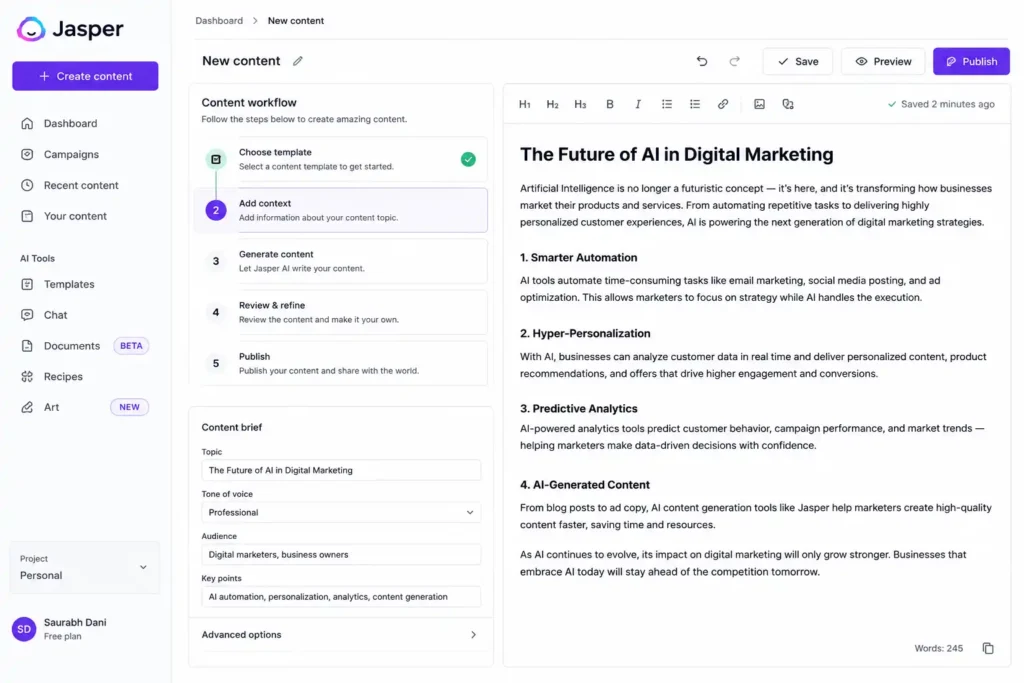
Jasper has matured significantly over the past two years. What was once a basic text generator is now a full-stack content platform with brand voice training, SEO integration, and team collaboration features. For small businesses that need to produce consistent marketing content without a dedicated copywriter, Jasper is the gold standard.
The platform’s Boss Mode lets you give it a brief and walk away — it handles research integration, tone matching, and structure. In tests, blog posts that previously took a skilled writer four hours to draft were produced in under 45 minutes, requiring only light editing.
Key Strength: Brand voice training means your content actually sounds like you, not like a generic template.
- 60+ templates for every content format
- Native Surfer SEO integration for on-page optimization
- Supports 30+ languages for global businesses
3. Quillbot — Best All-in-One AI Writing & Content Creation Suite
Best for: AI writing, paraphrasing, grammar correction, AI detection, image generation, document workflows, and content productivity
Pricing: Free plan available | Premium plans from $19/month
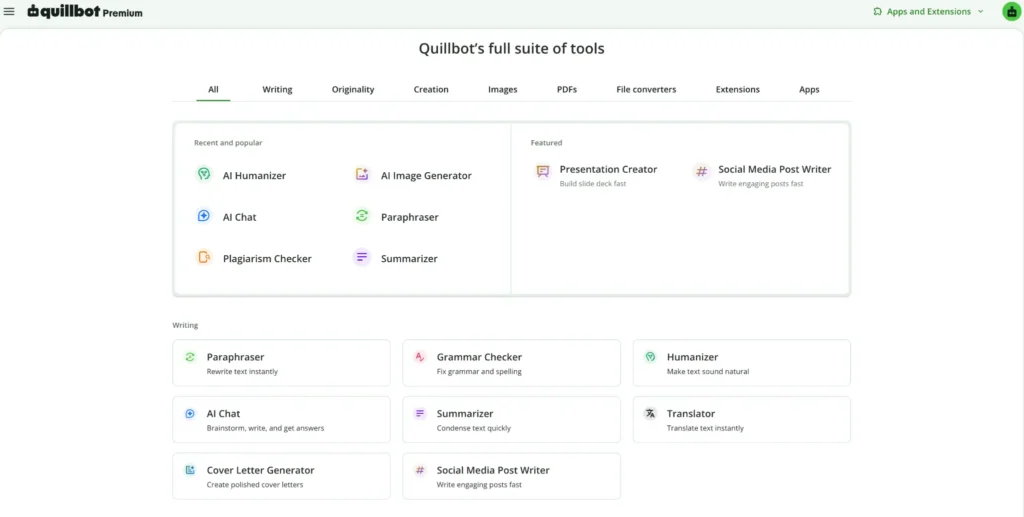
Quillbot has evolved far beyond its origins as a paraphrasing tool. Today, it functions as a complete AI-powered writing and content creation suite designed to help students, professionals, marketers, educators, and businesses create better content faster. Instead of relying on multiple tools for editing, rewriting, summarizing, detecting AI-generated content, generating citations, creating visuals, and preparing presentations, users can access everything within a single ecosystem.
What makes Quillbot particularly valuable is its focus on the entire content lifecycle. Whether you’re researching a topic, drafting a report, creating marketing content, refining communications, generating images, or preparing presentations, Quillbot provides tools that support each stage of the workflow. Features such as AI Chat, Humanizer, AI Detector, Grammar Checker, AI Image Generator, AI Image Detector, PDF tools, and AI Presentation Maker work together to help users create polished content without constantly switching between applications.
Key Strength: One platform combines everything, eliminating the need for multiple standalone tools.
- All-in-one platform for writing, editing, research, and content creation
- AI Chat, Humanizer, Grammar Checker, and AI Detector in a single workflow
- AI Image Generator, AI Image Detector, and AI Presentation Maker for multimedia content
- PDF converter, editor, and document management tools
- Browser extensions and cross-platform access for seamless productivity
4. Canva Magic Studio — Best for Visual Content
Best for: Social media graphics, presentations, brand assets
Pricing: Free tier available | Pro from $15/month
Canva’s Magic Studio transforms what was already the most accessible design tool into something close to having a junior graphic designer on staff. Magic Resize, Background Remover, and the new Magic Media text-to-image generator mean small business owners with zero design experience can produce professional-grade visuals in minutes.
The 2025 addition of Magic Morph and the expanded brand kit system means growing teams can maintain visual consistency across hundreds of assets without hiring a creative director.
Key Strength: The free tier is genuinely useful — not crippled — making it the top recommendation for bootstrapped businesses.
5. Mailchimp Intuit Assist — Best for Email Marketing Automation
Best for: Email campaigns, audience segmentation, automated sequences
Pricing: Free up to 500 contacts | Paid from $13/month
Mailchimp’s integration of Intuit Assist brings predictive send-time optimization, AI-generated subject line testing, and automated audience segmentation to a platform that millions of small businesses already trust. The new generative email builder can produce complete campaign drafts from a three-sentence brief, including imagery, copy, and call-to-action placement.
According to Mailchimp’s own 2025 benchmarking data, campaigns using AI-assisted send-time optimization showed a 29% improvement in open rates compared to manually scheduled campaigns.
- Automated customer journey mapping
- Predictive CLV (customer lifetime value) scoring
- One-click A/B testing for subject lines and content blocks
6. Buffer AI Assistant — Best for Social Media Management
Best for: Social scheduling, caption generation, performance analytics
Pricing: Free for 3 channels | Essentials from $6/month per channel
Buffer has always been the no-frills champion of social media scheduling, and its AI Assistant addition keeps the simplicity intact while adding meaningful automation. The caption repurposing feature is particularly powerful: paste in a blog post URL and Buffer generates platform-specific captions for Instagram, LinkedIn, X (formerly Twitter), and Facebook simultaneously, each calibrated to the tone and format of that platform.
Key Strength: Exceptional value for solopreneurs and small teams who need multi-channel presence without a social media manager.
7. Surfer SEO — Best for Search Engine Optimization
Best for: On-page SEO, content scoring, keyword clustering
Pricing: Essential plan from $89/month
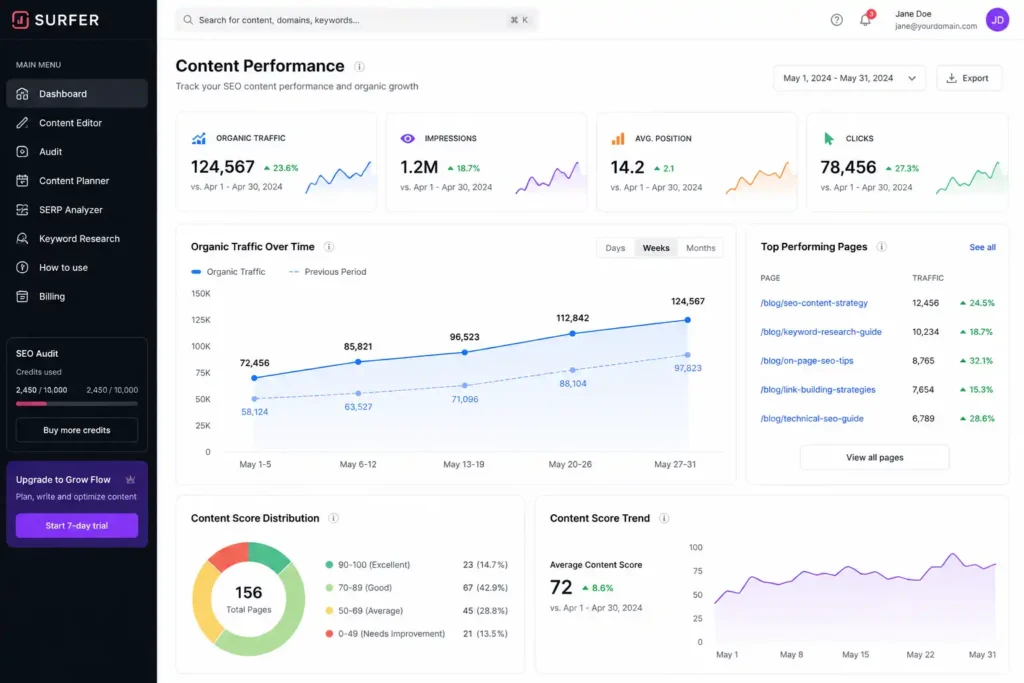
For small businesses that rely on organic search traffic, Surfer SEO is arguably the highest-ROI tool on this list. Its content editor scores your writing in real time against the top 20 ranking pages for your target keyword, ensuring your content meets the topical depth and structural requirements that Google rewards.
The 2026 version introduced an AI content audit feature that analyzes your existing content library and prioritizes which pages to update for maximum ranking impact — a game-changer for businesses with aging content that’s quietly losing traffic.
Best AI Tools for Customer Support
Customer support is one of the highest-impact areas for AI adoption in small businesses. The tools below allow you to provide enterprise-quality response times and resolution rates without hiring a support team.
8. Tidio — Best Live Chat and Chatbot Platform
Best for: E-commerce, retail, service businesses with high inquiry volume
Pricing: Free plan available | Lyro AI from $29/month
Tidio’s Lyro is built differently from most chatbots: instead of rule-based decision trees, it uses conversational AI trained specifically on customer service interactions. Feed it your FAQ page and product documentation, and it can autonomously resolve up to 70% of incoming customer queries — Tidio’s internal data shows their top-performing merchants hit resolution rates above 60% within the first week of deployment.
The live chat fallback system means complex queries automatically escalate to a human agent with full context, so customers never feel like they’ve hit a dead end. For e-commerce businesses dealing with order status, return policies, and product questions, Lyro is practically a full-time support hire.
- Integrates natively with Shopify, WooCommerce, and BigCommerce
- Multilingual support across 7 languages
- Visitor behavior tracking to proactively trigger conversations
9. Zendesk AI — Best for Growing Support Operations
Best for: Businesses scaling from 1 to 10+ support staff
Pricing: Suite Team from $55/agent/month
Zendesk’s AI layer, built on top of its already-robust helpdesk infrastructure, adds intelligent ticket routing, automatic sentiment analysis, and AI-generated response suggestions that help human agents answer 3x faster. For small businesses at the inflection point between founder-led support and a real support team, Zendesk provides the structure needed to scale without chaos.
Key Strength: The AI-powered triage system can detect frustrated customers and flag their tickets as high priority before a human even reads them.
Best AI Tools for Sales and CRM
Sales is where AI moves the needle most directly on revenue. The tools in this section handle lead scoring, pipeline management, and customer relationship intelligence so your sales efforts are focused where they’ll actually convert.
10. HubSpot CRM with AI Features — Best All-in-One CRM
Best for: Small businesses that want marketing, sales, and service under one roof
Pricing: Free CRM | Starter from $15/month
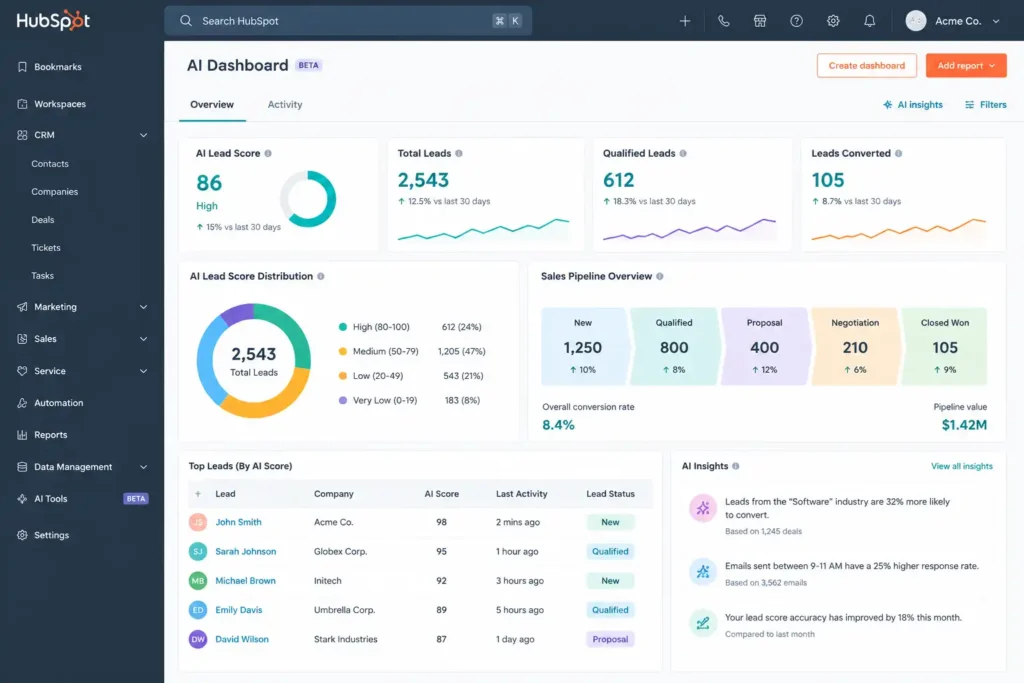
HubSpot’s 2025 and 2026 releases have deeply embedded AI into the core CRM experience. The Breeze AI engine now powers predictive lead scoring, automated deal summaries, and a sales coach feature that analyzes recorded calls and surfaces specific coaching insights — all accessible on their free and Starter plans.
For a small business managing under 1,000 contacts, HubSpot’s free CRM with AI features is genuinely one of the most valuable pieces of software available at any price point. The catch is that premium features require moving to paid plans, but the upgrade path is gradual enough that you only pay for what you grow into.
- AI-powered email drafting with deal context awareness
- Meeting prep briefs auto-generated before every call
- Lead rotation and task automation built into free tier
11. Apollo.io — Best for Outbound Sales and Lead Generation
Best for: B2B businesses focused on outbound prospecting
Pricing: Free plan | Paid from $49/month
Apollo.io combines a 275 million-contact B2B database with AI-powered sequence automation and intent data, making it the go-to tool for small businesses doing outbound sales. Its AI email personalization engine can generate customized first lines at scale, dramatically improving cold email reply rates compared to generic templates.
A 2025 user study conducted by Apollo found that small business users who enabled AI-assisted sequencing saw a 47% higher reply rate compared to manual outreach campaigns.
Key Strength: The combination of a massive verified contact database with AI sequencing means you can run sophisticated outbound campaigns that previously required a dedicated SDR.
12. Gong.io — Best for Sales Call Intelligence
Best for: Businesses with active sales calls who want data-driven coaching
Pricing: Custom pricing; typically $100–$200/seat/month — worth it for dedicated sales teams
Gong records, transcribes, and analyzes every sales call, then surfaces patterns that predict deal outcomes. For small businesses building a sales team, Gong essentially gives you an executive-level sales coach who listens to every call and provides specific, actionable feedback. The deal intelligence features identify at-risk opportunities before they go dark, giving reps a chance to re-engage before it’s too late.
Best AI Tools for Productivity and Automation
The tools in this section are the connective tissue of a modern small business tech stack — they eliminate repetitive work, automate cross-platform workflows, and free up your team to focus on high-value activities.
13. Notion AI — Best for Knowledge Management and Documentation
Best for: Teams that need a smart, searchable internal wiki
Pricing: Free with AI add-on at $10/member/month; Plus plan from $16/month includes AI
Notion AI transforms static documentation into a living, queryable knowledge base. Ask it to summarize a 20-page SOP, draft a project brief based on your notes, or extract action items from a meeting transcript — it does all of this without requiring any reformatting of your existing documents.
For small teams that have outgrown sticky notes and email threads but aren’t ready for enterprise wiki solutions, Notion AI is the sweet spot: flexible enough to adapt to any workflow, smart enough to actually use the information you put into it.
14. Zapier with AI Actions — Best for No-Code Automation
Best for: Businesses using multiple SaaS tools that need to talk to each other
Pricing: Free tier | Professional from $29/month
Zapier has been automating small business workflows for years, but its AI layer fundamentally changes how automation is built. Instead of constructing multi-step workflows manually, you can now describe what you want in plain English: ‘When someone fills out my Typeform, add them to HubSpot, send a Slack notification, and create a follow-up task in Asana.’ Zapier’s AI builds the workflow for you.
The platform connects 6,000+ apps, meaning virtually any software you use can be automated. According to Zapier’s 2025 small business automation report, users who built five or more active Zaps saved an average of 6.5 hours per week.
- Natural language Zap builder (describe it, AI builds it)
- AI-powered data formatting and transformation in workflows
- Error detection and auto-fix recommendations
15. Otter.ai — Best for Meeting Transcription and Notes
Best for: Teams with frequent meetings, client calls, or interviews
Pricing: Free for 300 minutes/month | Pro from $10/month
Otter.ai handles meeting transcription with speaker identification, real-time note generation, and AI-generated summaries with action items. For small business owners who spend significant time in calls but lack a dedicated EA, Otter eliminates the cognitive overhead of note-taking and ensures nothing falls through the cracks.
The OtterPilot feature joins your Zoom, Google Meet, or Teams calls automatically, takes notes, and sends a structured summary to all participants within minutes of the call ending.
16. QuickBooks with Intuit Assist — Best for Accounting and Finance
Best for: Any small business that needs bookkeeping, invoicing, and cash flow visibility
Pricing: Simple Start from $18/month | Plus from $27/month
QuickBooks’ integration of Intuit Assist brings AI-powered cash flow forecasting, anomaly detection, and automated categorization to the bookkeeping platform that already dominates the small business market. The natural language query feature is genuinely useful: instead of navigating menus to pull a report, you can type ‘What were my top five expenses last quarter?’ and get an immediate, accurate answer.
Key Strength: Connects directly with bank accounts and cards for near-real-time financial intelligence, reducing month-end reconciliation time by up to 80%.
17. Grammarly Business — Best for Professional Communication
Best for: Any business where written communication matters (which is all of them)
Pricing: Free version available | Business from $15/member/month
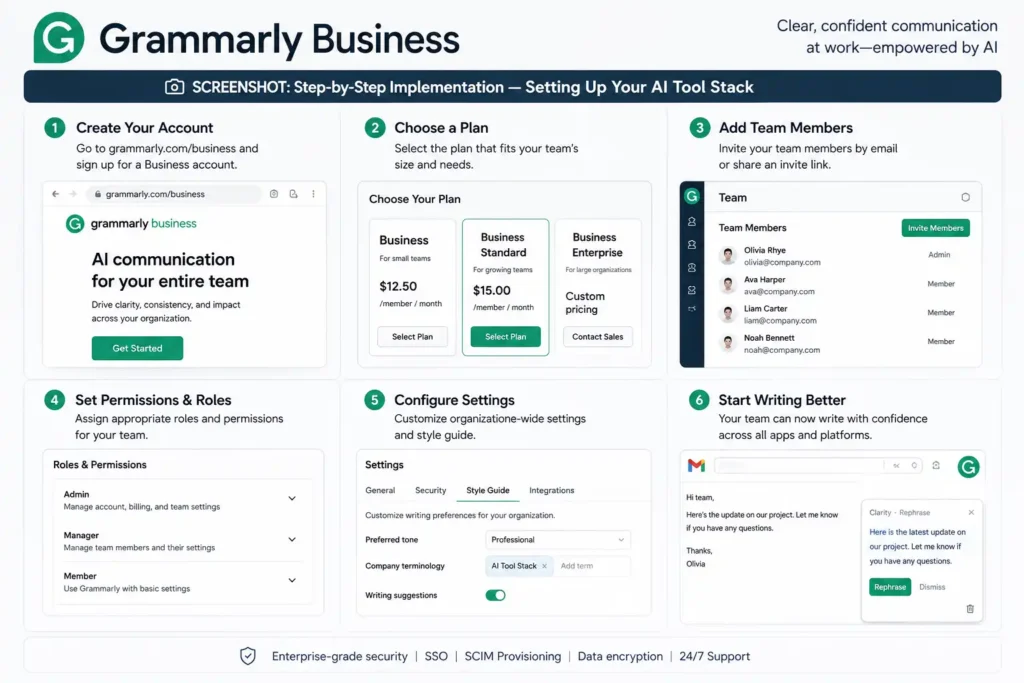
Grammarly has expanded far beyond spell-check into full AI writing assistance. The Business tier adds a company style guide feature that enforces brand voice across every employee’s written output — emails, proposals, social posts, and support responses all maintain a consistent tone without requiring a communications manager.
The 2025 addition of the Grammarly GO generative feature lets you draft emails, respond to messages, or create documents from bullet points directly within Gmail, Outlook, Slack, and virtually any browser-based tool.
Free vs. Paid AI Tools: What You Actually Get
The AI tool market in 2026 has matured enough that genuinely useful free tiers exist across most categories and you can read about best free AI image generators in our technology section. Here’s how to think about the investment decision:
| Category | Best Free Option | When to Upgrade |
| Content Creation | Canva Magic Studio (free) | When you need brand voice training or output volume > 20 pieces/month |
| Email Marketing | Mailchimp (up to 500 contacts) | When your list exceeds 500 or you need advanced segmentation |
| CRM / Sales | HubSpot Free CRM | When you need predictive scoring or multiple pipelines |
| Customer Chat | Tidio Free Plan | When chat volume exceeds 50 conversations/month |
| Automation | Zapier Free (5 Zaps) | When you need multi-step workflows or high run volume |
| Meeting Notes | Otter.ai Free (300 min) | When you have daily meetings or need team sharing |
| Pro Tip: Start with free tiers across 2-3 categories and measure impact for 30 days before committing to paid plans. The tools that actually change your workflow will reveal themselves quickly — and those are the ones worth paying for. |
Real-World Case Studies
The following case studies illustrate how small businesses at different stages have deployed AI tools to achieve measurable results. Where specific company details have been altered for privacy, cases are labeled accordingly.
| Case Study: Brightleaf Botanicals — E-Commerce Retailer (Illustrative Example) |
| 💡 Challenge A 12-person e-commerce business selling specialty houseplants was spending 18+ hours per week on customer support emails and social media content creation. Their customer response time averaged 14 hours, leading to cart abandonment and negative reviews. |
| 🛠 Strategy Deploy Tidio Lyro for front-line customer support and Buffer AI Assistant for multi-channel social content, with a 60-day ROI measurement window. |
| ⚙️ Execution Week 1-2: Tidio trained on product FAQs, shipping policies, and care guides. Week 3: Buffer AI connected to all four social channels with brand voice guidelines. Week 4-8: Optimization based on resolution rate and engagement data. |
| 📈 Results Customer response time dropped from 14 hours to under 3 minutes for 67% of queries. Social media engagement increased 41% over 60 days. The founder reclaimed approximately 14 hours per week — reinvested into supplier relationships and new product sourcing. |
| 🔑 Key Takeaways AI customer support delivers fastest ROI in high-volume, repetitive inquiry environments. Even modest social media AI assistance compounds significantly over time due to consistency and frequency improvements. |
| Case Study: Meridian Accounting Partners — B2B Professional Services |
| 💡 Challenge A solo accountant running a boutique firm for small business clients struggled to market his expertise consistently. He was producing one blog post per month and sending sporadic email newsletters, resulting in flat referral-dependent revenue growth. |
| 🛠 Strategy Use Jasper AI for content production, Surfer SEO for optimization, and Mailchimp Intuit Assist for automated nurture sequences — targeting a 3x increase in content output without additional time investment. |
| ⚙️ Execution Jasper content briefs created for 12 tax and financial planning topics. Surfer SEO used to optimize each piece. Mailchimp automated a 5-email welcome sequence for new subscribers plus a monthly newsletter built from repurposed blog content. |
| 📈 Results Content output scaled from 1 to 4 articles per month in the same time budget. Email open rates improved 34% after implementing AI send-time optimization. Organic search traffic grew 280% over 8 months. Revenue from inbound leads increased 55% year-over-year. |
| 🔑 Key Takeaways For service professionals, thought leadership content is a direct revenue driver. AI removes the production bottleneck without requiring a marketing hire. The compounding effect of consistent SEO-optimized content is significant over a 6-12 month horizon. |
| Case Study: Stackline Studio — Digital Agency with Remote Team |
| 💡 Challenge A 7-person creative agency was losing hours each week to meeting follow-ups, project documentation gaps, and inconsistent client communication quality across team members with varying writing skills. |
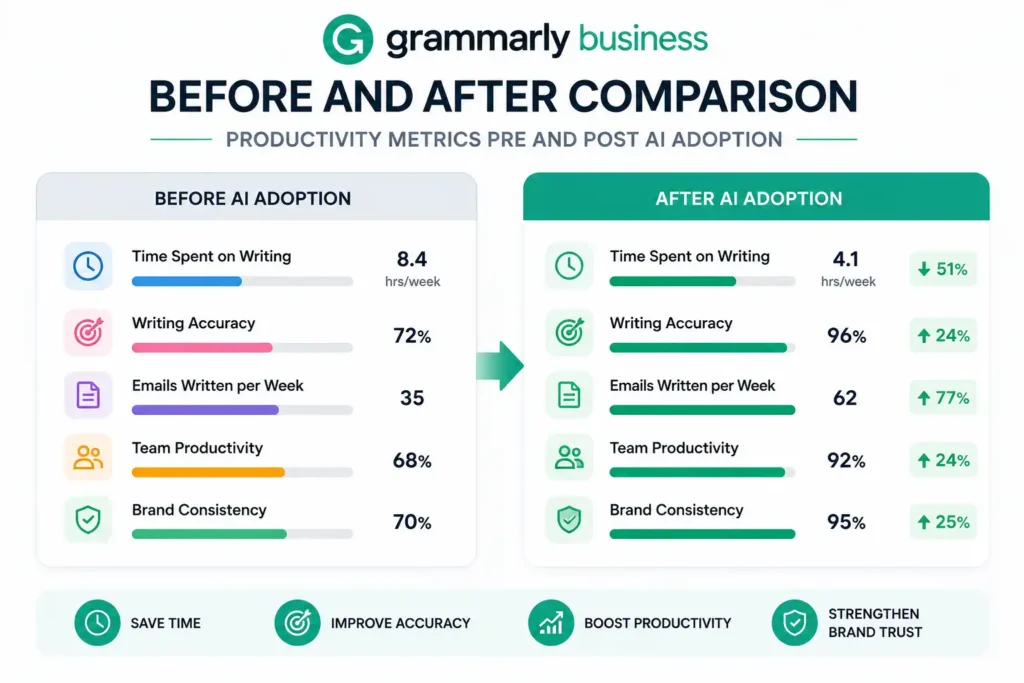
| 🛠 Strategy Implement Otter.ai for all client and internal meetings, Notion AI as the central knowledge base, and Grammarly Business with a custom style guide for all outbound client communications. |
| ⚙️ Execution Otter.ai deployed across all team video calls. Notion AI knowledge base migrated from a disorganized Google Drive. Grammarly Business installed company-wide with style guide covering tone, formatting, and brand voice rules. Training session conducted over two weeks. |
| 📈 Results Meeting follow-up time reduced by 70%. Client-reported communication satisfaction increased in NPS surveys (from 7.2 to 8.6 average). New employee onboarding time decreased by 40% due to accessible, searchable internal documentation. Zero client complaints about inconsistent communication tone in the six months post-implementation. |
| 🔑 Key Takeaways Knowledge management and communication quality improvements have outsized impact on client retention in service businesses. The combination of transcription, documentation AI, and writing assistance creates a self-reinforcing system that improves with use. |
What Industry Experts Say
The consensus among small business advisors and technology analysts in 2026 is clear: AI adoption is no longer a competitive advantage — it’s table stakes. The question isn’t whether to use AI, but how to use it strategically.
| “The small businesses that are pulling ahead right now are the ones that stopped thinking about AI as a technology project and started thinking about it as a workflow redesign. Every hour you spend on a task that a machine can do better is an hour you’re not spending on the relationships and creativity that only humans can deliver.” — Small Business Technology Advisor, 2025 Small Business Tech Summit |
Key Industry Observations for 2026
- AI tools are increasingly vertical-specific — platforms built for retail, professional services, or healthcare outperform generic solutions in their niches
- The total cost of AI adoption has dropped 60% since 2023, making even sophisticated tools accessible to single-person operations
- Data privacy regulations (particularly in the EU and California) are shaping which AI tools can be used for customer data — always check compliance before deployment
- Businesses that combine 3-5 integrated AI tools see compounding efficiency gains that exceed the sum of individual tool benefits
- The biggest predictor of AI ROI isn’t the tool chosen — it’s the quality of onboarding and the consistency of use in the first 30 days
The Emerging Trend: Agentic AI for Small Business
The next frontier for small business AI is agentic workflows — systems where AI doesn’t just assist but autonomously executes multi-step tasks with minimal human supervision. Several platforms on this list are already moving in this direction, and by late 2026, expect to see fully autonomous lead qualification, content calendars, and financial reporting becoming standard features rather than premium add-ons.
For small business owners, this trajectory means the current crop of tools is just the starting point. Building habits and workflows around AI now positions you to leverage significantly more powerful capabilities in the next 18-24 months.
How to Choose the Right AI Tool for Your Business
With dozens of legitimate options in every category, the framework for choosing matters more than the specific tools. Here’s a decision process that works regardless of business type or budget:
- Step 1 — Identify your highest-pain, most time-consuming workflows first. The best AI investment is always where you’re losing the most hours to repetitive work.
- Step 2 — Match tools to your existing tech stack. An AI email tool that integrates with your CRM is 10x more valuable than a better standalone solution that requires manual data transfer.
- Step 3 — Prioritize tools with free trials of 14 days or more. AI tools that work for your specific business type should show results within two weeks of actual use.
- Step 4 — Calculate realistic ROI before committing. Estimate time saved per week × your effective hourly rate × 4 weeks, and compare against monthly cost. Most tools on this list break even in under a week.
- Step 5 — Start with one tool per workflow area. Tool sprawl is a real productivity killer — master one before adding the next.
| Warning: Avoid AI tools that require long-term contracts before you’ve proven ROI. Monthly billing should be the default for any tool you’re evaluating. Any vendor that won’t let you pay month-to-month for the first 90 days is a red flag. |
Frequently Asked Questions
What are the best AI tools for small businesses in 2026?
The top AI tools for small businesses in 2026 include Jasper AI for content creation, HubSpot CRM for sales automation, Tidio Lyro for customer support, Zapier for workflow automation, and Mailchimp Intuit Assist for email marketing. The best choice depends on your specific business needs and the workflows where you’re losing the most time.
How can small businesses use AI to grow?
Small businesses can use AI to automate repetitive tasks (data entry, scheduling, follow-ups), generate marketing content at scale, provide 24/7 customer support via chatbots, analyze sales pipelines to prioritize high-value leads, and optimize marketing spend through predictive analytics. The compounding effect of consistent AI-assisted output is the key growth driver.
Are AI tools worth the investment for small businesses?
For most small businesses, yes — significantly so. The majority of AI productivity tools pay for themselves through time savings alone within the first month. A tool costing $50/month that saves 5 hours per week at a $50/hour effective rate generates $1,000/month in recovered productivity. The key is choosing tools that address your actual bottlenecks rather than impressive-sounding features you won’t use.
What is the best free AI tool for small business?
Canva Magic Studio offers the most comprehensive free tier for visual content creation. HubSpot’s free CRM is the strongest no-cost option for sales teams. Otter.ai (300 minutes/month free) is excellent for meeting transcription. Grammarly’s free tier covers basic writing improvement. Most serious small businesses will eventually need paid tiers in at least one or two categories, but free tiers are a legitimate starting point.
How much do AI business tools cost?
AI tools for small businesses range from free to several hundred dollars per month. Most essential tools fall in the $15–$100/month range per user. A complete AI stack covering marketing, customer support, sales, and productivity typically costs between $150 and $350/month for a team of five — comparable to a few hours of freelance labor.
Can AI help a very small business or solopreneur?
Absolutely — AI arguably delivers the highest ROI for solopreneurs because it most directly addresses the core constraint: limited human bandwidth. A one-person business using Canva Magic Studio, Tidio, Mailchimp, and Notion AI effectively operates with capabilities that previously required a team of four.
Which AI tool is best for automating business tasks?
Zapier remains the gold standard for cross-platform workflow automation because it connects 6,000+ apps. For in-platform automation within specific categories, Mailchimp Intuit Assist excels at marketing automation, HubSpot at sales automation, and Tidio at customer support automation. The best choice depends on which specific tasks you want to automate.
What AI tools do startups typically use?
Early-stage startups commonly deploy Notion AI for documentation, Zapier for automation, HubSpot free CRM for sales tracking, Canva for marketing assets, and either Tidio or Intercom for customer communication. Startups with technical co-founders often also use GitHub Copilot for development productivity.
Are there AI tools specifically designed for local businesses?
Yes — tools like Birdeye and Podium are specifically built for local businesses and combine AI-powered review management, messaging automation, and local SEO features. For local service businesses, these specialized platforms often deliver better ROI than general-purpose AI tools because they’re designed around the specific workflows of appointment booking, review generation, and local customer communication.
How do I get started with AI tools without technical expertise?
Start with tools that offer guided onboarding and don’t require technical configuration. Canva Magic Studio, Mailchimp, Buffer, and Otter.ai are all designed for non-technical users and can be operational within an hour. Avoid platforms that require API setup or developer involvement unless you have technical resources — there are always comparable non-technical alternatives.
Final Verdict: Building Your AI Tool Stack in 2026
The best AI tools for small businesses in 2026 share a common quality: they give lean teams the capabilities of much larger operations without requiring the headcount. Whether you’re a solopreneur trying to stretch your bandwidth or a 10-person team trying to compete with 100-person competitors, there’s a combination of tools here that will meaningfully move the needle.
Here’s our recommended starting stack based on the most common small business profiles:
| Business Type | Recommended Starting Stack | Est. Monthly Cost |
| Solopreneur / Freelancer | Canva Pro + Otter.ai + Notion AI + Grammarly Business | $50–$75 |
| E-Commerce Store | Tidio Lyro + Mailchimp + Canva + Buffer | $75–$120 |
| B2B Service Business | HubSpot Starter + Jasper + Otter.ai + Zapier | $100–$180 |
| Local Service Business | Tidio + Mailchimp + QuickBooks + Grammarly | $80–$130 |
| Growing Team (5-15) | Full stack: CRM + content + support + automation | $200–$350 |
The businesses that will look back on 2026 as a turning point are the ones that stopped treating AI adoption as a future consideration and started treating it as a present necessity. The tools are mature, the prices are accessible, and the competitive gap between AI-enabled and AI-resistant small businesses is widening every quarter.
Start with one tool. Measure the impact. Scale what works. The compounding effect of AI-assisted operations — better content, faster responses, smarter outreach, cleaner data — doesn’t manifest in a single week, but it becomes unmistakable within a quarter.
The question is no longer whether small businesses can afford AI. It’s whether they can afford to operate without it.
Technology Perspective
Technology continues to transform industries through artificial intelligence, cloud computing, automation, cybersecurity, digital platforms, and data-driven decision making. As organizations increasingly adopt digital solutions, understanding emerging technologies becomes essential for businesses, professionals, and consumers. DGM News regularly covers these developments through expert analysis, technology news, and educational resources.
Innovation Outlook
Rapid advances in artificial intelligence, automation, machine learning, cloud infrastructure, and digital transformation continue reshaping global industries. Monitoring these developments helps organizations adapt to changing technologies, improve efficiency, and prepare for future innovation.
Did you know?
Artificial Intelligence is expected to influence nearly every major industry over the coming decade, from healthcare and finance to transportation, manufacturing, education, and entertainment.
AI, Machine Learning, Deep Learning and Generative AI Explained
Google AI Updates
About DGM News
DGM News is an independent digital publication delivering the latest Technology News, AI News, and FinTech News. We provide expert insights on startups, innovation, cybersecurity, software, business, gadgets, cloud computing, artificial intelligence, and emerging technologies. Our mission is to publish informative, accurate, and regularly updated content that helps readers stay informed in today's rapidly evolving digital landscape.
Since our editorial focus includes technology, artificial intelligence, and financial technology, we continuously expand our coverage as new innovations emerge.
Editorial Standards
Every article published on DGM News undergoes editorial review before publication. We prioritize factual accuracy, clarity, transparency, and reader value while following responsible digital publishing practices.
Research Methodology
Our editorial team researches publicly available information from official announcements, technical documentation, research publications, developer resources, reputable industry reports, and trusted public sources whenever applicable. Information is reviewed to improve clarity and accuracy before publication.
Fact-Checking Policy
We make reasonable efforts to verify factual information before publishing. Articles are reviewed for accuracy, consistency, and relevance. If significant developments occur after publication, content may be revised to reflect updated information.
Update Policy
Technology evolves rapidly. Articles may be reviewed and updated periodically to reflect software releases, AI developments, security advisories, regulatory updates, product launches, and other important industry changes.
Source Verification
Whenever possible, DGM News reviews information using official company announcements, technical documentation, research publications, government resources, publicly available reports, and reputable industry references before updating articles.
Editorial Independence
DGM News maintains editorial independence in all publishing decisions. Editorial content is produced independently and is intended to provide balanced, informative, and reader-focused coverage without influence from advertisers or commercial partnerships.
AI Usage Disclosure
Artificial intelligence tools may assist with research organization, grammar improvement, formatting, or editorial workflows. Every article is reviewed by human editors before publication to help maintain quality, clarity, and factual accuracy.
Corrections Policy
Accuracy is important to us. If readers identify outdated information or factual inaccuracies, they are encouraged to contact our editorial team. Verified corrections are reviewed and incorporated whenever appropriate.
Reader Feedback
Reader feedback helps improve our journalism. We welcome suggestions, corrections, and constructive feedback through our Contact page to continuously improve the quality of our reporting.
Last Editorial Review
This article follows the DGM News editorial review process and may be updated periodically as new information becomes available.
Why Trust DGM News?
DGM News is committed to publishing technology journalism that emphasizes accuracy, transparency, editorial independence, and regularly updated information. Our editorial process is designed to provide readers with reliable coverage of technology, AI, fintech, startups, and digital innovation.
DGM News Resources
Topics We Cover
Artificial Intelligence • AI Tools • Machine Learning • FinTech • Cybersecurity • Cloud Computing • Programming • Software Development • Gadgets • Mobile Technology • Business Technology • Startups • Digital Marketing • Blockchain • Cryptocurrency • Science • Innovation • Consumer Technology • Enterprise Technology • Automation
