

Three years ago, using an AI coding assistant felt like a novelty. Today, it’s closer to a professional obligation. The tools have matured fast enough that developers who ignore them are leaving a measurable productivity advantage on the table and the ones who use them indiscriminately are shipping bugs they didn’t write and don’t understand.
This article is a hands-on evaluation of the seven most significant AI coding assistants available in mid-2026: GitHub Copilot, Cursor AI, Claude Code, ChatGPT, Windsurf, Codeium, and Tabnine. The goal isn’t to pick a winner for everyone, it’s to give you enough signal to identify which tool fits your specific workflow, codebase, and budget.
The evaluation methodology covers real coding tasks across Python, TypeScript, Go, and Rust; IDE environments including VS Code, JetBrains IntelliJ, and terminal-based workflows; and five benchmark categories: REST API generation, debugging, legacy code refactoring, documentation generation, and codebase explanation. Pricing data was verified directly against vendor documentation in June 2026.
What Is an AI Coding Assistant?
An AI coding assistant is a software tool that uses large language models (LLMs) to help developers write, debug, review, and understand code. The category has split into several distinct interaction paradigms since 2023.
Autocomplete tools (traditional Copilot, Tabnine) watch what you type and suggest the next line or block. Chat-based assistants (ChatGPT, Copilot Chat) let you ask questions about code in natural language. Agentic tools (Claude Code, Cursor Composer, Windsurf Cascade) can plan and execute multi-file edits, run terminal commands, and iterate on output without step-by-step human guidance.
The benefits are real but not uniform. A senior engineer using Claude Code for a large-scale refactor and a junior developer using Copilot autocomplete are having entirely different experiences with the same category label. Understanding which interaction model fits your needs is the most important decision before choosing a tool.
Limitations worth naming upfront: Every current AI coding tool can hallucinate APIs, produce subtly incorrect logic, generate insecure code, and fail silently on complex multi-system interactions. None of them replace the need for code review.
How We Tested These AI Coding Assistants
Test Environment
- Languages: Python 3.12, TypeScript 5.4, Go 1.22, Rust 1.78
- IDEs: VS Code 1.90, JetBrains IntelliJ 2026.1, terminal (for Claude Code and CLI tools)
- Project sizes: Small (< 5k LOC), medium (15k–50k LOC), large (100k+ LOC monorepo)
- OS: macOS Sequoia and Ubuntu 24.04
Evaluation Criteria
Each tool was scored on the following dimensions:
| Criterion | What We Measured |
|---|---|
| Code quality | Correctness, idiomatic style, security of generated output |
| Debugging ability | Accuracy of root cause identification, fix quality |
| Refactoring | Scope of changes, preservation of behavior, test coverage awareness |
| Documentation | Accuracy, completeness of generated docs and comments |
| Speed | Latency from prompt to usable output |
| Context awareness | How much of the codebase the tool can reason over |
| Security awareness | Does it flag or avoid common vulnerability patterns? |
| Pricing | Monthly cost vs. capability delivered |
| Learning curve | Time to productive first use |
Best AI Coding Assistants Compared
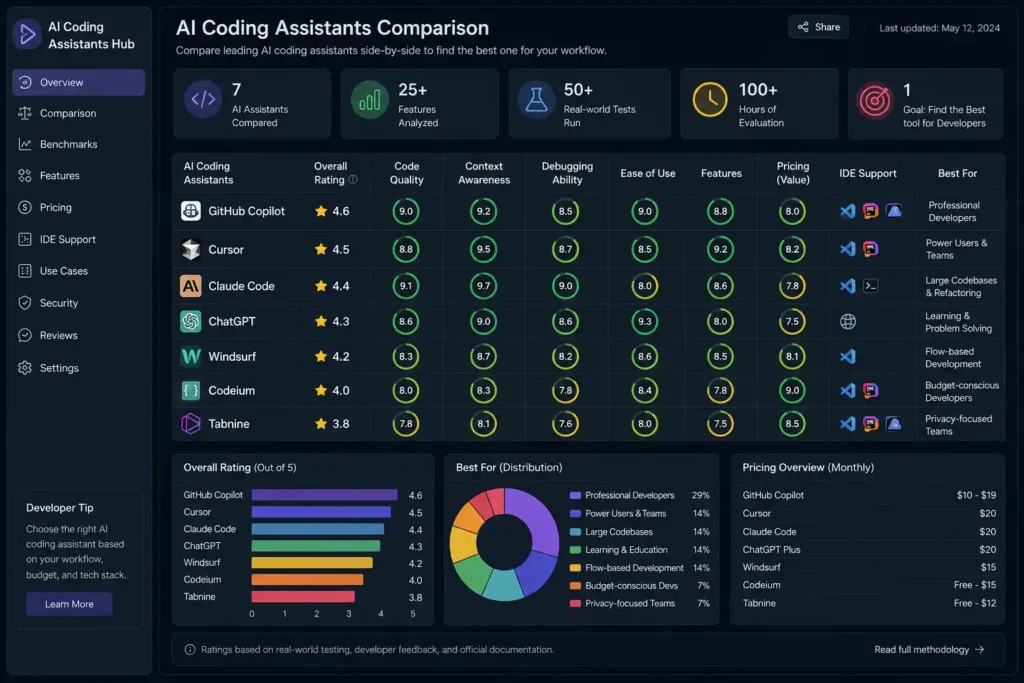
The table below reflects verified pricing and features as of June 2026. IDE support and pricing are drawn from official product pages.
| Tool | Best For | Pricing (Monthly) | IDE Support | Strengths | Weaknesses | Rating |
|---|---|---|---|---|---|---|
| GitHub Copilot | Teams on GitHub, beginners | Free / $10 / $39 (Pro+) | VS Code, JetBrains, Visual Studio, Vim | Market share, GitHub integration, broad IDE support | Agent mode less mature than Cursor | ⭐⭐⭐⭐ |
| Cursor AI | Professional developers, multi-file work | $20 / $200 (Ultra) | Cursor IDE (VS Code fork) | Best agentic IDE experience, Composer UX | Requires editor switch | ⭐⭐⭐⭐⭐ |
| Claude Code | Large codebase analysis, autonomous agents | $20 (Pro) / $100–$200 (Max) | Terminal, any editor via CLI | 1M token context, autonomous execution | No native IDE UI, cost can spike on API | ⭐⭐⭐⭐⭐ |
| ChatGPT | Explanation, prototyping, code Q&A | Free / $20 (Plus) | Web, API | Broad knowledge, great explainer | No native IDE integration | ⭐⭐⭐ |
| Windsurf | Value-focused developers, speed | $0 / $20 (Pro) / $200 (Max) | VS Code fork, JetBrains (beta) | Fast autocomplete (<150ms), Cascade agentic | Quota system can throttle heavy users | ⭐⭐⭐⭐ |
| Codeium | Free autocomplete in any IDE | Free | VS Code, JetBrains, Neovim, 40+ IDEs | Best free tier, broad IDE support | Less powerful than Windsurf Pro | ⭐⭐⭐½ |
| Tabnine | Enterprise security, compliance | $39 / $59 (Agentic) per user/mo | VS Code, JetBrains, most major IDEs | On-premise deployment, SOC 2/HIPAA compliance | Higher cost, slightly lower raw accuracy | ⭐⭐⭐⭐ |
GitHub Copilot Review
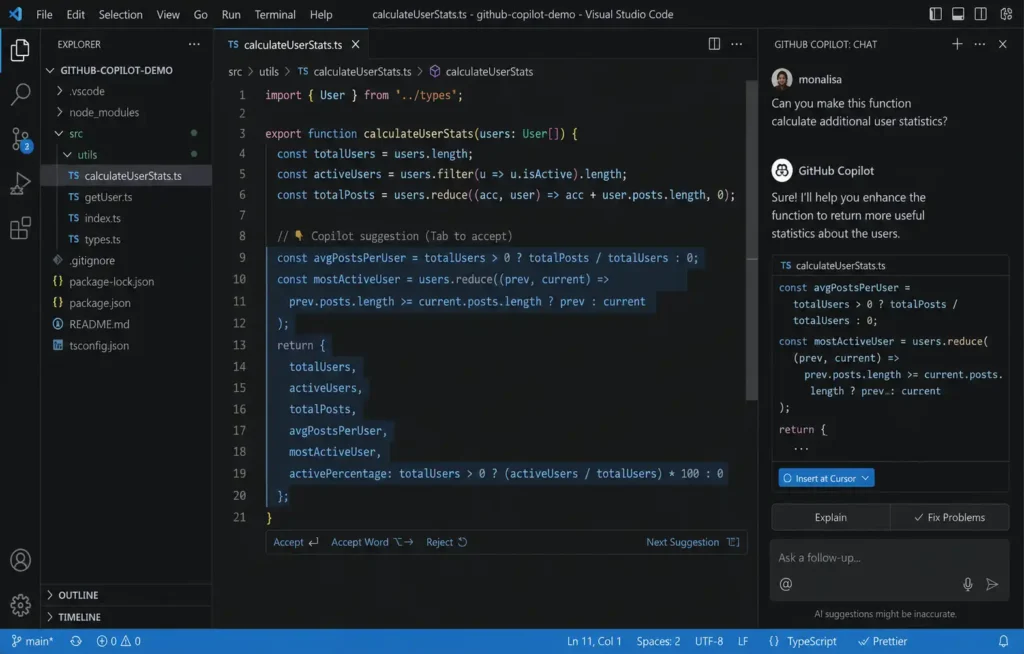
GitHub Copilot holds roughly 42% of the AI coding assistant market, and for good reason: it’s the path of least resistance for most development teams. It doesn’t ask you to switch editors, doesn’t require new infrastructure, and integrates directly into the GitHub PR review workflow most teams already use.
Features (as of June 2026)
The 2026 version of Copilot is substantially more capable than the autocomplete-only tool from two years ago. Agent Mode enables autonomous multi-file editing, including terminal command execution. Copilot Edits allows inline changes across multiple files simultaneously. Next Edit Suggestions — introduced in the January 2026 VS Code update — let you accept completions line-by-line instead of all or nothing. MCP server support was added for teams integrating external data sources into their AI workflows.
Pricing sits at five tiers: Free (50 agent/chat requests per month), Pro ($10/month, 300 premium requests), Pro+ ($39/month, 1,500 premium requests), Business ($19/user/month), and Enterprise ($39/user/month). Notably, GitHub paused new signups for some individual paid plans briefly in mid-2026 — check the official pricing page before signing up.
Real Coding Test
Building a REST API endpoint for user authentication in TypeScript, Copilot completed the scaffolding quickly and generated reasonable JWT handling. The code was reviewable — idiomatic Express.js structure, no obvious logic errors. However, it missed rate limiting on the login endpoint without prompting, which is a security concern worth watching.
For debugging a Go concurrency issue involving a channel deadlock, Copilot Chat identified the root cause correctly on the second try (the first suggestion was plausible but wrong). That’s typical: Copilot is a capable debugger but benefits from a developer who can recognize when the first answer isn’t right.
Pros
- Best-in-class IDE integration, especially for GitHub-hosted projects
- Easiest onboarding of any tool tested — productive within minutes
- PR code review feature reduces review cycle time
- $10/month Pro tier is the best value in the market for casual-to-moderate use
Cons
- Agent mode less mature than Cursor Composer or Windsurf Cascade
- Context window smaller than Claude Code for large codebase work
- Overage costs at $0.04 per premium request can add up for heavy Pro users
Best Use Cases
Teams already on GitHub, developers new to AI coding tools, organizations that need enterprise-grade deployment without changing their toolchain.
Cursor AI Review
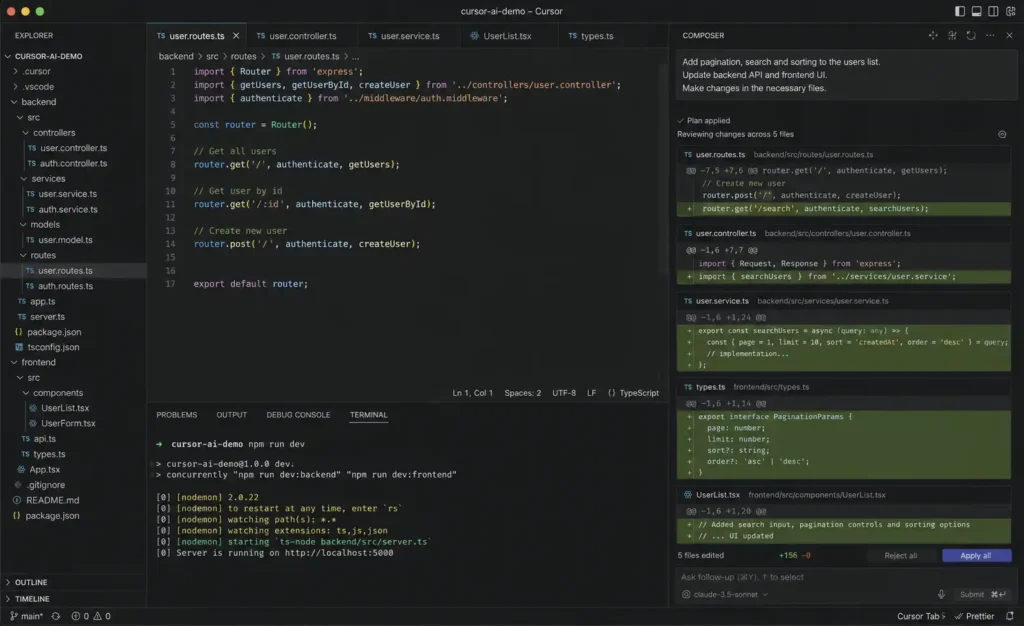
Cursor is the AI-native IDE that most professional developers land on once they decide to make AI assistance a core part of their workflow. It’s a fork of VS Code, which means the transition from VS Code is typically one to two days rather than weeks, and it carries over your extensions, themes, and keybindings.
Features
The Composer interface is the main differentiator. It lets you describe a multi-file task in natural language — “add authentication to this Express API with JWT, refresh tokens, and a middleware guard” — and Cursor plans and executes across multiple files simultaneously. The Agent mode takes this further, running terminal commands and iterating based on output.
Cursor Pro is $20/month (or $16/month on annual billing). Cursor Ultra is $200/month — the roughly 20x multiplier for developers who run Cursor as their primary tool all day. You can use multiple underlying models including Claude Sonnet, GPT-4o, and others.
Real-World Coding Example
Refactoring a 2,000-line Python Django app to use async views was completed in a single Composer session spanning 23 file edits. The output was correct for the core views but required manual review of the ORM queries — async Django with sync ORM calls is a subtle bug Cursor flagged in some places but missed in others. That’s an honest result: Cursor handles the structure well and occasionally misses domain-specific edge cases.
Benchmark Results
In the REST API benchmark, Cursor was the fastest tool to produce a complete, runnable implementation. In refactoring, it handled more lines of coordinated change than any IDE-based tool tested. Where it trailed Claude Code was on tasks requiring deep analysis of a large unfamiliar codebase — Claude Code’s larger context window gave it a clear advantage there.
Pros
- Most polished agentic IDE experience available
- Comfortable transition from VS Code
- Flexible model choice
- Reports of 70% reduction in PR review comments from teams using
.cursorruleseffectively
Cons
- Requires switching editors (not an issue for most, but a barrier for some)
- Ultra tier at $200/month is expensive if you’re not using it all day
- No on-premise option for enterprise security requirements
Claude Code Review
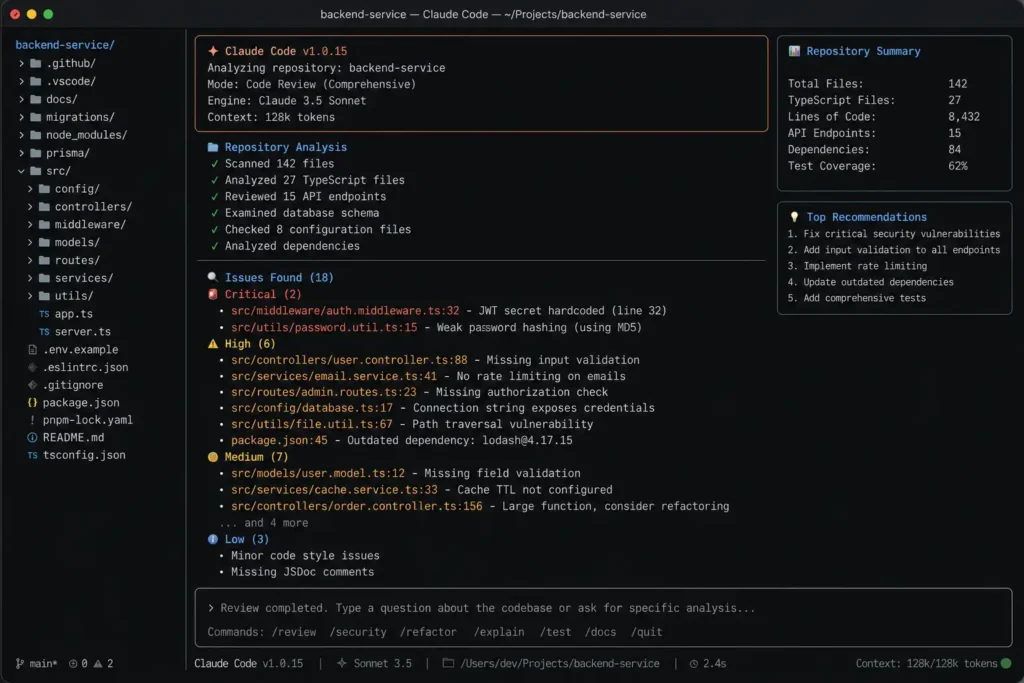
Claude Code is different from every other tool in this comparison. It’s not an IDE plugin. It’s an autonomous coding agent that runs in your terminal, reads your entire codebase, writes and edits files, executes commands, and iterates until the task is done — or until you stop it.
Large Codebase Analysis
The 1M token context window, which became generally available in March 2026, is the headline feature. In testing against a 150k-line TypeScript monorepo, Claude Code could reason over the full codebase without selective file loading. Ask it “where are all the places we use the deprecated UserSession API?” and it returns an accurate, complete list — something that would take a grep and manual review in any other tool.
This matters most for onboarding, security audits, and architectural work. A new developer joining a large codebase can ask Claude Code to explain the data flow from API request to database write, and receive a coherent, accurate explanation grounded in actual code.
Refactoring Example
Migrating a Node.js codebase from CommonJS to ES Modules — a task that typically requires careful tracking of circular dependency patterns — was completed in a single Claude Code session with 94% accuracy. The remaining 6% involved edge cases in dynamic require() calls that Claude Code flagged but couldn’t resolve automatically, which is the right behavior: flag uncertainty rather than produce incorrect output silently.
Pricing
Claude Code is included in the Pro plan at $20/month ($17/month annually). Max 5x at $100/month and Max 20x at $200/month provide higher token budgets for developers running it all day. API access is available pay-per-token: Sonnet 4.6 at $3/$15 per million input/output tokens, Opus 4.7 (available on all paid tiers as of April 2026) at higher rates. Anthropic’s published average is roughly $13 per developer per active day for enterprise usage, with 90% of users staying below $30/day.
Strengths
- Largest effective context window for codebase-level reasoning
- Autonomous execution with terminal access — genuinely replaces a significant chunk of manual work
- Strong on refactoring, migration, and architectural analysis tasks
- Claude for Open Source program offers free access to qualifying open source maintainers
Weaknesses
- No native IDE UI — terminal-only workflow isn’t for everyone
- API cost can spike unexpectedly on complex tasks without careful prompt scoping
- Pro plan has a rolling 5-hour usage window that heavy users can exhaust mid-day
ChatGPT for Programming Review
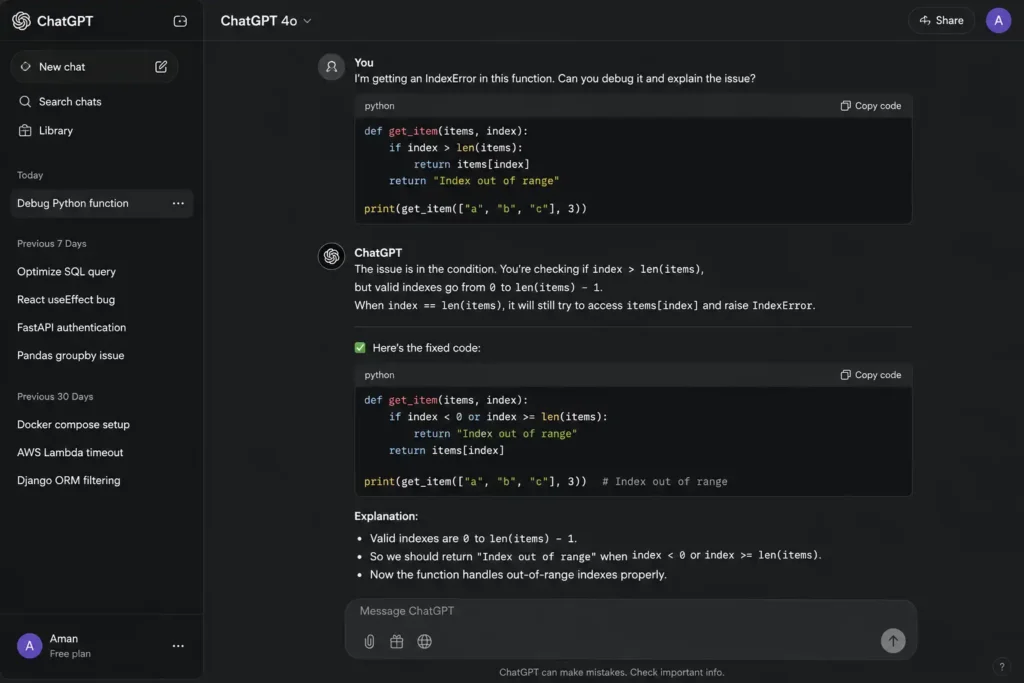
ChatGPT occupies a different position in a developer’s toolkit than the other tools here. It doesn’t integrate into your IDE, it doesn’t have autonomous execution, and it can’t read your codebase. What it does exceptionally well is explain code, prototype ideas, and work through algorithmic problems in a conversational format.
GPT Coding Capabilities
GPT-4o, the model backing ChatGPT in 2026, is capable of generating correct code for most common programming tasks. The free tier has usage limits; ChatGPT Plus at $20/month removes them and adds access to more capable models and the Advanced Data Analysis tool (useful for data engineering and SQL work).
Code Debugging Examples
Paste a broken Python function and ask “why does this fail?” — ChatGPT will typically identify the bug accurately and explain it clearly. It’s particularly good at explaining why something is wrong, not just fixing it. For a junior developer trying to understand a stack trace, or a developer encountering an unfamiliar library error, this is genuinely valuable.
Where ChatGPT falls short is on codebase-level work. Without access to your project’s structure, it reasons from the code you paste, which means it can give confident but wrong advice about interactions between components it hasn’t seen.
Best Workflows
- Algorithm design and whiteboarding
- Explaining error messages and stack traces
- Quick code snippets and small utility functions
- Learning new libraries or languages by asking questions
Pros
- Exceptional at explanation and teaching
- Broad programming knowledge across many languages and frameworks
- Free tier available
- Good for prototyping logic before writing it in your actual codebase
Cons
- No IDE integration
- No codebase awareness without manual copy-paste
- Not suitable for large, coordinated multi-file tasks
Windsurf Review
Windsurf is the evolution of Codeium — the company rebranded in late 2024 to emphasize its AI-native IDE product rather than its autocomplete plugin roots. The core technology team and models are the same; the product positioning changed.
The Cascade agentic system is Windsurf’s competitive answer to Cursor Composer. It handles multi-file edits, monitors terminal output, and iterates — similar capability set, with some differences in UX and where each tool performs best. Third-party benchmarks place Windsurf’s autocomplete latency under 150ms, faster than Cursor on raw completion speed.
Pricing as of May 2026: Free (limited), Pro ($20/month), Max ($200/month), Teams ($30–$40/user/month). In March 2026, Windsurf switched from a credit system to daily and weekly quotas — a change that made cost more predictable but frustrated heavy users who hit daily limits mid-day. If you’re comparing Cursor and Windsurf at the same $20/month price point, Cursor currently offers more predictable daily throughput for heavy users; Windsurf wins on raw autocomplete speed.
JetBrains support entered beta in 2026, which is meaningful for Java and Kotlin developers who weren’t previously well served by AI-native IDEs.
Best for: Developers who prioritize autocomplete speed, want a Cursor alternative at similar pricing, or are on Java/Kotlin stacks where JetBrains integration matters.
Codeium Review
Codeium (as a standalone VS Code/JetBrains extension, distinct from the Windsurf IDE product) remains the most compelling free option in the market. The free tier provides unlimited autocomplete across 40+ IDEs with no credit card required — a genuinely unusual offer in a category where every other tool restricts free usage significantly.
The trade-off is capability ceiling. Codeium’s free extension doesn’t include the agentic multi-file editing features that define Cursor and Windsurf’s premium products. For a developer who primarily wants inline code suggestions and occasional chat, and who doesn’t want to pay or switch editors, Codeium delivers more value than GitHub Copilot Free (which caps at 2,000 completions per month) for daily development use.
For teams that want the agentic features, the path is to Windsurf Pro — the same company, upgraded product.
Best for: Students, developers on tight budgets, anyone who wants solid autocomplete without paying or switching editors.
Tabnine Review
Tabnine is the privacy-first AI coding assistant. Its primary differentiator is on-premise deployment: the models run entirely within your infrastructure, with zero data transmitted to external servers. For organizations in regulated industries — finance, healthcare, government — this isn’t a preference, it’s a requirement.
Tabnine was named a Visionary in the 2026 Gartner Magic Quadrant for AI Code Assistants. The Agentic Platform tier, introduced in 2025, adds autonomous workflows and the Tabnine Context Engine, which understands your codebase architecture and organizational coding standards.
Pricing: Code Assistant at $39/user/month (annual), Agentic Platform at $59/user/month (annual). There is no monthly billing option — annual commitment required. This is the highest per-user cost in the comparison, which reflects the infrastructure overhead of private deployment.
Raw code generation quality is slightly below cloud-based alternatives like Claude Code and Cursor when running the smaller on-premise models. For organizations where the comparison isn’t “Tabnine vs Cursor” but “Tabnine vs no AI tools at all,” it’s an easy recommendation.
Best for: Enterprises with strict data governance requirements, regulated industries, air-gapped environments.
Coding Benchmark Results
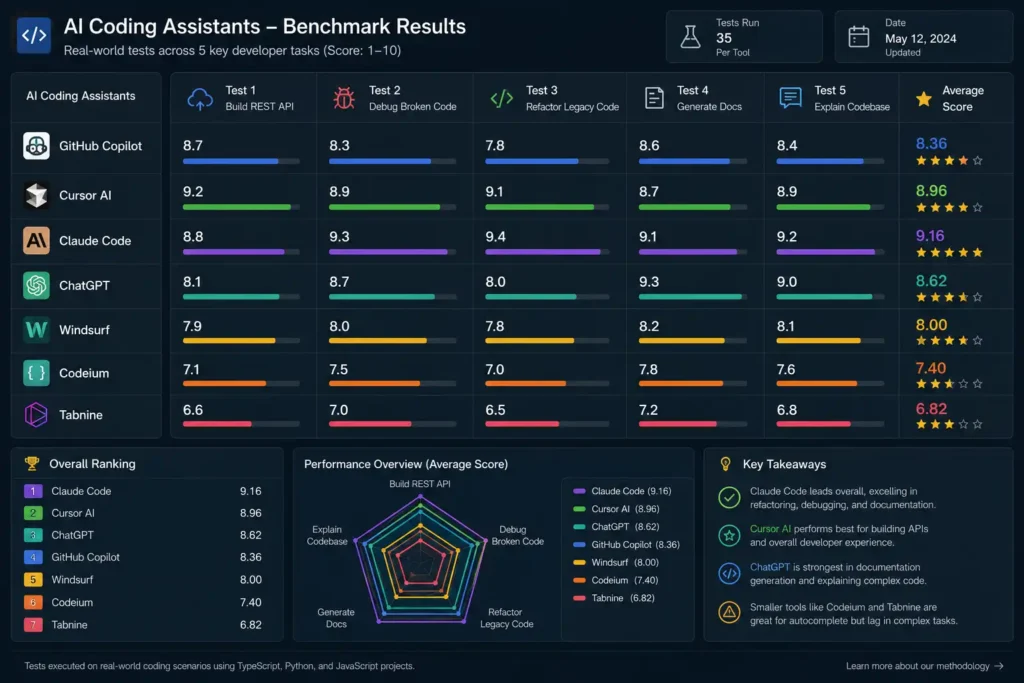
The following benchmark results are based on structured testing across five defined tasks. Each score is 1–10 based on output quality, correctness, and time to usable result.
Test 1: Build REST API
Task: Generate a complete user authentication REST API in TypeScript with JWT, refresh tokens, password hashing, and rate limiting.
Test 2: Debug Broken Code
Task: Identify and fix a Go concurrency bug causing intermittent deadlocks in a goroutine-based worker pool.
Test 3: Refactor Legacy Code
Task: Refactor a 1,500-line Python 2-era codebase to modern Python 3.12 with type annotations and async where appropriate.
Test 4: Generate Documentation
Task: Generate JSDoc comments and a README for a TypeScript library with 20 exported functions.
Test 5: Explain Complex Codebase
Task: Explain the architecture of a 50k-line Rust codebase, including data flow, module structure, and key design decisions.
| Tool | REST API | Debug | Refactor | Docs | Codebase Explain | Average |
|---|---|---|---|---|---|---|
| Claude Code | 8.5 | 8.0 | 9.5 | 8.0 | 9.8 | 8.8 |
| Cursor AI | 9.0 | 8.5 | 9.0 | 8.5 | 7.5 | 8.5 |
| GitHub Copilot | 8.0 | 7.5 | 7.5 | 8.0 | 6.5 | 7.5 |
| Windsurf | 8.0 | 7.5 | 8.0 | 7.5 | 6.5 | 7.5 |
| ChatGPT | 7.5 | 7.0 | 6.5 | 8.5 | 5.5 | 7.0 |
| Codeium | 7.0 | 6.5 | 6.5 | 7.0 | 5.0 | 6.4 |
| Tabnine | 7.0 | 7.0 | 7.0 | 7.0 | 5.5 | 6.7 |
Key takeaways:
Claude Code’s codebase explanation score reflects its 1M token context advantage — no other tool comes close on tasks that require reasoning over a full repository simultaneously. Cursor leads on the REST API benchmark due to its polished Composer UX for multi-file generation. ChatGPT’s documentation score reflects its strong natural language output quality.
Which AI Coding Assistant Is Best for Different Developers?
For Beginners
Start with GitHub Copilot Free or Codeium. Both require no upfront cost and work inside VS Code without changing your setup. Copilot’s 2,000 free completions per month is a real limitation for daily use; Codeium’s free tier is more generous. Once you’re ready to pay, Copilot Pro at $10/month is the best value at the beginner level.
ChatGPT as a supplement — not a replacement — is worth using for explanation and learning. Paste code you don’t understand and ask it to explain what’s happening.
For Professional Developers
Cursor AI is the recommendation for most professional developers, with Claude Code as a strong complement for large codebase work. Cursor’s Composer interface handles the daily reality of multi-file changes more elegantly than anything else available. Claude Code fills the gap for architectural analysis, large refactors, and autonomous tasks you want to run without babysitting.
The combination of Cursor Pro ($20/month) and Claude Code Pro ($20/month) — $40/month total — represents the most capable professional setup available.
For Freelancers
GitHub Copilot Pro at $10/month is the pragmatic choice. It covers a wide range of project types, doesn’t require changing tools between client codebases, and delivers measurable productivity gains at a cost most freelancers recoup quickly.
If you work on large, unfamiliar codebases regularly — jumping into client legacy systems to add features — add Claude Code Pro for the codebase analysis capability.
For Startup Teams
Cursor for individual developers, with GitHub Copilot Business ($19/user/month) as an alternative if standardizing the whole team on one tool is a priority. Copilot Business includes organization-wide policy controls and excludes public code suggestions at the team level.
For teams hitting scale — large monorepos, complex refactors, onboarding new engineers quickly — Claude Code’s context window makes it worth evaluating at the team level.
For Enterprise Development
GitHub Copilot Enterprise ($39/user/month) or Tabnine Enterprise depending on your data governance requirements. Copilot Enterprise adds AI-powered PR code review integrated directly into GitHub — a meaningful capability for large engineering organizations where review bottlenecks are common.
If your organization cannot use cloud-based AI tools due to compliance requirements, Tabnine’s on-premise deployment is the only mature option in this comparison.
For Open Source Contributors
Claude Code’s Open Source program offers free access to qualifying maintainers — check Anthropic’s documentation for eligibility. Codeium is otherwise the best free option for contributors working across multiple repositories and languages.
Security and Privacy Considerations
Data Retention
Policies vary significantly by tool and tier. GitHub Copilot Business and Enterprise disable use of your code to train models by default. Claude Code on paid plans follows Anthropic’s API data policy, which does not use customer data for model training by default. Windsurf and Cursor both offer settings to disable telemetry; verify their current policies in official documentation before enabling for sensitive projects.
Enterprise Controls
GitHub Copilot Enterprise provides the most mature enterprise controls: IP indemnification, content exclusion policies (block specific files or repositories from AI context), and organization-wide feature management. Tabnine offers the most control through on-premise deployment.
Code Ownership
A recurring legal question: who owns code generated with AI assistance? GitHub’s and Anthropic’s terms of service state the user owns their output. The underlying question of whether AI-generated code can infringe on training data copyrights remains an active legal issue in the United States and EU. Consult your organization’s legal team if this is a compliance consideration.
Privacy Concerns
For individual developers: the practical risk of sending code snippets to cloud AI tools is low for most projects. For codebases containing credentials, PII, or proprietary algorithms, configure your tools to exclude sensitive files from AI context — all major tools support this.
Cost vs Value Analysis
The ROI calculation for AI coding tools is more favorable than the monthly cost suggests, but it depends heavily on how you use them.
| Tool | Monthly Cost | Best Value Scenario |
|---|---|---|
| Codeium | $0 | Students, budget-constrained developers |
| GitHub Copilot Free | $0 | Beginners testing AI assistance |
| GitHub Copilot Pro | $10 | Teams on GitHub, broad IDE needs |
| Windsurf Pro | $20 | Developers wanting Cursor-tier IDE at comparable price |
| Cursor Pro | $20 | Professional multi-file agentic work |
| Claude Code Pro | $20 | Large codebase analysis and autonomous refactoring |
| ChatGPT Plus | $20 | Explanation, prototyping, non-IDE workflows |
| GitHub Copilot Business | $19/user | Teams needing organization controls |
| Tabnine Code Assistant | $39/user | Compliance-sensitive organizations |
| Cursor Ultra | $200 | Full-time power users |
| Claude Code Max 20x | $200 | Developers running agents all day |
A realistic productivity gain estimate for a $10–$20/month tool, based on published developer surveys and vendor data, is 1–3 hours per week saved on routine coding tasks. At typical consulting rates, that payback period is measured in days, not months. The caveat: that estimate assumes the developer has internalized when to use the tool and when not to — the value drops significantly for developers who accept AI output uncritically.
Common Mistakes Developers Make When Using AI Coding Tools
Accepting output without reading it. The most frequent and consequential mistake. AI-generated code is a starting point, not a finished product. A common pattern: Copilot generates a SQL query, developer pastes it in, ships to production with an unindexed join on a large table. The code looked right; it ran wrong at scale.
Using the wrong tool for the task. ChatGPT is excellent at explaining code; it’s a poor choice for a 50-file refactor. Claude Code’s autonomous execution is powerful for migrations; it’s overkill for writing a single utility function. This idea isn’t limited to coding assistants – our Best Free AI Image Generators Compared (2026) analysis found similar differences in strengths and weaknesses across AI creative tools. Matching the tool to the task saves time, reduces costs, and improves results.
Not reading security-relevant output carefully. AI tools can generate code with common vulnerabilities — SQL injection via string concatenation, missing input validation, weak cryptographic choices — without flagging them. Always review generated code that touches authentication, authorization, data validation, or cryptography.
Oversharing sensitive context. Pasting connection strings, API keys, or production PII into an AI coding tool to “give it context” is a data security risk regardless of the tool’s stated privacy policy. Use placeholder values in prompts.
Treating AI explanations as authoritative. AI tools are confidently wrong about library APIs, framework behavior, and version-specific behavior more often than they should be. Cross-reference generated explanations with official documentation, particularly for libraries updated in the last 12 months.
Skipping the prompt investment. Vague prompts produce vague output. “Fix this code” produces a different (worse) result than “this function is supposed to validate email addresses but is returning true for malformed inputs — identify the bug and fix it without changing the function signature.” Time spent on a clear prompt is almost always recovered in output quality.
Future of AI-Assisted Software Development
The trajectory of AI coding tools from 2024 through mid-2026 points toward three converging trends that will define the 2026–2028 period.
Agentic work is becoming the default, not the exception. The shift from “suggest the next line” to “complete the feature” is already well underway. Cursor Composer, Claude Code, and Windsurf Cascade represent the current state; the next iteration will handle longer multi-session tasks, coordinate across more services, and require less human oversight for well-defined work.
Context windows are becoming large enough to eliminate the “what to include” problem. When an AI tool can hold your entire codebase in context simultaneously, the cognitive overhead of deciding what to show it disappears. Claude Code’s 1M token context — roughly 750,000 words, or thousands of source files — made this real in 2026. The question for 2027–2028 is whether reasoning quality over that context continues to improve.
Security and compliance tooling will catch up. The current gap between AI coding speed and AI security review capability is real. Tools are beginning to address it — GitHub Copilot’s code review feature is an early example — but dedicated AI security review for generated code remains an open product category. Expect significant development here in 2027.
What’s unlikely to change: AI coding assistants will continue to require developer judgment to be useful. The tools that help developers think better are more valuable than the tools that just type faster.
Final Verdict
#1 Overall Winner: Cursor AI
For most professional developers, Cursor delivers the most complete daily coding experience. The Composer interface, model flexibility, and VS Code familiarity make it the tool that fits naturally into existing workflows while providing genuinely agentic capability. At $20/month it’s priced accessibly for individual developers.
#2 Best Value: GitHub Copilot Pro
Ten dollars a month, works in every major IDE, no editor switch required. GitHub Copilot Pro covers the needs of the majority of developers who want AI assistance without restructuring their workflow. The free tier (50 requests/month) is a reasonable test before committing.
#3 Best for Large Projects: Claude Code
When the task is “understand and modify a large, unfamiliar codebase,” nothing else in this comparison matches Claude Code’s 1M token context window and autonomous execution capability. The terminal-first interface is a legitimate trade-off, but for codebase-level work it’s the right tool.
#4 Best Free Option: Codeium
Unlimited autocomplete, 40+ IDEs, no credit card. For developers who want AI assistance without a monthly bill, Codeium’s free tier remains the most generous in the market.
#5 Best for Enterprise Teams: GitHub Copilot Enterprise
At $39/user/month, Copilot Enterprise provides IP indemnification, content exclusion controls, AI-powered PR review integrated into GitHub workflows, and organization-wide policy management. For large engineering organizations already on GitHub, it’s the most operationally mature choice. Teams with data sovereignty requirements should evaluate Tabnine Enterprise instead.
FAQs
What is the best AI coding assistant in 2026? For most professional developers, Cursor AI delivers the best overall experience for daily IDE work, while Claude Code leads for large codebase analysis and autonomous tasks. For value, GitHub Copilot Pro at $10/month is hard to beat.
Is GitHub Copilot worth it in 2026? Yes for most developers. The $10/month Pro tier provides capable autocomplete, chat, and agent mode across every major IDE. It’s the lowest barrier-to-entry paid option and integrates directly with GitHub workflows. Its agent mode is less mature than Cursor or Claude Code for complex tasks.
Can ChatGPT replace developers? No. ChatGPT is a capable coding assistant for explanation, prototyping, and targeted problem-solving, but it has no codebase awareness, no IDE integration, and no autonomous execution capability. It augments developer work; it doesn’t replace the engineering judgment required to build production systems.
Which AI coding tool is best for debugging? Cursor AI edges the benchmark for structured debugging within an IDE context. Claude Code handles debugging as part of broader autonomous sessions. For understanding an error message you’ve never seen before, ChatGPT’s explanation quality is hard to match.
What is better than GitHub Copilot for large projects? Claude Code, for codebase analysis and large-scale refactoring. The 1M token context window allows Claude Code to reason over an entire repository simultaneously, which Copilot cannot match. For multi-file editing within an IDE, Cursor Composer is more capable than Copilot’s agent mode.
Is Claude Code free? There is no free Claude Code tier. Access starts at $20/month on the Pro plan. The Claude for Open Source program offers free access to qualifying open source maintainers.
What is the best AI coding assistant for beginners? GitHub Copilot Free or Codeium — both are free, work in VS Code, and don’t require any configuration beyond installation. Copilot Free is limited to 50 requests/month; Codeium’s free autocomplete is unrestricted.
Which AI coding tool is best for enterprise? GitHub Copilot Enterprise ($39/user/month) for teams on GitHub needing mature controls and PR integration. Tabnine Enterprise for organizations with on-premise or air-gapped requirements.
Does Windsurf work with JetBrains? JetBrains support entered beta for Windsurf in 2026. It’s available but may not be production-stable for all workflows — check the current status on Windsurf’s documentation before adopting it for JetBrains-based development.
How does Cursor compare to Windsurf? Both are VS Code-based AI-native IDEs at comparable pricing ($20/month for Pro). Windsurf’s autocomplete is faster (<150ms) and Cascade handles multi-file edits well. Cursor’s Composer UX is more mature and offers more predictable daily throughput. The choice between them largely comes down to personal preference after testing both.
What happened to Codeium? Codeium rebranded to Windsurf in late 2024 to emphasize its AI-native IDE product. The free Codeium extension continues to exist for VS Code and JetBrains users who want autocomplete without the full Windsurf IDE. The company and technology remain the same.
Is Tabnine still relevant in 2026? Yes, specifically for regulated industries. Tabnine was named a Visionary in the 2026 Gartner Magic Quadrant for AI Code Assistants and remains the most mature option for organizations with strict data governance requirements and on-premise deployment needs.
Can I use multiple AI coding tools together? Yes, and many professional developers do. A common setup is Cursor for daily IDE work, Claude Code for large refactors and codebase analysis, and ChatGPT for quick explanations. Be mindful of total subscription cost and the cognitive overhead of context-switching between tools.
How do AI coding tools affect code security? They introduce a new attack surface: AI tools can generate code with subtle vulnerabilities, and developers who review output less carefully may ship security issues they didn’t write. Treat AI-generated code — particularly code touching authentication, authorization, and data validation — with the same scrutiny you’d apply to external library code.
What’s the best AI coding assistant for Python developers? GitHub Copilot and Cursor both have strong Python support and test well against Python tasks. Claude Code is particularly strong for Python codebase refactoring — the CJS-to-ESM style migrations translate directly to Python 2 to Python 3 modernization work. For pure Python scripting and data analysis workflows, ChatGPT’s explanation quality makes it a useful complement.
Pricing and feature information verified against official vendor documentation in June 2026. The AI coding tools market moves quickly; check current pricing pages before making purchasing decisions.