Introduction
Not every user needs a feature-heavy application loaded with every possible option. Sometimes, simplicity and efficiency are exactly what is called for. IPTV Smarters Player Lite has been designed with this philosophy in mind — delivering a clean, functional IPTV playback experience without unnecessary complexity.
This article takes a detailed look at IPTV Smarters Player Lite: what it is, what features it includes, how it compares to its more feature-rich sibling IPTV Smarters Pro, and who it is best suited for.
What Is IPTV Smarters Player Lite?
IPTV Smarters Player Lite is a streamlined version of the popular IPTV Smarters application family. Developed by the same team behind IPTV Smarters Pro, the Lite version is built to offer a fast and responsive IPTV playback experience with a reduced feature set and a lighter footprint on the user’s device.
Like its Pro counterpart, IPTV Smarters Player Lite is not a content provider. It is a player application that connects to an IPTV subscription through either an M3U playlist URL or Xtream Codes API credentials. All the actual content — live channels, movies, series — comes from the IPTV service the user subscribes to.
Core Features of IPTV Smarters Player Lite
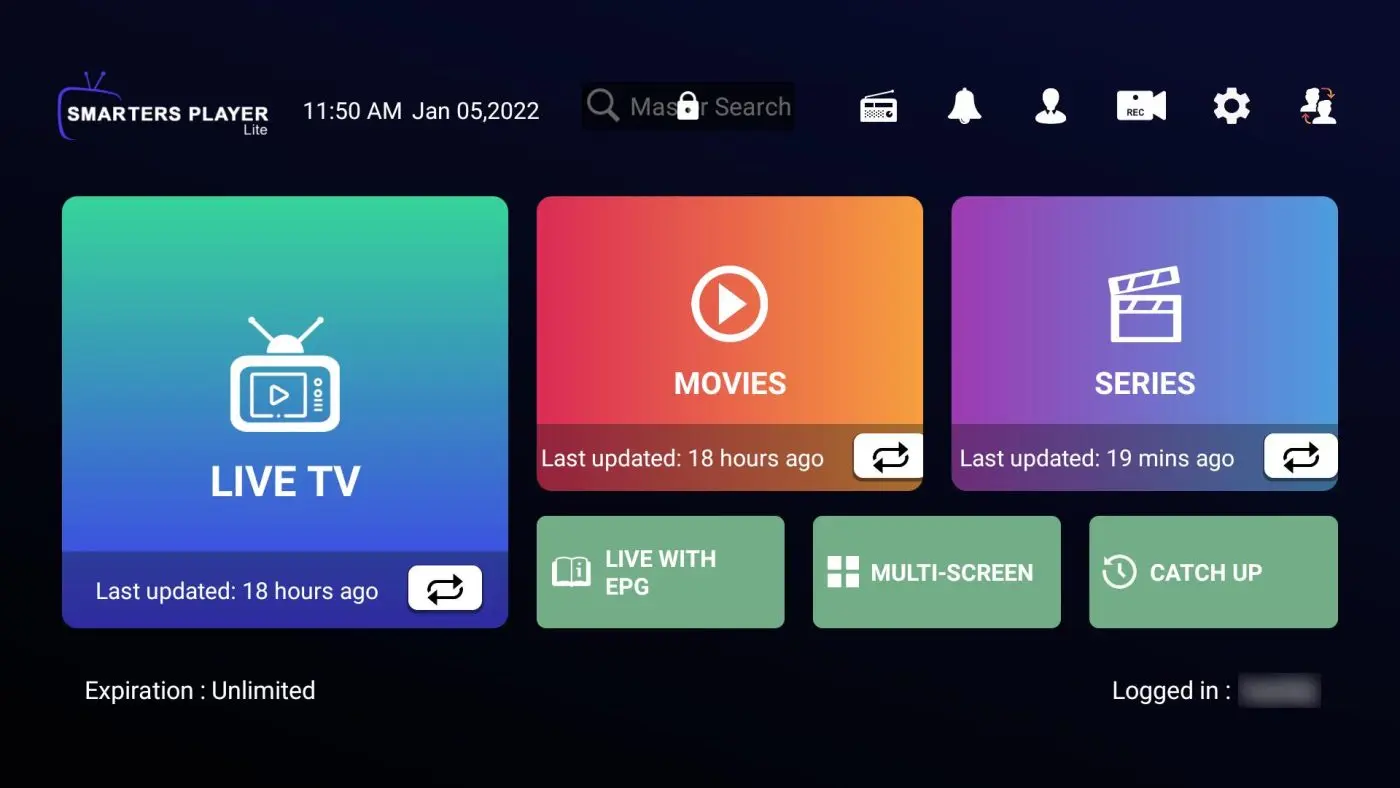
Despite being a lightweight application, IPTV Smarters Player Lite is by no means lacking in essential functionality. Here is what users can expect:
Live TV Playback — The core purpose of the application is to play live IPTV streams, and it does this reliably and with minimal lag on compatible devices.
M3U and Xtream Codes Support — Just like the Pro version, IPTV Smarters Player Lite supports both major playlist formats. Users can connect via Xtream Codes credentials or by pasting an M3U URL.
Electronic Program Guide (EPG) — The app supports EPG integration, allowing users to view a schedule of what is currently airing and upcoming programming. This feature is essential for a comfortable TV-watching experience.
Video on Demand Access — Beyond live content, users can access their IPTV provider’s VOD library through the Lite version. Movies and series sections are available within the application.
Multiple Profile Support — IPTV Smarters Player Lite allows users to add and manage multiple playlists, making it suitable for users with more than one IPTV subscription.
User-Friendly Interface — The interface is clean and well-organized. Navigation is simple and intuitive, requiring no prior technical knowledge to use effectively.
IPTV Smarters Player Lite vs. IPTV Smarters Pro: What Is the Difference?
One of the most common questions from potential users is how the Lite version compares to IPTV Smarters Pro. While both applications come from the same developer and share a similar foundation, there are some meaningful differences:
Resource Usage — The Lite version is designed to use fewer system resources, which makes it a better choice for older or less powerful devices. If you are running an entry-level Android phone or an older tablet, the Lite version will typically run more smoothly.
Feature Depth — IPTV Smarters Pro includes additional features such as more advanced parental controls, multi-screen support on some platforms, and a broader range of player customization options. The Lite version covers the fundamentals — live TV, VOD, EPG — but without some of the more advanced configuration tools.
Design Simplicity — The Lite version’s interface is designed to be even more accessible than the Pro version. This makes it a strong choice for users who find feature-rich applications overwhelming and simply want a straightforward app to watch their IPTV subscription.
Download Size — As the name implies, the Lite version has a smaller application size, which is relevant for users with limited device storage.
Who Should Use IPTV Smarters Player Lite?
IPTV Smarters Player Lite is the right choice for several types of users:
New IPTV Users — If you are just getting started with IPTV and are not yet sure which features you will need, the Lite version provides a great starting point. It gives you access to all the essential functionality without overwhelming you with options.
Users with Older Devices — If your Android smartphone or tablet is a few years old, running a lighter version of the app can significantly improve performance and prevent the sluggishness that sometimes affects older hardware when running resource-intensive applications.
Users Who Value Simplicity — Some users simply prefer a clean, minimal interface. IPTV Smarters pro is designed for people who want to open the app, find their content, and watch — without navigating through layers of settings and options.
How to Install and Configure IPTV Smarters Player Lite?
Installing IPTV Smarters Player Lite
The application is available on the Google Play Store for Android devices. Search for “IPTV Smarters Player Lite” and install the official version from WHMCS SMARTERS. The application is free to download.
Connecting Your IPTV dutch Subscription
After installation, open the app and follow these steps:
- Tap “Add New User” or the equivalent option on the home screen.
- Choose your preferred connection method: Xtream Codes API or M3U URL.
- If using Xtream Codes, enter your server URL, username, and password.
- If using M3U, paste your playlist link into the provided field.
- Give your profile a name and save.
The app will load your playlist. Depending on the size of your playlist, this may take a few seconds.
Setting Up EPG
If your IPTV provider supplies an EPG URL, navigate to the settings section of the app and enter the URL. This will populate the program guide with schedule information for your channels.
Performance Expectations
IPTV Smarters Player Lite delivers solid playback performance for most use cases. The quality of the stream you see will depend on your internet speed and the quality of streams your IPTV provider delivers, rather than the app itself. For general use, a broadband connection with at least 10 Mbps is recommended.
On low-end devices, the Lite version handles playlists and stream switching more efficiently than the Pro version, making it the practical choice for hardware-constrained environments.
Tips for Getting the Best Experience
Keep the App Updated — Regular updates from the developer fix bugs and improve performance. Check for updates periodically in the Google Play Store.
Use a Stable Internet Connection — For uninterrupted streaming, a reliable internet connection is crucial. A wired connection or a strong Wi-Fi signal will yield better results than a weak wireless connection.
Restart the App if Issues Occur — If channels fail to load or playback freezes, closing and reopening the application often resolves temporary issues.
Clear Cache Regularly — Clearing the app cache from your device settings can help if you notice the application slowing down over time. On Android, go to Settings > Apps > IPTV Smarters Player Lite > Storage > Clear Cache.
Conclusion
IPTV Smarters Player Lite demonstrates that you do not need a complex, feature-packed application to enjoy a quality IPTV experience. By focusing on the essentials and stripping away unnecessary complexity, it delivers a smooth, accessible streaming experience that works well on a wide range of devices.
Whether you are new to IPTV, working with older hardware, or simply prefer a no-fuss interface, IPTV Smarters Player Lite is a well-crafted application worth considering. Paired with a good IPTV subscription, it provides everything most users need for enjoyable, reliable viewing.