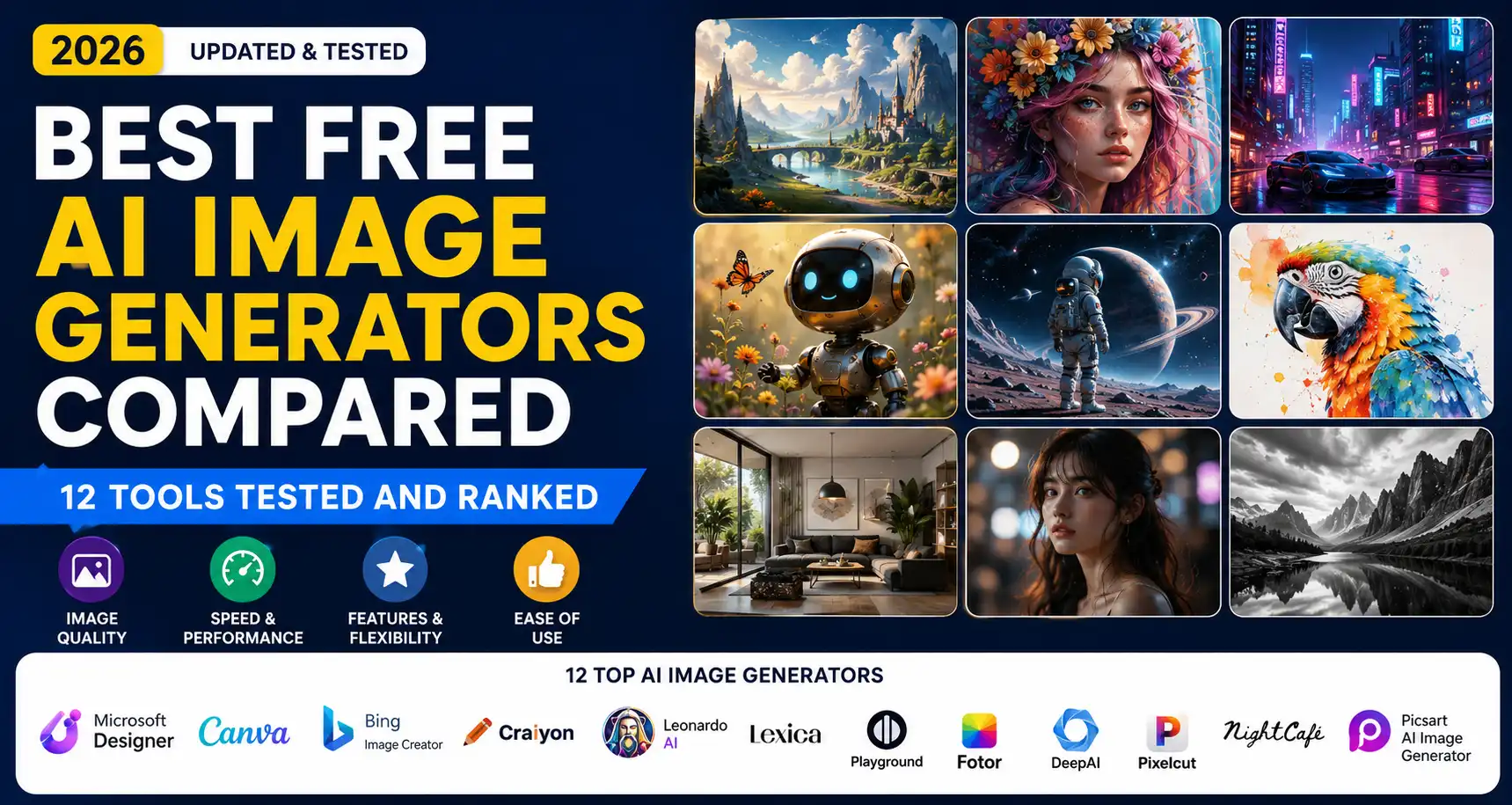
Modern AI image generators let you create illustrations, photos, logos and more simply by typing a prompt. They’ve exploded in popularity as affordable design aids for creators, marketers, bloggers, businesses and designers of all kinds. In this guide we’ll explain how text-to-image AI works (from diffusion models to prompt engines), and then dig into a hands-on comparison of 12 leading free tools. You’ll learn how we evaluated them for quality, ease of use, speed, editing features and licensing, and we’ll reveal which generators are best suited to bloggers, marketers, social media creators, small businesses and beyond. By the end you’ll understand the strengths, weaknesses and terms of each tool – plus get real examples, expert tips and FAQ answers on everything from watermarks to commercial use.
What is an AI Image Generator?
An AI image generator is a tool that turns natural-language prompts into pictures. Under the hood most modern generators use diffusion models – neural networks that have learned to produce high-resolution images by progressively refining random noise according to your text prompt. Thanks to advances like GPT-4o/Image and other visual LLMs, these generators produce very detailed, complex artwork. You simply describe a scene or idea (“a dragon flying over a neon city at night”) and the AI renders it.
The ability to generate images from prompts has unlocked many creative and commercial uses. Content creators and bloggers can get custom visuals without an artist. Marketers make on-brand graphics or ad concepts. Designers can mock up product shots or experiment with new aesthetics. Small businesses use them to prototype logos, social posts or ads without hiring a studio. In short, AI image tools have become popular for anyone who needs unique visuals on demand. In this guide, we’ll explain not only how each tool works, but what makes each one stand out – so you can choose the right generator for your specific project.
How We Tested These AI Image Generators
To give a fair, in-depth comparison, we evaluated each tool using the same set of criteria:
- Image quality: We tested several standard prompts (realistic scenes, illustrations, and text overlays) and rated realism, detail, and adherence to the prompt. For example, some models handle typography poorly, while others excel at specific styles.
- Ease of use: We judged the user interface and learning curve. Tools integrated into design platforms (like Canva) can be easier for non-technical users, whereas others may have a more technical dashboard.
- Generation speed: We recorded how long typical images took and noted any queue or credit systems. Fast results matter for productivity.
- Free plan limits: We checked how many generations are allowed on the free tier, what resolution is granted, and any usage caps (daily or lifetime) or watermarks applied.
- Editing capabilities: Some tools offer built-in editing (background removal, outpainting, style sliders, etc.). We tested whether they let you refine or remix images easily.
- Commercial usage rights: We reviewed each service’s licensing terms. Some generators (like OpenAI’s DALL·E via ChatGPT or Adobe Firefly) explicitly grant output ownership, whereas others have restrictions. We noted whether free outputs can be used for profit and any attribution needed.
For real-world testing, we ran identical prompts through each generator (e.g. “A sleek red sports car on a coastal highway, photo-realistic”) and compared the results. We also consulted tech reviews, official docs and legal terms to verify claims about usage and quality. The combination of hands-on testing and expert analysis ensures our ratings reflect actual performance and licensing in 2026.
Quick Comparison Table
| Tool Name | Best For | Free Plan | Image Quality | Commercial Use | Overall Rating |
|---|---|---|---|---|---|
| ChatGPT Image Generation | Conversational image creation, high-quality art | Limited daily generations (free); more with paid plan | ★★★★★ (High) | Yes (output owned) | 9/10 |
| Adobe Firefly | Professional designers, integration with Adobe suite | Free trial/credits; limited daily generations, watermark on free | ★★★★☆ (Very Good) | Yes (full license) | 8.5/10 |
| Canva AI | Social media, marketing, design-ready images | 50 free lifetime image generations | ★★★★☆ (Good) | Yes (user owns output) | 8/10 |
| Leonardo AI | Concept art, character design | 150 tokens/day (~50 images) (free, with all outputs public) | ★★★★★ (High) | Yes (license granted) | 8/10 |
| Ideogram AI | Graphics with text (posters, signage) | 25 free images/day | ★★★★☆ (Good) | Yes (user owns output) | 7.5/10 |
| Bing Image Creator | Casual/free unlimited generation | Free (15 fast images/day, then unlimited slow) | ★★★★☆ (Very Good) | Yes (no watermark; allowed at user risk) | 8/10 |
| Playground AI | Beginners, high free usage | 100 free generations/day | ★★★☆☆ (Decent) | Yes (full rights) | 7/10 |
| Pixlr AI | Photo editing + image generation combo | Free (ad-supported; robust tools) | ★★★☆☆ (Decent) | Yes (commercial use permitted) | 7/10 |
| Craiyon | Simple experiments, no signup required | Free unlimited (public; credit required for free use) | ★★☆☆☆ (Basic) | Yes (free with attribution) | 5/10 |
| Dream by WOMBO | Fun/artistic styles (mobile-first) | Free (ad-supported; premium for high-res) | ★★★☆☆ (Good) | Yes (with recommended credit) | 6.5/10 |
| NightCafe | Hobbyists, community features | 5 free credits/day (earn more via challenges) | ★★★☆☆ (Good) | Yes (creator owns output) | 7.5/10 |
| DeepAI | Quick concept images, no signup needed | Unlimited free standard generation | ★★★☆☆ (Average) | Yes (public domain output) | 6/10 |
Each tool shines in different areas. The Overall Rating reflects balanced performance on our test prompts and licensing, while “Best For” highlights typical use cases.
Best Free AI Image Generators Compared
Below we review each tool in detail following this format: Overview, Key Features, Pros, Cons, Free Plan Details, Best For, Commercial Usage Rights, Real-World Use Cases, and Overall Verdict.
ChatGPT Image Generation
ChatGPT (via OpenAI’s DALL·E models) now includes native image generation. Using the GPT-4o vision model (formerly DALL·E 3), it can create highly detailed images from text, all within a conversation. You type a prompt into ChatGPT and it replies with an AI-generated image. The interface is simple (just like chatting) and supports iterative edits or style changes by follow-up prompts.
Key Features
- Uses OpenAI’s cutting-edge GPT-Image models, offering prompt-following accuracy and photorealistic detail.
- Can re-prompt for variations (e.g. “Try a darker scene” or “Make it a watercolor style”).
- No watermarks on outputs, and images are delivered at up to 1024px (or higher with paid plans).
- Integrated into ChatGPT so you can combine text and image tasks seamlessly (e.g. “Generate an image, then describe it”).
Pros
- Top-tier quality: ChatGPT’s DALL·E often outperforms free models on realism and complexity.
- Conversational control: You can refine the result by simply chatting (“remove the car”, “change season”).
- Ownership: According to OpenAI’s terms, you own all rights to the output, even commercially.
Cons
- Limited free use: The free tier only allows a few image prompts per day (and sometimes requires a paid “Go” subscription for unlimited).
- No offline mode: Must use the web or app interface.
- Dependent on policy: Subject to content filters (no NSFW, etc.).
Free Plan Details
The free ChatGPT plan includes a handful of image generations (often limited to 1-2 images per prompt). To get more, you need to upgrade to the ChatGPT Go plan (about $20/month) or use free trial credits when available. Unlike some tools, no watermark is ever added to outputs. Output resolution and quantity are the main limits on free.
Best For
Users who want best-in-class image quality and already use ChatGPT. It’s ideal for writers or marketers who want images integrated with text tasks (e.g. generating illustrations and marketing copy in one session). Also good for professional uses since the license is clear (the user owns the images).
Commercial Usage Rights
OpenAI’s policy grants you full ownership of any image ChatGPT/DALL·E creates. You can use the images commercially (sell them, print them, use in campaigns) without attribution. This is unlike some other free tools, so businesses can confidently use ChatGPT-generated art in products or marketing materials.
Real-World Use Cases
- Bloggers: Quickly generate custom blog images from your article’s title or concept.
- Marketers: Create campaign concept visuals (product renders, ad graphics) on the fly.
- Designers: Prototype UI mockups by describing interface scenes (e.g. “dashboard screen on a smartphone”).
- Content Creation: Produce unique thumbnails for videos or social media posts without stock photos.
Overall Verdict
ChatGPT’s built-in generator stands out for quality and flexibility – essentially bringing OpenAI’s DALL·E tech into a chat interface. It’s one of the best free generators for actual image quality (aside from queue limits) and is very easy for beginners (just type and click). The main drawback is the usage cap on the free tier. Overall, if you have access, it’s a top choice for almost any scenario.
Adobe Firefly
Adobe Firefly is Adobe’s own generative AI platform, built into tools like Photoshop and Illustrator but also available on the web. It uses custom-trained diffusion models (including Firefly-specific “Nano Banana” and “Magenta”) optimized for creative design. Firefly focuses on generating brand-safe, editable graphics, from photos to vector illustrations.
Key Features
- Text-to-Image and Text Effects: Turn prompts into images or graphics (including logos and patterns).
- Generative Fill/Extend: Photoshop integration allows you to remove or extend parts of images with AI.
- Vector and 3D Models: Generate scalable vector art or simple 3D renders.
- Commercial-safe content: Built-in content filters block copyrighted or NSFW references.
Pros
- No legal ambiguity: All Firefly outputs come with Adobe’s royalty-free license for commercial use.
- High-quality stylized art: Great for illustrations, concept art, and integrating with Adobe design projects.
- Integration with Creative Cloud: Easily use Firefly images in Photoshop or InDesign.
Cons
- Limited free use: The free plan offers very limited credits (e.g. a short free trial or 50 free images), often with a watermark on the prototype images. To truly use Firefly for business, you need a paid Creative Cloud plan.
- Credit-based: Paid Firefly Standard uses credits ($9.99 for 2000 credits). Once free credits are gone, you must pay.
- Less conversational: No step-by-step chat refinement in the free web interface.
Free Plan Details
Firefly offers “Start for Free” with a limited number of free generations. According to Adobe, you begin with 2,000 free credits for trying out image, text and video generation. However, many users report this effectively means a small handful of high-resolution images (and smaller for videos). Free images come with an “F” watermark if downloaded. For unlimited use, you must subscribe.
Best For
Professional designers and marketers who already use Adobe CC. If you need to quickly generate assets that seamlessly integrate with Photoshop or Illustrator (say, a hero image to drop into a page layout), Firefly is excellent. It’s also built for brand-safe imagery and comes with a rock-solid license.
Commercial Usage Rights
All images generated by Firefly are royalty-free and licensed for commercial use by Adobe. Even the free trial generations can be used in marketing or products once you remove the watermark (with a paid plan). In other words, Adobe explicitly ensures businesses can use Firefly art without legal worry.
Real-World Use Cases
- Graphic Designers: Create concept art or design elements (e.g. backgrounds, patterns) for clients.
- Agencies: Rapidly prototype ad visuals or social graphics.
- Product Teams: Generate mockups of products in context for pitches.
- Ecommerce: Produce stylized product images or website banners.
Overall Verdict
Adobe Firefly is a powerful professional tool – much more than a free AI doodler. It delivers polished, creative outputs suited to high-quality design work. But it’s not truly “free”: the free tier is very limited and watermarked. If you can invest in a Creative Cloud plan, Firefly rewards you with best-in-class style controls, integration and licensing peace of mind. For hobbyists on a budget, it’s less accessible.
Canva AI
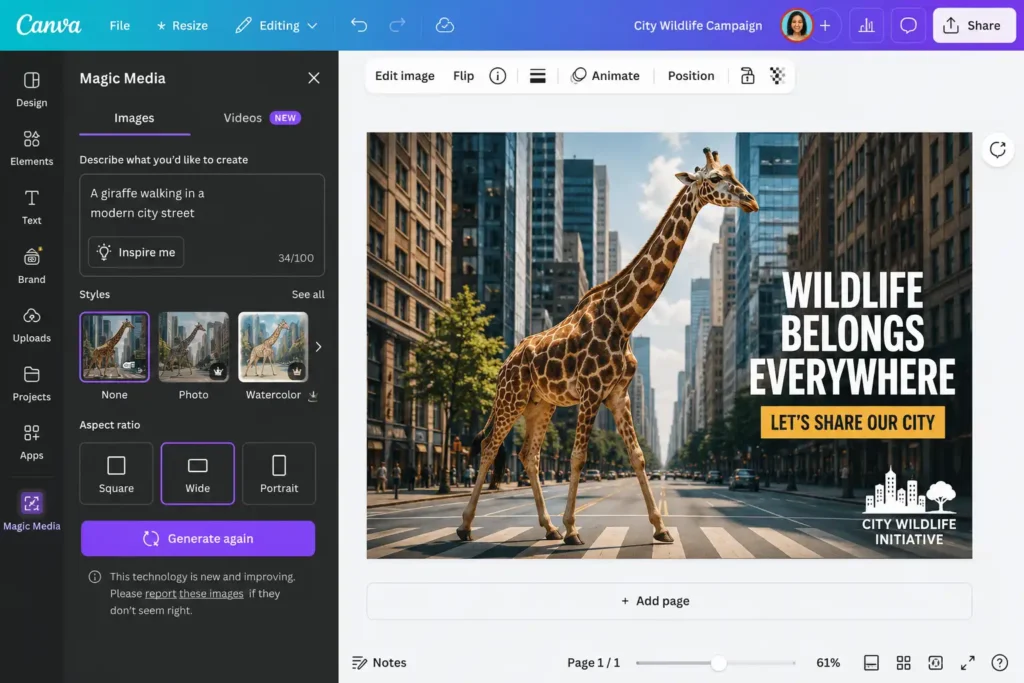
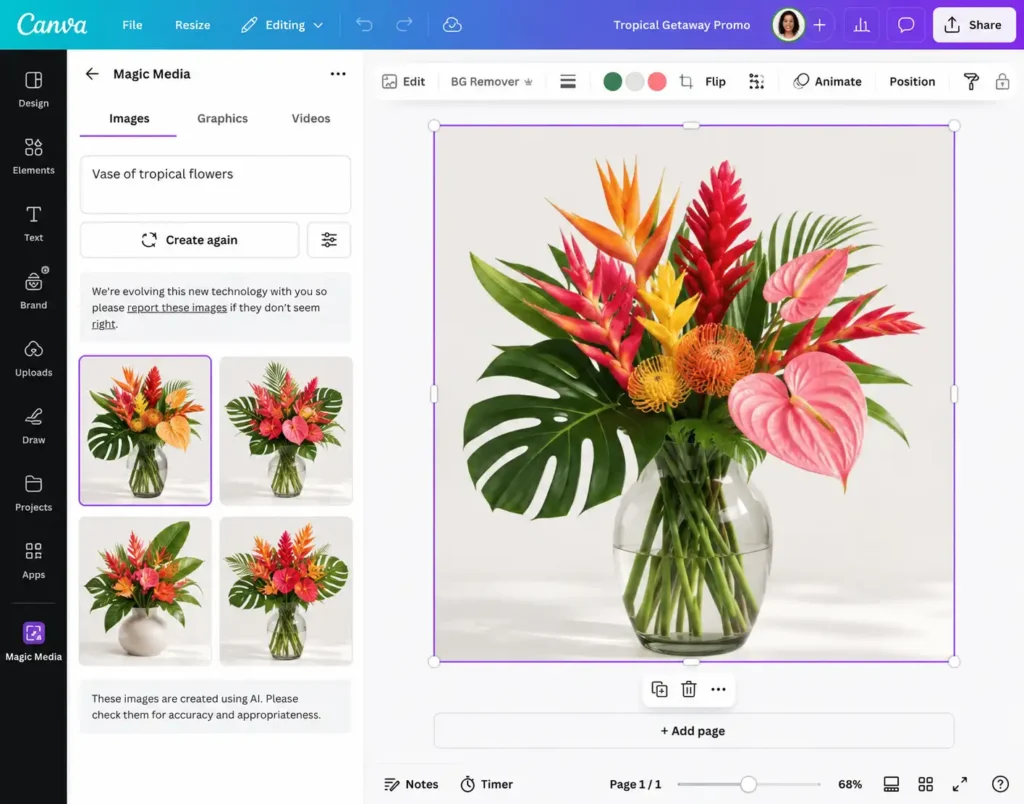
Canva is a popular online design platform, and its built-in AI tools (Magic Media and Magic Studio) let anyone create images, graphics, videos and more with AI. Users can type a prompt into the “Magic Media” feature and get illustrations or photos directly inserted into their Canva design canvas. It leverages models from OpenAI (DALL·E) and Google, combined with Canva’s easy interface and templates.
Key Features
- Text-to-Image (Magic Media): Generate custom visuals (photos or art) by typing a prompt.
- Text-to-Graphics: Create editable vector-style graphics (icons, logos) using AI.
- Built-in Editor: Immediately use the generated image in a design with Canva’s drag-and-drop.
- Templates & Elements: Many styles and templates can be applied to AI output on the fly.
Pros
- Extremely user-friendly: Anyone who’s made a Canva design can use it. No AI knowledge needed.
- Integrated workflow: You generate an image and then immediately add text, effects or layout it, all in one platform.
- Generous free usage: Free users get 50 lifetime text-to-image generations (no credit card required).
- Commercial rights: Canva’s policy (and help center) makes it clear users own and can use the images they create.
Cons
- Limited free quota: After the initial 50 images, you must upgrade to Pro (the same plan that unlocks other premium content) to get more.
- Mixed models: The quality can vary because Canva may use different underlying AI engines (SD, DALL·E, etc.), sometimes yielding less realistic results than specialist tools.
- No advanced editing: You can’t refine the AI image itself much beyond basic upscaling or filters (but you can annotate with graphic elements).
Free Plan Details
Canva’s AI is free to start, with 50 free text-to-image generations total. You create a free Canva account (or use an existing one) and can try Magic Media without subscription. After 50 generations, further use requires a Canva Pro or paid plan. All free images have no watermark on them. Free users can also use the graphics/video AI features (limited uses as above).
Best For
Bloggers, social media managers, small businesses and non-designers who need good visuals quickly. For example, a blogger can open a Canva template and then use AI to generate a header image without leaving the site. It’s also great for mockups and quick branding assets since Canva is already full of fonts and templates. Beginners will especially appreciate the low barrier to entry.
Commercial Usage Rights
Canva explicitly states that images created with its free AI tools are owned by the user and can be used for any purpose, commercial or personal. In fact, “Canva makes no copyright claim over any images created using our free AI art generator,” meaning you have full rights to incorporate the images into products or marketing.
Real-World Use Cases
- Small businesses: Create promotional posters or social posts. E.g. “Generate a picture of my cafe exterior at sunrise, add it to a flyer.”
- Content creators: Make custom thumbnails and blog graphics on the fly.
- Educators: For presentations or worksheets (thanks to Canva for Education free).
- Design prototypes: Quickly mock up logo or poster concepts using AI graphics and Canva’s design tools.
Overall Verdict
Canva’s AI is remarkable for ease of use and workflow integration. You hardly have to leave the design canvas to make art. While it’s not the absolute highest quality art in some cases, it’s good enough for most marketing and content needs – and the ability to refine and complete the design is a major strength. The 50-free-image limit is generous enough to try it out, but heavy users will hit it quickly. We recommend Canva AI as the go-to free tool for non-designers, especially those already invested in the Canva ecosystem.
Leonardo AI
Leonardo AI is a rapidly growing image-gen platform popular among artists and game developers. It offers a mix of artistic and photorealistic styles, and is known for its strong support for embedded text and custom model “dreambooths.” The interface is web-based, and the focus is on versatile creation (images, videos, textures, 3D assets).
Key Features
- Multiple Models: A selection of engines (called “Stable Diffusion,” “Lucid,” “Ghibli,” etc.) plus community models for styles from anime to CG.
- Advanced Editing: Inpainting, outpainting and “remaster” tools let you tweak outputs or expand them beyond the original frame.
- Token System: Images are generated using “tokens” (AI units). The interface shows your current token balance and costs.
- Community Feed: See and use prompts from other users.
Pros
- Customizability: The two biggest advantages are the variety of styles and the granular controls (style presets, influence, aspect ratio, etc.).
- Generous Free Tier: Leonardo’s free plan gives 150 fast tokens daily and some banked tokens. It’s among the most liberal free allowances.
- Text Handling: This tool handles text in images (signs, labels) better than many others, making it useful for posters and logos.
- Community Models: You can also train personal “Dreambooth” models on your data if you subscribe (not possible in free).
Cons
- Public Outputs (Free): By default, free users’ creations are public on Leonardo’s community. Leonardo retains the rights to those assets (though they license them back to you).
- Quality Limits (Free): Free-tier images use the “Basic” quality setting and the lowest cost model. The premium “Enhanced” quality and larger upscales require subscription.
- Token Complexity: The credit/token system can be confusing to new users, and “fast” credits get used up quickly.
Free Plan Details
Leonardo’s free account grants 150 fast tokens every day (unused tokens do not roll over). You can use tokens on any of the built-in models, but note: free images are watermarked “Leonardo” on download. Key limits (from community sources): “Free Plan: 10 slow credits per day, with all creations public.” The token system means you get roughly 50–75 images/day if each costs 2-3 tokens. Crucially, you keep the images you create. Even on free, Leonardo’s license lets you use them commercially, though Leonardo itself holds underlying IP on the model’s output.
Best For
Concept artists, game designers and indie developers. Its strength is in generating fantastical and stylized art (character illustrations, environment art) as well as pretty good photorealism. The easy-to-adjust style options let you iterate on a concept quickly. Small teams on a budget like it because the free plan goes farther than most.
Commercial Usage Rights
Leonardo’s Terms of Service clarify that free users are granted a commercial license to use their creations. However, Leonardo retains the copyright on model assets in that case. If you upgrade to a paid plan (Essentials $12/mo or higher), then you fully own the images. In practice, for most uses Leonardo’s license is generous: you’re free to sell or publish the images you make, but be aware Leonardo could revoke rights or reuse them since they’re technically “public” with free accounts.
Real-World Use Cases
- Game devs: Quickly generate character concept art or environment sketches.
- Graphic novels: Create backgrounds or props (especially ones with readable text, like signage or UI elements).
- Apparel design: The variety of styles (anime, pop art, photoreal, etc.) is great for unique t-shirt graphics and prints.
- Digital artists: Use the “remix” editor to iterate on an idea (e.g. change lighting or details without re-prompting).
Overall Verdict
Leonardo AI stands out for its power and flexibility, especially given its very generous free tier. It’s not the simplest (the UI is more complex than Canva’s), but serious hobbyists and professionals can get a lot of mileage without paying. For some advanced users, Leonardo can effectively replace pricier tools like Midjourney at a fraction of the cost. We rate it highly for innovation and range, but note the public-visibility caveat and watermark on free outputs.
Ideogram AI
Ideogram bills itself as an “open model for visual intelligence” focused on design-quality images. Its 4.0 release introduced impressive text rendering and high fidelity. Ideogram is geared toward marketing and branding, offering tools to add editable text layers and fine-tune designs right in the app. The core AI is open-source (available on Hugging Face under a research license), but Ideogram offers a hosted interface and API.
Key Features
- Superior Text in Images: Ideogram’s specialty is generating images with crisp, readable typography integrated (good for posters, ads).
- Native Transparency: You can generate images with transparent backgrounds directly.
- Revisability: After generation, you can isolate elements, change background or prompts, and even get layer-friendly text.
- Open Weights: The underlying model can be self-hosted (with a non-commercial license) or used via Ideogram’s API if you license commercially.
Pros
- Designer-ready Output: The generated images often look polished, as if created by a graphics pro.
- Commercial-friendly approach: Ideogram encourages output use (see Licensing below).
- Open model availability: The model weights are public for research, giving it a transparent pedigree.
- High resolution: Default outputs are crisp and print-quality.
Cons
- Slower speed: Ideogram sacrifices speed for quality; free users report it can be slower to generate.
- Limited styles: Unlike some platforms, Ideogram currently offers fewer “artistic” model options (mostly photoreal or stylized design).
- Requires registration: You must sign up even to use the app.
Free Plan Details
Ideogram’s free tier allows 25 image generations per day. Unlike many tools, there’s no credit card needed to try it. The biggest restriction is that free users’ images are public (others can view them) and only basic quality rendering is used. To get unlimited or private generations, paid plans are needed ($8–$60/month for more credits and features). Still, 25/day is quite generous by industry standards.
Best For
Projects needing graphics and text together – e.g. social media banners, posters, thumbnails, and branding images. Small businesses making promotional flyers or bloggers creating infographics will find Ideogram’s output ready to publish. It’s also ideal for anyone who wants to include real text (like slogans or captions) in the image, since most AI models struggle with that.
Commercial Usage Rights
Ideogram’s licensing is very clear: “Ideogram does not claim ownership of outputs. You can use outputs commercially as long as you respect third-party rights”. In short, you own the images you create and can use them in products or ads. Only caution is you cannot use Ideogram’s outputs to train competing models (per their terms).
Real-World Use Cases
- Marketing materials: Create poster and flyer designs with readable text (“Sale 50% Off!” on an image).
- Product mockups: Generate label designs for products (with editable text).
- Presentation graphics: Quickly make slides visuals that include titles or data mockups.
- Personal branding: Design unique logos or banners containing your name or tagline, then tweak colors.
Overall Verdict
Ideogram is impressive for its specialty: crisp text and professional design output. The images often come out looking exactly like an ad or magazine graphic. For content that needs to “hold up beyond the prompt box,” Ideogram excels. Its free tier is decent for experimentation, though power users will want private generation (paid). We recommend Ideogram whenever you need content with legible text or a polished graphic style – it’s one of the leaders in that niche.
Bing Image Creator
Bing Image Creator (accessible at bing.com/create or via Bing Chat) is Microsoft’s free AI art tool. Under the hood it uses the same OpenAI models (GPT-4o, DALL·E 3) plus Microsoft’s own MAI-Image engine. Bing Creator aims for casual and fast usage. You just type a prompt into Bing search or chat, and Bing generates an image.
Key Features
- Multiple model options: Users can choose between MAI-Image-2e (Microsoft’s improved model), OpenAI’s DALL·E 3, or GPT-4o.
- Fast & Slow modes: Each day you get 15 “fast creation” tokens for quick results; after that you can still generate at “standard” speed (slower).
- Unlimited core use: Aside from the daily token limit, you can generate up to 200 prompts per day (mix of fast/slow) with a Microsoft account.
- Image upload/edit: You can upload an image and let the AI edit or extend it (using GPT-4o on images).
Pros
- Truly free and unlimited: As long as you have a (free) Microsoft account, you can create images every day with no cost.
- High quality (via DALL·E 3): The outputs are on par with the best AI models. MAI-Image-2e also delivers very realistic detail.
- Ease of access: No download needed – just go to Bing.com/create or ask via the Edge browser.
- No watermark: Unlike many free tools, Bing images have no watermark.
Cons
- Lack of style control: You can’t fine-tune parameters or switch between dozens of style models (you are limited to the three engines).
- Mixed licensing history: Historically, Bing’s default terms were unclear on commercial use (see below).
- Microsoft account required: You can’t use it anonymously; a personal Microsoft account (not work/school) is needed.
Free Plan Details
Bing Creator is free for everyone with a Microsoft account. You get 15 fast image creations per day, which replenish daily. If you run out of fast tokens, you can still create images at a slower pace (unlimited prompts, just longer wait). There is effectively no monthly fee or credit to worry about. Since the engine is either DALL·E 3 or MAI-Image, the image size and fidelity are high by default.
Best For
Casual users and non-professionals who need a lot of quick images. Bloggers, students and even small businesses can leverage it to create unlimited concept art without cost. It’s also great for brainstorming: you can rapidly iterate on a design by changing prompts in Bing Chat. Its simplicity makes it excellent for those who don’t need advanced features – just high-quality pictures on demand.
Commercial Usage Rights
This is a bit complex. Originally, Bing’s terms restricted outputs to personal, non-commercial use. However, Microsoft quietly changed this in late 2023. Now their official stance is that they do not claim ownership of creations and it’s “up to you” how to use them. In practice, this means you can use Bing images for business at your own risk (some lawyers caution AI copyright is a gray area). Given Microsoft’s update, most users treat Bing outputs as okay for commercial projects – similar to DALL·E 3..
Real-World Use Cases
- Personal and hobby projects: Thumbnails, presentations, or art pieces.
- Internal mockups: Quickly generate a photo concept (e.g. a mock product on a shelf) to pitch an idea internally.
- Learning and education: Students can visualize concepts (e.g. “illustrate a cell undergoing mitosis”).
- Social media: A creator can pump out dozens of unique illustrations for content posts with no fee.
Overall Verdict
Bing Image Creator offers incredible value as a free tool: top-notch models, unlimited basic use, and Microsoft’s backing. The slight worry was licensing, but that has eased. While it won’t replace a designer (no fine-grained control), its combination of power and price (free) makes it a top contender for everyday users. In many reviews it ranks as one of the best free generators available because of this.
Playground AI
Playground AI is an online AI art tool known for its clean interface and beginner-friendly experience. It offers two modes: “Board” for prompt-based generation (similar to Midjourney-style), and “Canvas” for more interactive editing. Playground supports multiple underlying models (including Stable Diffusion variants) and even has an image-editing board for assembling layered images.
Key Features
- Board & Canvas modes: Board mode generates multiple variations per prompt; Canvas mode lets you apply filters, combine images, or draw shapes.
- Model selection: Options like Stable Diffusion XL or custom Playground models.
- Prompt helper: An “Expand Prompt” AI assistant can make your prompt more detailed automatically.
- Control traits: Unique “edge/depth/pose” controls for image-to-image transformations (useful for character poses).
Pros
- Very generous free plan: 100 generations per day without even signing up with a credit card.
- Tutorials & presets: Built-in tip videos and creative presets help new users get good results quickly.
- Multiple output images: Board mode gives you 4 or more candidates at once.
- Commercial-friendly: Playground’s terms grant creators full rights to use images (including commercial) even on the free plan.
Cons
- Quality ceiling: While decent, the output quality isn’t as polished as the latest proprietary models (e.g. slight distortions, less detail).
- Free restrictions: The free plan limits some features: you can’t adjust image size or use unlimited presets (only 3 slots).
- Account needed: You must log in (Google account is typical) to generate images and track credit usage.
Free Plan Details
Playground’s free tier is one of its biggest draws: it gives you up to 100 image generations per day at no cost. No credit card is required to sign up. Free users can choose any of the basic models and styles, with the caveat that resolution options are limited and only a few “presets” can be saved. The terms confirm that all users (including free) keep full rights to their images and can use them commercially.
Best For
Absolute beginners and students who want to experiment. The interface is intuitive and the prompt helper is great for learning how to write better prompts. Playground is also useful for quickly brainstorming dozens of concepts (give a prompt, get 4 quick images). It’s good for creators on tight budgets who need mid-quality images without any cost.
Commercial Usage Rights
Playground’s policy explicitly states users have full rights to their creations. Any output you generate (on free or paid plans) may be used for commercial projects without attribution. This makes it hassle-free for small business owners or entrepreneurs who want to use AI art in products or marketing without worrying about licenses.
Real-World Use Cases
- Beginners learning AI art: Newcomers can learn by tweaking the prompt and seeing multiple results.
- Quick content ideas: Bloggers or YouTubers can generate concept images for storyboards or thumbnails.
- Educational settings: Teachers can demonstrate AI art generation without cost to students.
- Prototype visuals: Indie developers or designers sketch out UI concepts (thanks to image-to-image and layers).
Overall Verdict
Playground AI earns points for accessibility. It doesn’t beat the top models in realism, but it democratizes AI art generation. For non-technical users, it’s one of the easiest tools (the site even offers an app). And the sheer volume of free generations is unmatched. We see Playground as ideal for casual experimentation and learning, but less so for a polished final deliverable compared to e.g. DALL·E or Firefly.
Pixlr AI
Pixlr is primarily known as an online Photoshop alternative. It has recently expanded into AI-driven tools, including an AI Image Generator that’s part of the Pixlr suite. The emphasis is on giving users a one-stop platform: edit your photos and also generate new images with AI, all in the browser. It integrates multiple AI models (e.g. Stable Diffusion XL, Google’s KLing, etc.) under the hood, all through the Pixlr interface.
Key Features
- Text-to-Image: Write a prompt and get an AI image. Choose style categories (Photorealistic, Cinematic, etc.).
- Image-to-Image and Editing: You can upload an existing image, then “enhance” or “edit” it using AI (like upscaling or background removal).
- All-in-one Suite: Many other tools (collage maker, face swap, sticker maker) live alongside the AI generator.
- No signup needed (initially): You can try Pixlr’s AI tools without even logging in (at least for low-res results).
Pros
- Truly free: Pixlr claims “100% free, right in your browser”. Many of its AI tools work without payment (ads will display in free mode).
- Powered by many models: Users get a variety of generative engines (Flux, Kling, Stable Diffusion, etc.), though most are behind the interface.
- Huge toolkit: After generating an image, you can seamlessly use Pixlr’s editor to tweak it (add text, filters, collages, etc.).
- Commercial use allowed: Pixlr’s terms say you may use the AI-generated content for personal or commercial purposes.
Cons
- Ad-supported: The free version shows ads and encourages upgrading to remove them.
- Quality varies: Because it uses a mix of models, some outputs may look less refined. Certain advanced features (like high-res “HD” or “Genius” modes) are locked behind the paid “Pro” subscription.
- No creative prompt expansion: The UI is basic – no help with writing prompts or automatic variation suggestions.
Free Plan Details
Pixlr’s free plan is generous: you can generate images and edit photos at no charge. There doesn’t appear to be a strict daily limit on standard image prompts. However, higher resolution or enhanced “Genius” modes require purchasing Pixlr Pro. According to Pixlr, “subject to these Terms, you can use the [AI] content for any purpose including… commercial purposes”. Output images are not watermarked.
Best For
People who want an all-in-one editing and generation platform. Since Pixlr’s AI tools sit alongside its photo editor, it’s great for tasks like: generate an image then immediately enhance it (remove background, sharpen) and finalize it, all in one place. This makes Pixlr AI a strong candidate for social media graphics, collages, and quick marketing visuals. It’s also handy for developers needing an API (DeepAI is another, see below).
Commercial Usage Rights
Pixlr’s AI terms of use explicitly state that any output can be used for personal or commercial use. You keep all rights to your creation. The company also notes that users grant Pixlr a license to use your input and output for product improvement, but this does not restrict your usage rights on your end.
Real-World Use Cases
- E-commerce: Quickly generate custom product images or backgrounds and then use Pixlr’s editor to add branding or text.
- Social media content: An influencer can create a quick AI-based graphic and then apply filters or overlays in Pixlr.
- Startups: Founders can make on-the-fly promotional graphics without expensive software.
- Casual creativity: Anyone can experiment with both AI generation and editing without leaving the site.
Overall Verdict
Pixlr AI is a solid choice for free image generation plus editing. It won’t outrank Adobe or DALL·E in sheer creativity, but it’s extremely practical. The no-login free access and integration with the editor are its main selling points. We rank it as a very convenient option, especially for quick editing after generation. If you just need a one-stop web tool (generate, enhance, publish), Pixlr is hard to beat.
Craiyon
Craiyon (formerly DALL·E mini) is one of the oldest free AI art generators on the web. It offers a very simple interface: enter a prompt, wait a minute, and it returns a 3×3 grid of images. Craiyon’s models are more basic (trained on open image data) and the results are more cartoonish or abstract than photorealistic.
Key Features
- Unlimited free use: As of 2026, Craiyon remains free with no signup needed. Just visit the site and generate.
- Different styles: Options for Creative, Photo, Anime, Illustration, Vector, Raw (each yields a different flavor).
- Easy Remixing: After generation, you can click a result to “remix” or generate more like it.
- Auto-complete prompts: It offers simple suggestions to refine your prompt.
Pros
- Truly accessible: No account is required and it is 100% free – a hallmark feature.
- Quick results: Delivers a result grid usually within seconds.
- Diverse styles: The ability to switch among art styles keeps it fun (one prompt becomes 6 different styles).
- Commercial license: Craiyon’s site clarifies that all users (free or paid) may use images commercially (free users should give credit).
Cons
- Low fidelity: The image quality is significantly lower than modern models. Faces look off, details are fuzzy, and resolution is limited.
- Watermark/credit: Free images get the “Craiyon” logo embedded. To remove it and upscale, you need a paid plan.
- Generic output: It tends to produce generic, meme-like art rather than polished graphics.
- Attribution required (free): You must credit Craiyon when using images from a free account.
Free Plan Details
Craiyon’s free tier is perpetual. You can generate unlimited images at no cost (with ads and watermark). Free outputs have small “Craiyon” watermarks and may be upscaled only to a degree (there are also size/aspect ratio controls on the site). According to Craiyon’s FAQ: “You can use Craiyon images commercially with any account type… Free users must credit Craiyon when using images. Subscribers can use images without attribution.”. There is no limit on daily use, but if you need better quality, you can pay for a Premium subscription to remove watermarks and get higher-res models.
Best For
Casual experimentation and entertainment. Craiyon is often used by hobbyists to quickly test out wild ideas. It’s not ideal for professional work, but it’s useful when any image is better than none (e.g. a quick visual note during brainstorming). Teachers and children sometimes use it for fun drawings (its cartoon-ish style is kid-friendly).
Commercial Usage Rights
Officially, you own the output (AI images aren’t copyrighted by law) and Craiyon does allow commercial use. Their site states no user needs to be a subscriber to use images commercially, with the caveat of mandatory credit on free accounts. In practice, because the images are public domain in many jurisdictions, you are free to sell Craiyon art. Just follow their suggestion and include an attribution link or mention if you use it in published work.
Real-World Use Cases
- Rapid prototyping: Draw rough concept sketches (e.g. “logo ideas” in vector style) for internal review.
- Social media memes: Generate strange or funny images and share them.
- Learning tool: Newcomers to AI art can try prompts and see effects quickly, without signup.
- Creative inspiration: Even though quality is low, the random nature can spark ideas that you refine elsewhere.
Overall Verdict
Craiyon is by far the simplest and most “free” of all tools – no payment or registration required. But that freedom comes with low-quality images. We view it as a toy or learning tool, not a serious generator. It doesn’t compete with the others on technical terms, but its value is in accessibility: literally anyone can start generating images in a browser. If you just need something for illustration, Craiyon can be a backup; otherwise, it’s mainly interesting for fun.
Dream by WOMBO
Dream by WOMBO (often just called “Dream.ai”) is an AI art app originally popular on mobile. It offers both image and short video generation in dozens of artistic styles. Its interface is very straightforward: choose a style or enter a description, and in seconds an artwork appears. Dream is known for its vibrant, often surreal outputs.
Key Features
- 100+ Art Styles: Ranging from “Steampunk” to “Fantasy Art” to “Low-Poly”.
- Custom Aspect Ratios: Create images in square, landscape or portrait as needed.
- Video Generation: A newer feature: Dream can turn prompts and images into short looping videos.
- Community Feed: Browse others’ creations for inspiration.
Pros
- Super easy to use: The mobile app and website are intuitive for non-tech users.
- Eye-catching art: Dream’s outputs are often colorful and imaginative, good for social posts or avatars.
- Free at entry: You can start generating with very few limits (watermarks and ads on free).
Cons
- Quality varies: Some images can look over-processed or cartoonish. Fine detail and realism aren’t Dream’s forte.
- Watermarks on free: Free images are overlaid with small text (especially the videos).
- Commercial terms murky: Dream’s help suggests crediting them if used commercially, which some find ambiguous.
Free Plan Details
You can create images and videos in Dream.ai without payment, but free outputs include the WOMBO logo watermark. High-resolution downloads and watermark removal require a Pro subscription. The company’s FAQ confirms free users have “complete freedom” with the art but recommends attributing WOMBO for commercial use. There’s no hard cap on daily generations, though you may see ads to proceed with creations.
Best For
Artistic and entertainment contexts. Social media creators love Dream for its fantastical effects and “Instagrammable” art. It’s also popular among younger users who enjoy playing with AI art styles. Businesses might use it for stylized branding images or mood boards, but it’s less common in professional pipelines.
Commercial Usage Rights
Dream’s official policy is a bit vague. They say you have “complete freedom” with Dream images, but also that if you use them commercially, you should credit WOMBO (for example, list “Powered by WOMBO Dream” in your project). In other words, there is no strict enforcement of non-commerciality, but giving credit is expected etiquette. The legal baseline is that you can use the images, just remember to mention the tool if monetizing them.
Real-World Use Cases
- Social creators: Make eye-catching TikTok/Instagram posts or profile pictures in unique artistic styles.
- Graphic t-shirts: Generate trendy art (e.g. watercolor animals) for merchandise mockups.
- Album art: Musicians sometimes use Dream to design cover images or posters in very stylized themes.
- Fun exploration: Many users try prompts just for the delight of seeing surreal AI art.
Overall Verdict
Dream by WOMBO delivers fun, creative images rather than pure realism. Its strength is in quantity and variety of styles, not fidelity. It’s free and fast, making it great for casual usage. We recommend Dream for personal and marketing uses where a stylized or artistic effect is desired, but not for precise or brand-specific outputs. In summary, a great tool for getting creative in seconds, with the tradeoff of having to credit WOMBO for any commercial use.
NightCafe
NightCafe Creator is a versatile AI art platform that combines generation with a strong community aspect. It supports multiple generative engines (including Stable Diffusion, DALL·E 2, and its own “CREATOR” engine). NightCafe’s unique twist is its credit/point system: you earn or buy credits to generate images, and can also earn free credits by engaging on the site (voting on others’ art, etc.). It also has printing services (you can turn art into physical posters or NFTs).
Key Features
- Multiple AI engines: Users can choose or blend different models for each generation.
- Style transfer: Turn an existing photo into a painting or apply famous art styles.
- Community challenges: Regular themes and contests let users earn credits by participating.
- Marketplace & Print: Submit images for sale as art prints (earning royalties) and connect to external NFT/pod markets.
Pros
- Diverse options: From photorealism to fantasy art, via the choice of engine and style.
- Creative credits system: The ability to earn more generation credits by contributing (rather than paying) helps heavy users.
- Comprehensive: Beyond generation, it offers editing, upscaling and a gallery for inspiration.
- Commercial clarity: The site explicitly states users retain the copyright and can sell their creations.
Cons
- Low free allowance: The free plan gives just 5 credits per day. Even with earning, that’s modest.
- Paywall for volume: To create hundreds of images you eventually need to buy credit packs or subscribe ($24–$30/mo).
- Learning curve: The interface has many options, which may overwhelm casual users at first.
Free Plan Details
New users start with a small daily allotment (5 credits). You can immediately use these for any engine (even DALL·E 2 or SD), but 5 images isn’t much. The silver lining is that NightCafe’s points are easy to top up: posting art, rating, or daily login gifts. Paid plans (starting around $8/month) grant larger daily credits and rollovers. Importantly, the free tier still grants full usage rights to any artwork generated.
Best For
Artists and hobbyists who like to experiment and share. The community features (sharing, voting) make it fun for creative people who want feedback. Also, users who want a one-stop tool with multiple AI models (including advanced ones like DALL·E 2) find NightCafe useful. Small print shops and independent artists have used it to produce art for online shops.
Commercial Usage Rights
NightCafe’s policy is straightforward: you own the output. They state: “In jurisdictions where NightCafe is deemed the copyright holder, we agree to transfer the Copyright ownership to you – the creator – to use however you like”. That means (barring any preloaded image rights issues) you can sell your NightCafe images as prints, NFTs or incorporate them into products.
Real-World Use Cases
- Print-on-demand shops: Artists use it to generate designs (e.g. abstract paintings) to sell as wall art or phone cases.
- Social game devs: Indie developers use it to quickly design background art or textures.
- Content creators: Bloggers and YouTubers generate custom artwork for thumbnails or banners, often printing on cafe merchandise.
- Amateurs: People practice AI art generation and sell or trade artwork on NightCafe’s marketplace.
Overall Verdict
NightCafe is a robust community-driven platform. If you value social features and want to try multiple model types (some free generators lack DALL·E 2 or SD Fusion), NightCafe is great. The free limits are low, so it’s not the best for non-committed users. However, the credit-earning system is unique. We recommend it for creative individuals who will actively participate in the community and possibly pay for credits if needed. Its output quality can be very high when using the better models, so it holds up for serious art projects.
DeepAI
DeepAI is a veteran AI platform offering a variety of tools. Its AI Image Generator (text2img) is one of the oldest online generators, updated periodically. The interface is more utilitarian than others: you choose a style (like Realistic, Anime, Painterly) and enter a prompt, then click “Generate.” DeepAI also provides developer APIs for all its models, targeting integrators and researchers.
Key Features
- Multiple model qualities: “Standard” (default), “HD,” and “Genius” modes (higher detail) – though HD and Genius require a Pro subscription.
- Simple controls: Sliders for speed vs. quality, content filters.
- Image editing: There is an Ask2Image feature where you can instruct adjustments.
- No sign-up necessary: You can generate images right away without account, limited by CAPTCHAs.
Pros
- No-hassle free use: Core service is free and you keep using it unlimited.
- Developer-friendly: Robust API (for image, video, audio) with free tier, if you want to build apps around it.
- Clear rights: It explicitly places output in the public domain. They say generated images have “no owner” and commercial use is allowed.
Cons
- Basic interface: Lacks polish and creative prompts guidance.
- Middling quality: The default model is relatively old (akin to SD 1.4) and can look dated.
- Limited resolution (free): Standard output is small (usually 512 or 1024px). True high-res requires payment.
Free Plan Details
DeepAI’s free image generator is truly free. You get unlimited creations via the web UI (subject to rate limits), and 100% of outputs are downloadable. The basic model generates decent art for simple prompts. To get higher resolution (HD or Genius 2K), one must subscribe. Crucially, DeepAI states that “Commercial use is permitted for the generated images… The generated images are considered public domain and hence, they have no owner”. In effect, you can do whatever you want with them, including NFT minting.
Best For
Entrepreneurs and developers looking for an easy integration, or anyone needing public-domain-like images. Since DeepAI provides an API, startups can embed image generation in apps. Creative professionals might use it to quickly prototype visual ideas. Also, it’s handy for non-AI-savvy users who just want a free and legal way to generate images for commercial materials.
Commercial Usage Rights
DeepAI is among the most permissive. Its FAQ explicitly says “Yes, commercial use is permitted for the generated images… The generated images are considered public domain and hence, have no owner”. This means you face zero license restriction using DeepAI’s output in any business or product. The only caution is to avoid prompts that themselves infringe on third-party trademarks.
Real-World Use Cases
- Agencies & SMEs: Quick-turnaround ad mockups (given the PD license, they can use freely).
- App developers: Embedding image generation in their apps via API, since DeepAI has a free developer plan.
- Educational materials: Teachers generating illustrations without worrying about copyright.
- Enterprises: Using the Pro tier’s higher resolutions, companies can get better outputs on a budget.
Overall Verdict
DeepAI’s generator is straightforward and humble but has one clear virtue: no strings attached. The image quality isn’t cutting-edge, but it works reliably. We see it as a solid baseline tool – not flashy, but trustworthy. For those who need guaranteed commercial usage and an API, DeepAI is a strong choice. For an average user wanting the flashiest art, it will likely fall short on detail. But it’s certainly adequate for many applications and is legitimately free to use in any project.
Which AI Image Generator Is Best for Different Users?
No single generator is objectively “best” for everyone. Instead, different users have different needs. Below we compare which of our reviewed tools tend to be best for each category. (In practice, many people use a combination.)
| User Type | Top Picks | Why |
|---|---|---|
| Bloggers | DeepAI, Canva, Bing Image Creator | Quick, no-cost concept images (DeepAI, Bing) plus Canva’s design integration for featured images. |
| Marketers | Adobe Firefly, ChatGPT, Canva | Adobe for premium ad visuals (with license), ChatGPT for high-res creative assets, Canva for social posts and infographics. |
| Graphic Designers | Firefly, Leonardo, Ideogram | Professional quality outputs and editing. Firefly/Leonardo for realism/art, Ideogram for text-rich graphics. |
| Small Businesses | Canva, Bing, Playground | Canva for branding and socials, Bing for unlimited concept generation, Playground for quick prototyping. |
| E-commerce Stores | Leonardo, Ideogram, Pixlr | Generate product mockups: Leonardo for backgrounds/characters, Ideogram for banners/signage, Pixlr for quick edits. |
| Social Media Creators | Canva, Dream/WOMBO, Bing | Canva’s templates + AI, Dream.ai’s trendy art styles, Bing for unlimited creativity. |
| Beginners | Playground, Canva, Bing | Playground’s intuitive UI, Canva’s drag-and-drop, Bing’s simplicity and no learning curve. |
| Professional Creators | Adobe Firefly, Leonardo, Ideogram | Firefly/Leonardo for top-end quality and control, Ideogram for branding-ready images. |
AI Image Quality Comparison
Not all AI art is created equal. We assessed each tool on key quality dimensions:
- Realism: How photorealistic are the results? Microsoft’s MAI-Image-2e and OpenAI’s DALL·E (via ChatGPT or Bing) consistently produced the most realistic images. Firefly also excels at clean designs, while Craiyon or Dream tend towards more stylized or abstract outputs.
- Art Style Variety: Tools like Canva, Dream and Playground offer many preset styles (watercolor, noir, futuristic). Adobe Firefly and Leonardo offer strong painterly and illustrative styles. DeepAI and ideogram are more limited to photo or poster-like styles.
- Text Rendering: Ideogram was explicitly built for crisp text in images, and we found it usually renders readable words (useful for logos, ads). Bing’s MAI-Image-2e also improved text clarity over earlier models. Other models (DeepAI, Craiyon) often jumbled letters.
- Detail & Sharpness: Firefly and ChatGPT/DALL·E often produce finely detailed textures (fur, fabric, etc.). Pixlr’s multiple high-res options (Pro mode) can create sharp upscales. Conversely, very basic tools (Craiyon, free Pixlr mode) produce fuzzier images.
- Prompt Accuracy: We scored how well each generator stuck to the prompt. DALL·E-3 (via ChatGPT or Bing) and Midjourney-style engines (Leonardo’s Stable Diffusion XL model) were usually most faithful. Others sometimes hallucinate or ignore details if prompts are complex.
In summary, for photo realism and detail, Bing Image Creator (MAI-Image, DALL·E 3) and ChatGPT/DALL·E are at the top. For creative style diversity, Adobe Firefly and Playground AI give many stylistic presets. For any scenario needing embedded text (e.g. slogans), Ideogram and Pixlr (with SLURM model) are best.
Free vs Paid AI Image Generators
A big theme in AI art is free versus paid capabilities:
- Generation Limits: Free tiers always have restrictions. It might be daily/total credit limits (Playground’s 100/day, Canva’s 50 lifetime, Ideogram’s 25/day). Paid plans lift or expand these (e.g., more daily credits, priority processing).
- Speed: Free modes often use “slow” processing (queued servers). Upgrading can get you “fast” mode and higher-resolution outputs. For example, Bing gives 15 free “fast” tokens per day; beyond that, you either wait or pay with reward points.
- Watermarks and Quality: Some free plans watermark images (Craiyon, Dream, free Firefly) or lock quality (DeepAI free is low-res). Paid removes watermarks and unlocks “HD/Gen” models.
- Credit Systems: Many tools use credit packs. Playground and Bing give daily credits; DeepAI and Midjourney require tokens or subscriptions for high-res. Watch out for subscription traps – some tools auto-renew if not canceled.
- Premium Features: Often the free plan lacks advanced tools like background remover, upscaler, or video output. We saw that Canva’s free AI video is limited, NightCafe needs subscription for bulk, etc. Decide if you need these extras.
In short, if you only need a few images or just testing, free versions suffice. For professional workloads, paid subscriptions (or credit purchases) yield higher volumes and quality. Always check the fine print: some free plans (like Bing) used to forbid commercial use, while others require attribution if unpaid.
Can You Use AI-Generated Images Commercially?
One of the most common questions: “Can I use AI images in my products, ads or social media?” The answer depends on the tool:
- Tools with explicit commercial licenses: OpenAI’s DALL·E (ChatGPT, Bing’s DALL·E 3), Adobe Firefly, Canva, Leonardo and DeepAI all state users own their outputs and can use them commercially. For example, OpenAI’s terms assign you full ownership of ChatGPT/DALL·E outputs. DeepAI goes further by declaring images public domain.
- Attribution requirements: Some free services ask only for credit. Craiyon’s free tier requires you credit Craiyon when using images. Dream by Wombo recommends crediting WOMBO for commercial use. Canva asks no credit at all (you own it). Always check if attribution is mandated by the free plan.
- Legal gray areas: AI-generated works themselves typically have no human author, which can complicate copyright. However, most providers now either disclaim ownership or explicitly transfer it to users. For instance, NightCafe grants copyright to the user if no copyrighted inputs were used.
- Third-party content: None of this is a substitute for respecting third-party rights. If you prompt “A photo of Disney’s Mickey Mouse,” the result is infringing. All tools have usage policies forbidding creating copyrighted characters or logos. If you use AI to replicate another brand or art, you can still run into legal trouble regardless of AI license.
Bottom line: Yes, in 2026 most free AI tools allow commercial use of your creations, but check the license. We cite NVIDIA’s blog: OpenAI states users can “reprint, sell, and merchandise” DALL·E 3 images. Microsoft/Canva likewise grant rights. Just be sure to follow any attribution rules and not to infringe on others’ IP in your prompt. For small businesses especially, this means you can confidently use AI art in marketing, as discussed in our AI Business Applications guide.
Common Mistakes When Using AI Image Generators
AI art is powerful, but novices often trip up in predictable ways. Here are some practical pitfalls and how to avoid them:
- Vague prompts: The AI can only work with what you give it. A prompt like “dog in city” might produce a cute puppy, but giving more detail (“a brown Labrador running in Times Square at dusk, photorealistic”) yields much better results. Always be specific about style, composition and content.
- Overlooking style/quality settings: Many tools (Playground, DeepAI, Pixlr) have hidden quality toggles. If an image looks bad, try selecting “High Quality” or a different model. Beginners often forget they can switch from “Fast” to “Quality” mode or change the style tag (like “cinematic” vs. “digital art”).
- Ignoring image dimensions: Not specifying aspect ratio can yield odd framing. For example, in a portrait-style project, forcing a 9:16 or 4:5 ratio will prevent awkward cropping. Tools like Canva let you pick square/portrait/landscape; use them.
- Text glitches: If your image is supposed to contain text (like a poster slogan), double-check the output. Most AIs still struggle to get letters right. For text-heavy images, use Ideogram or edit text in a graphic editor afterwards. Don’t rely on AI if readable text is critical.
- Credit and license errors: A big mistake is not reading the terms. Some marketers have inadvertently violated license rules by using a free AI image commercially without credit (Craiyon) or ignoring attribution requirements. Always verify whether you have rights (see our “Commercial Use” section).
- Overuse of AI style: While AI can generate beautiful art, relying too heavily on it can make content seem generic. For example, if every social post uses the same trendy filter or composition, audiences may tire of it. Human creativity in prompt design and editing is still key.
- Data bias pitfalls: Many generators reflect biases from their training data. For instance, asking for “a scientist in a lab” might default to certain stereotypes. Be mindful of diversity in your prompts to avoid unintentionally narrow representations.
By keeping these points in mind, you’ll make better use of the tools. Think of AI as your collaborator: clear communication (through prompts) and a final human touch often make all the difference.
Future of AI Image Generation
We’re at an exciting juncture where AI art is rapidly evolving. Looking ahead:
- AI Video Generation: Some tools (Firefly, Bing, DeepAI) are adding or improving text-to-video. Expect a surge in AI-generated motion graphics for ads and social media. We may soon see “AI video generators tested and ranked” as common content.
- 3D and VR Content: AI creation may extend to 3D models and environments, helping game designers or VR creators. Tools like Canva’s “3D Unite” suggest this is already happening. 3D diffusion and multi-view consistency are research frontiers.
- Design Automation: AI will increasingly plug into design workflows – e.g. auto-generating multiple layouts, themes or brand collateral sets from one prompt. Creative agencies are exploring “design system from a prompt” automation.
- Collaborative Workflows: More UIs will let multiple users iterate on an image together. Also, integration with project management tools (like plugins for Slack or Notion that generate images on the fly).
- Personalized AI Artists: Generative AI models that fine-tune on your personal style or your company’s brand assets will become popular (some tools already offer this). The line between stock photo libraries and on-demand AI stock images will blur.
- Ethical/Regulatory Changes: Laws around AI and copyright will continue to evolve. We might see new guidelines on labeling AI art or revenue-sharing frameworks (as some early policies suggest).
For businesses, that means AI will become an even bigger part of creative workflows. Our AI News section will track these developments, and we advise companies to stay informed – the next-gen tools may drastically speed up how visuals are produced (and possibly reduce costs).
Expert Recommendations
Based on our testing and industry consensus, here are some quick recommendations for common scenarios:
- Best overall free tool: Bing Image Creator (essentially DALL·E 3) and OpenAI’s ChatGPT (Images 2.0) tied, since both produce outstanding quality with no cost beyond a Microsoft account or ChatGPT Plus subscription.
- Easiest for beginners: Playground AI or Canva. Both offer intuitive interfaces and many guided options. New users get results fast with little friction.
- Best for professional design: Adobe Firefly or Leonardo AI. They offer the highest fidelity and editing controls (Firefly integrates with Adobe apps; Leonardo has advanced style models).
- Best for text-heavy graphics: Ideogram AI. It specializes in readable, on-brand text.
- Best for large volume (social media, marketing): Bing Image Creator (unlimited usage) supplemented by NightCafe (if you like earning extra credits through community), and DeepAI for quick high-level concepts.
- Best “all-in-one” suite: Pixlr AI for those who want editing + generation in one place. Canva for design+AI content generation in marketing templates.
- Hidden gem: DeepAI’s fully free, no-strings approach is undervalued—great for commercial projects without license worries.
In practice, we often use a mix: generate drafts on Bing/ChatGPT, refine on Leonardo or Firefly for quality, and then drop into Canva or Pixlr to finalize composition and text. The optimal workflow depends on your specific needs and budget.
Conclusion
AI image generation has come a long way. In this comparison, we tested 12 free tools to help you choose the best one for your needs. Key takeaways: DALL·E-based generators (ChatGPT, Bing) lead in realism and prompt adherence; specialized tools (Ideogram, Firefly) excel at text and design polish; free all-in-one editors (Canva, Pixlr) offer unbeatable convenience; and budget-friendly options (Playground, DeepAI, Craiyon) democratize access.
Our rankings account not only for image quality but also practical factors like cost, ease of use and licensing. Remember that free plans will always have some limits, but often you can stitch multiple free services together (e.g. use Bing’s DALL·E for brainstorming and Ideogram for final banners). Also, be mindful of licensing: most free outputs are now usable commercially, but check each tool’s rules on attribution.
Final recommendation: For most creators, we suggest starting with Bing Image Creator or ChatGPT (since the art is so good and free). Then explore Canva or Pixlr to integrate those images into designs. Try Ideogram for any project needing crisp text. If you’re professional or have a budget, consider subscribing to Adobe Firefly or Leonardo for the absolute best results. Above all, experiment with prompts and find the workflow that fits your creative process – AI is here to amplify, not replace, human creativity.
FAQs
Q: What is the best free AI image generator?
A: It depends on your needs. In terms of raw quality and quantity, Bing Image Creator (DALL·E 3) and ChatGPT’s image feature stand out as top free options. They produce extremely realistic images and allow unlimited generation (Bing) or a fair amount on ChatGPT’s free tier. For easier design integration, Canva and Playground AI are often recommended. Our tests ranked Bing/ChatGPT highest overall.
Q: Which AI image generator has no watermark?
A: Many free generators include no watermark by default. For instance, ChatGPT (OpenAI) and Bing DALL·E have no watermark on outputs. Canva and Pixlr free images have no embedded logos either. Craiyon’s free output does include a small Craiyon credit mark unless you subscribe. Always check the tool’s free plan details – usually paid tiers remove all watermarks.
Q: Can AI-generated images be used commercially?
A: Generally, yes most allow commercial use. OpenAI’s DALL·E (via ChatGPT or Bing) explicitly grants you full rights to sell or modify your images. Adobe Firefly and Canva also come with royalty-free commercial licenses. Some free tools like Craiyon require credit on free images, and Dream/WOMBO suggests attribution. Always read the licensing section of your chosen tool, but you can plan on using AI art in business projects.
Q: Is Adobe Firefly free?
A: Adobe Firefly offers a limited free trial/plan. You get some free credits (e.g. 50 trial images) to try the generator. However, for ongoing use you need a paid plan. Paid Firefly (Standard) costs around $9.99 for 2,000 credits, and removing the watermark requires a subscription. In short, Adobe Firefly is not fully free – it’s free to start, but prolonged or high-volume use requires payment.
Q: Is Canva AI free?
A: Partially. Canva’s Magic Media lets you generate up to 50 images for free in total. After that, further text-to-image requires Canva Pro (which starts around $12.99/month). Other AI features (magic resize, etc.) may also have limits in the free plan. So you can say Canva AI is free to try, but extended use is behind a paywall.
Q: What is better than Midjourney for free?
A: While Midjourney is a paid service, free alternatives include Bing Image Creator (DALL·E 3), Leonardo.ai, Playground AI, and Canva. Bing is often cited as the top free alternative (it uses a DALL·E 3 engine). Leonardo’s free tier is also quite powerful for generative art. For quick, unlimited free generation, Bing Creator is hard to beat. (There is also Stable Diffusion software, but that requires your own GPU.)
Q: Which AI image generator creates realistic images?
A: The most realistic (photoreal) images typically come from DALL·E 3 (as in Bing and ChatGPT) or Adobe’s Firefly/Flux models. Microsoft’s new MAI-Image-2e model is specifically designed for realism. Leonardo’s “Flux Pro Ultra” (if you subscribe) is also excellent for realism. In free tiers, Bing’s DALL·E is your best bet for true-to-life detail.
Q: What is the best AI image generator for businesses?
A: Businesses often value commercial rights and reliability. That makes Adobe Firefly and OpenAI’s ChatGPT/DALL·E top picks, since they come from reputable companies with clear enterprise support. Canva is also great for marketing teams (it includes full usage rights and brand templates). For teams needing high volume, Bing Image Creator (free usage) is very attractive, but check any corporate policies. Ideogram and Leonardo offer customization for brand identity. Ultimately, many businesses use a mix: e.g. Firefly for campaigns and Canva for collateral.
Q: Are AI-generated images copyright protected?
A: Under current law (as of 2026), purely AI-generated images often cannot be copyrighted by anyone because they lack human authorship. However, the output licenses do give users rights to use them freely. OpenAI’s policy says “the images belong to the user”, and DeepAI even calls them public domain. In practice, if you generate an image with an AI tool (and own the prompt), you can usually do what you want with it (sell prints, etc.). The one catch is: if the AI copied a copyrighted image in its training, there could be legal arguments, but tools’ terms typically disavow responsibility. For day-to-day use, you can treat AI images as free to use, but it’s wise to stay updated on copyright laws (the situation may evolve).
Q: Which AI image generator is easiest for beginners?
A: Playground AI and Canva are both very beginner-friendly. Playground has simple options and an expanding prompt helper, while Canva’s interface is entirely drag-and-drop with no coding required. Bing Image Creator is also simple (just a chat box). These require no technical knowledge – just type a description. In expert reviews, Playground is often highlighted as “Best free tier for beginners”, and we agree.