
Order a coffee, sit down, and within a few seconds your phone has quietly joined the café’s Wi-Fi without you tapping a thing. That convenience is the whole point of public networks, and most of the time nothing bad happens. But the speed and silence of that connection is also the part worth understanding, because your phone is making a trust decision on your behalf — and it is not always a good judge.
The honest picture is more reassuring than the scare stories suggest, and more nuanced than “public Wi-Fi is fine now.” Both things can be true at once.
Why It Is Safer Than It Used to Be
A decade ago, logging into anything over open Wi-Fi was genuinely risky because a lot of web traffic travelled in plain text. That has changed. Most websites and modern apps now use encryption by default, which protects the connection between your browser or app and the service you are using.
For everyday tasks like reading the news, checking a map, or sending an email through a modern app, sitting on airport Wi-Fi is far less dangerous than it once was. Security writers who actually test these networks often say as much: the baseline has improved.
The problem is that “most traffic is encrypted most of the time” is not the same as “the network can be trusted.” HTTPS helps protect what happens between your device and a website, but it does not prove that the Wi-Fi network itself is legitimate. That is where the remaining risk lives.
The Risk That Did Not Go Away: The Fake Network
The threat security professionals still take seriously is the “evil twin” — a rogue hotspot set up with a name that copies a real one, such as “Free_Airport_WiFi,” “Hotel_Guest,” or a café’s public network.
Because phones and laptops can automatically reconnect to network names they have seen before, a device may join the fake one simply because its signal is stronger, with no obvious warning to the user. Everything can look normal: pages load, email arrives, and the connection feels real. Meanwhile, the operator of that network may be able to observe unprotected traffic, push users toward fake login pages, or exploit weaker connections and careless clicks.
This is not just a theoretical classroom example. In a recent Australian case, police alleged that a man set up fake free Wi-Fi networks at airports and on domestic flights to trick users into entering personal details. The case was a reminder that evil twin attacks do not require a nation-state operation. They rely on familiar network names, automatic connections, and users who are trying to get online quickly.
What Encryption Actually Does About It
This is where it helps to understand the mechanics rather than just the warnings. Learning how VPN encryption works makes the protection concrete: a VPN builds an encrypted tunnel between your device and a trusted server, then sends your traffic through that tunnel. Instead of relying only on the public network you joined, you add a separate layer that protects the traffic leaving your device.
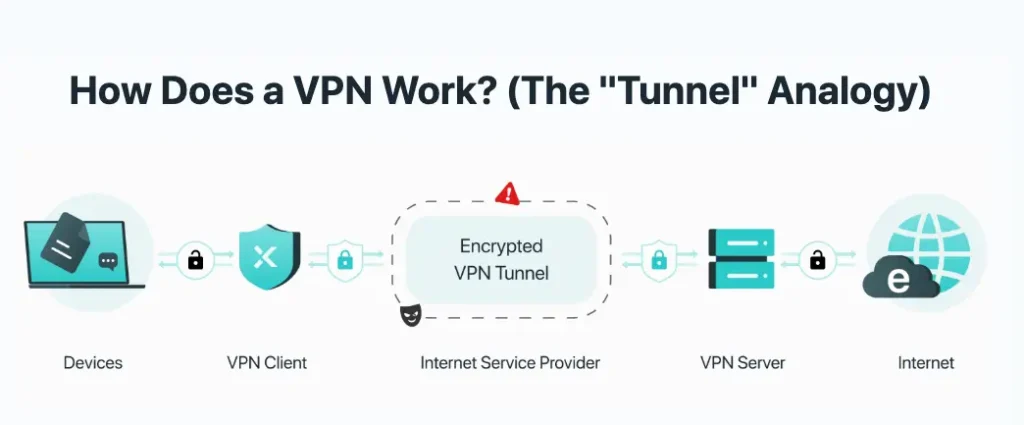
Even if you connect to a hostile or fake network, what an eavesdropper captures is much less useful: scrambled traffic rather than readable passwords, messages, or account details.
It is not a cure-all. Encryption will not save someone who types their credentials into a convincing fake login page, and it does not replace basic caution. But against the specific problem of an untrusted network watching your traffic, it directly limits what that network can see.
Practical Steps on the Device You Actually Carry
Since the phone is where many people connect to public Wi-Fi, a few mobile habits cover most of the realistic risk.
Turn off “auto-join” for open networks so your device stops connecting to look-alike hotspots on its own. Be skeptical of any network that asks you to log in with an email and password you use elsewhere. Forget old public networks you no longer need, especially airport, hotel, and café networks. And for sensitive tasks, treat mobile data as the safer default when it is available.
On the connection itself, encryption is the layer that does the heavy lifting. Installing a tool such as X-VPN’s Android app from Google Play is one example of setting up connection-level protection before joining unfamiliar networks, rather than scrambling to think about security after the phone has already connected.
For anything genuinely sensitive — banking, work logins, private documents — the safest option on a network you do not control is still your mobile data, or a connection you have deliberately protected.
A Calmer Way to Think About It
Public Wi-Fi does not deserve panic, and it does not deserve blind trust either. The realistic stance sits somewhere in between: the web has quietly made these networks safer, fake hotspots and auto-connecting devices keep a real risk alive, and a few small habits close much of the remaining gap.
Understand what your phone is doing when it connects, keep genuinely sensitive activity off networks you cannot vouch for, and use encryption when the connection needs a second layer of trust. That is not paranoia. It is simply knowing how the connection works.