
Have you ever noticed how a full day of work feels busy, but when actually the tasks are measured, it feels less productive?
Employees are busy with multiple tools, constant notifications, and growing workloads. Therefore, the real output doesn’t match the efforts that are put in.
That’s exactly why businesses are turning to AI. This technology is helping them do repetitive tasks and focus more on doing focused tasks. In fact, according to NVIDIA’s 2026 State of AI report, 53% of respondents said improved employee productivity was one of the biggest impacts AI had on business operations.
Therefore, in this article, we will discuss what AI in productivity is and how businesses are using AI to improve employee productivity.
Let’s begin.
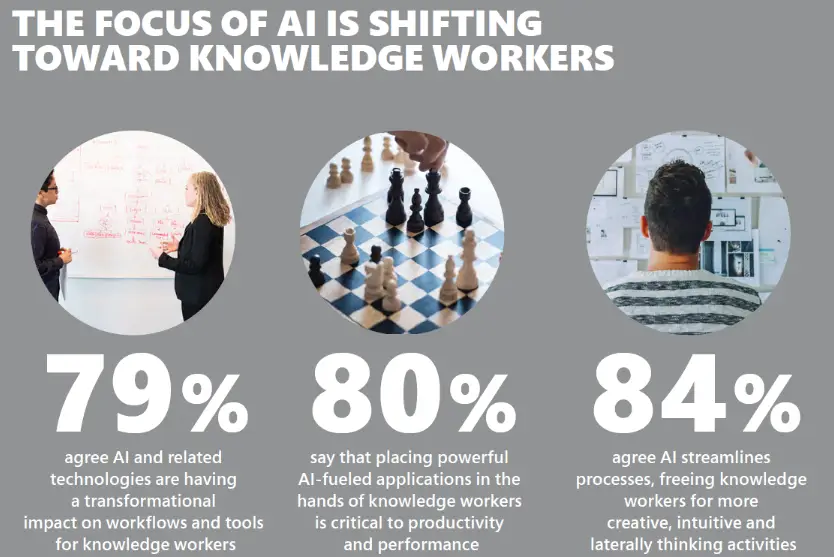
What is AI in Employee Productivity
When people hear the phrase “AI in productivity,” they think of automation or chatbots. But in reality, it is much more than these basic applications.
AI in employee productivity refers to tools and systems that assist employees in completing tasks faster. These tools also help in making better decisions and reducing manual effort. Instead of replacing humans in the workflows, these tools improve the efficiency of people.
Consider a normal workday of yours in the office. You’re writing and sending emails so that communication stays proper, summarizing important points from meetings, and trying to stay organized. All these tasks take a lot of time and energy. Therefore, you have less focus to do effective work. But what if some of these repetitive tasks are automated?
That’s what AI does. It helps you save your valuable time and effort, so that you can focus your attention on complex tasks. In many cases, tools like an employee productivity tracker also provide visibility into how time is spent. This helps you identify inefficiencies and optimize your workflow alongside automation.
For example:
- AI writing tools help draft emails or reports in seconds
- Meeting assistants generate summaries and action items automatically
- Data tools highlight insights instead of making you dig for them
- Workflow tools connect apps and trigger actions without manual input
The goal achieved using AI is speed, clarity, consistency, and better focus.
Another important change is how productivity itself is being defined. Earlier, productivity meant output. The simple definition was how much work you could complete and in how much time. But today, the definition of productivity is creating more impact and efficiency. In short, how effectively you use your time and energy.
AI supports this shift by removing low-value and repetitive work and giving employees the ability to focus on tasks that actually require thinking, creativity, and decision-making.
How Businesses Are Using AI to Improve Employee Productivity
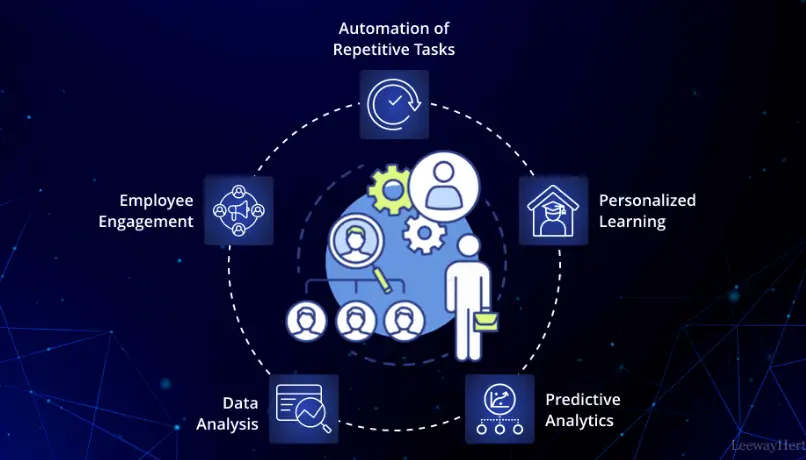
Businesses are not adopting AI in one single way. Instead, they are integrating it across workflows where it naturally fits. Let’s explore how this looks in practice.
1. Reducing Repetitive Work
One of the biggest reasons why productivity is hampered is because of doing repetitive tasks. The tasks, such as data entry, formatting documents, scheduling meetings, or updating systems, drain energy and don’t contribute much to something meaningful. Therefore, these can be given to someone else or can be automated.
Therefore, as a solution, companies are using AI to automate these tasks so employees don’t have to spend hours completing them.
For example, customer support teams use AI to categorize tickets and suggest responses. HR teams use AI to screen resumes and schedule interviews. Also, AI voice technology takes the first rounds of interviews and finds appropriate candidates so that the HR team can focus on worthy candidates more. Finance teams automate invoice processing and reporting.
This saves time and reduces fatigue. Employees can focus on work that actually requires their attention.
2. Improving Communication Across Teams
Communication is where productivity breaks down. Messages get lost, updates are unclear, and teams spend time aligning instead of executing.
AI tools are helping solve this by summarizing long email threads, generating meeting notes automatically, highlighting key decisions and action items, and extract AI insights in Claude from conversations and discussions.
Imagine finishing a meeting and instantly having a structured summary with next steps. That alone removes a huge layer of confusion and follow-ups.
This is especially useful for remote or hybrid teams where communication gaps can slow everything down.
3. Enhancing Decision-Making with Data
There’s a huge amount of data that is collected in a company from everywhere. But getting insights from the data is an equally challenging task.
However, AI helps with turning raw data into insights within a few minutes or hours. What used to take days for employees to complete by manually analyzing spreadsheets, they can now:
- Ask questions in natural language
- Get instant summaries of trends
- Identify patterns and anomalies quickly
For example, a marketing team can instantly see which campaigns are performing best and why an advantage that can significantly improve ad performance for a dropshipping business. They do not have to spend hours going through dashboards. This saves time, and you can focus on decision-making with those insights.
This transformation allows employees to move from data collection to decision-making, which is where real productivity happens.
4. Personalizing Workflows
Every employee in your office has a different style of working. Some prefer structured workflows, while others need flexibility.
AI tools are increasingly adapting to individual work styles. They learn patterns over time and suggest actions based on behavior.
For example:
- Recommending the best time to schedule meetings
- Prioritizing tasks based on deadlines and workload
- Suggesting shortcuts based on past activity
This creates a more personalized work experience.
5. Supporting Deep Work and Focus
There is a constant interruption in the focus work time due to notifications or meetings. This decreases the overall productivity of the employee. Here, AI helps by reducing noise. It can filter notifications, prioritize messages according to their importance, and block distractions during focus time.
Some tools analyze how employees spend their time and suggest ways to improve focus. This is personal as well as team growth.
An employee productivity tracker is an example of this. Instead of monitoring employees in a rigid way, these modern tools use AI to provide insights into work patterns. They show time spent on tasks, meeting overload, or productivity peaks, so employees can adjust their schedules more effectively.
The main difference in using these tools is intention.
6. Accelerating Learning and Skill Development
Another use of AI is learning.
With AI, employees no longer need to search through endless resources to find answers. It can provide instant explanations, tutorials, or generate learning paths based on role and skill gaps.
For example:
- A developer can get code suggestions or explanations instantly
- A sales executive can receive real-time coaching during calls
- A new employee can onboard faster with AI-guided training
7. Streamlining Cross-Tool Workflows
The major productivity issue that’s happening is switching between tools. Employees often switch between email, chat, project management tools, CRMs, and more. This leads to loss of time and context in the process.
AI helps connect these tools. It can trigger actions across platforms, sync data automatically, and reduce manual updates.
For instance:
- Updating a CRM after a meeting automatically
- Creating tasks from emails
- Syncing project updates across tools
Building Smarter Workflows, Not Just Faster Ones
AI allows employees to perform their tasks faster and better. It reduces the number of repetitive tasks, ensures effective communication, and facilitates sound decision-making. Businesses are creating environments where employees can focus on important tasks.
The most successful companies are integrating AI tools thoughtfully into workflows. This ensures that they support employees rather than overwhelm them.
If you want to learn more practical information like this and many other tips, make sure to check out more articles on DGM News.