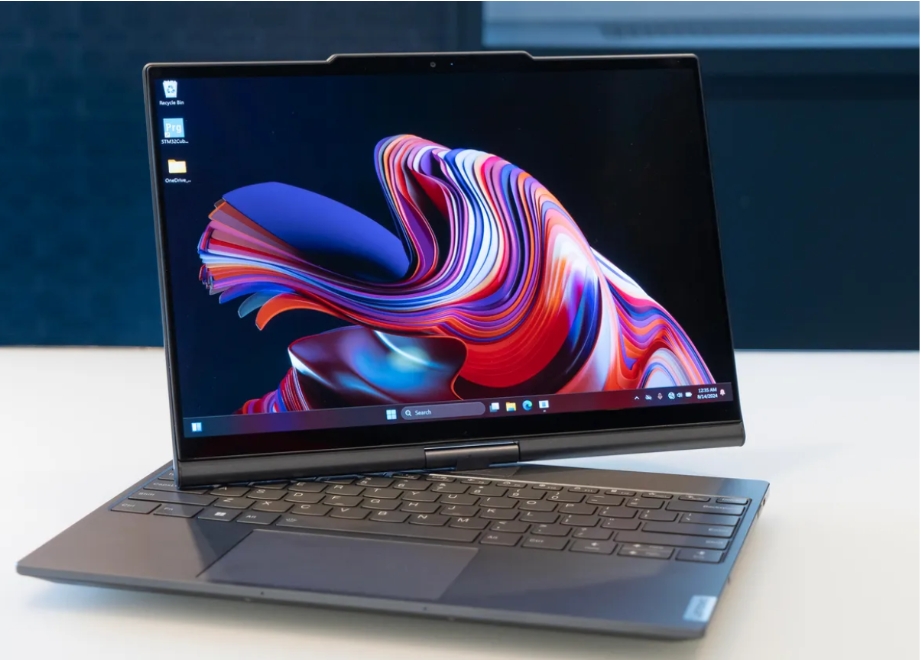
Think! What do you want from your device? No doubt, you desire innovation and expect more from your devices.
As technology evolves every day, an interesting legacy of innovation and functionality arrives in the form of Lenovo Aura Edition. The Aura Edition laptops are the essence of cutting-edge technology and features designed to elevate your day-to-day experience.
They enhance user experience and fill a gap between the physical and digital worlds. A New Era Arrived Just The Way You Deserve!
Smart Modes for Optimal Performance and Personalization.
Lenovo Aura Edition comes with Smart Modes that deliver smooth performance right in line with what you are doing at a particular moment.
Without necessarily letting you suffer through any inconvenience as you switch between tasks.
Let us read the pre-defined modes for your selection
Scenario Modes
Overview: Scenario modes intelligently adjust settings based on the user’s current activity or learned behavior. They aim to optimize device performance for various tasks, whether it’s gaming, working, or casual browsing.
Benefits
- Automatic Adjustments – These modes can switch settings automatically, ensuring that your device is always performing at its best based on what you’re doing.
- Personalization – By learning your habits, scenario modes can tailor experiences to suit your unique preferences.
Key Features
- Adaptive Performance: Automatically boosts CPU and GPU performance during gaming sessions, while conserving energy during less intensive tasks.
- User Profiles: Allows for different profiles based on user preferences, enabling seamless transitions between modes.
Shield Mode
Overview: Shield mode ensures that your online security and personal privacy are covered by giving you a more efficient way of managing sensitive information.
Benefits
- Enhanced Privacy – Your data is safe, free from those snooping eyes and data theft.
- Security Alerts – It gives alerts to users about potential threats and security vulnerabilities.
Key Features
- VPN Integration: Masks your IP address and sends your surfing encrypted, providing a good secure browse for you.
- Guard and Alert Systems: Guard and Alert System: Scans for suspicious activities and immediately sends alerts if it senses a given potential threat.
Attention Mode
Overview: This attention mode is designed to minimize distractions. It helps users focus and become productive for doing critical work or revising.
Benefits
- Increased Productivity – There are minimal distractions for the user. So they can complete a task more easily.
- Mental Clarity – Minimized distraction helps in decision-making as well as effective problem-solving.
Key Features
- Notification Management: Mutes all nonspecific notifications within work hours or when being focused.
- Website Blocking: It allows you to lock out any website considered distracting temporarily and prevent you from working due to such websites.
Collaboration Mode
Overview: Collaboration mode enhances the experience and adds a lot more magic to virtual meetings than to real ones. The mode ensures clear communication along with engaging and efficient ways of delivering the information.
Benefits
- Improved Engagement – It is designed to be interactive to the point where virtual meetings no longer feel disconnected but rather collaborative.
- Professional Appearance – It offers tools that enhance the quality of your video and presentation, leading to more effective communication.
Key Features
- Video Effects: Offers various kinds of effects that can improve the quality of your video feed.
- Screen Sharing Tools: This helps in making the sharing of your screen during a presentation smooth, making it easier for collaboration
Wellness Mode
Overview: Wellness mode is focused on the proper usage of digital technologies, reminding users to adopt healthy habits and regularly take breaks for their health.
Benefits
- Reduced Eye Strain – This provides an opportunity for users to take frequent breaks to avoid eye strain by digital technology.
- Healthier Work Habits – The mode promotes healthy work by ensuring better posture and ergonomic behaviors in operating the device.
Key Features
- Break Reminders: This sends notifications to remind the users about taking breaks and stretching or looking away from the screen.
- Ergonomic Guidelines: Precepts and best practices to set up a healthy workstation
Eco Mode
Overview: Eco mode has been designed to find a balance between battery life and high performance, suitable for users requiring extension of their device’s battery life without compromising much on the performance.
Benefits
- Longer Battery Life – This has the effect of less power consumption when high performance is not essential, allowing for longer times of use.
- Sustainable Usage – This encourages environmentally friendly practices by energy conservation.
Key Features
- Power Management: Automatically adjusts settings such as brightness and background processes to reduce battery consumption.
- Performance Scaling: Provides options to scale back performance when less intensive activities still maintain usability.
Enhance User Experience with Other Innovative Features
- Presence Detection
Presence Detection allows you to increase work efficiency by automatically logging in or locking your PC, or by pausing or resuming video based on presence detection.
- Zero Touch Login / Lock
It wakes up and logs into your PC when you approach the device, turns the display down and locks the PC when you leave.
- Zero Touch Video play
For selected players, it stops the video playback when you leave the device and resumes on your return.
- Camera Switch
The camera switch is a mechanical button to protect your privacy that prevents capturing your image. How to disable the device’s camera?
Slide the camera switch in the direction with the Camera Switch Off Icon. To use the camera again, slide the camera switch in the opposite direction.
- The Copilot Key
This era of AI has arrived. Copilot is designed to provide AI-powered assistance in a way that makes it quite effortless for you to engage in generating AI on Windows.
Copilot can easily accessed by pressing the icon labeled ‘Copilot Key’ on the bottom row of your keyboard
Conclusion
The Aura Edition laptop is technologically advanced with its sleek, user-friendly design and convenient features to answer the demands of the modern user.
With Smart Share, file sharing becomes effortless. This allows users to seamlessly connect their smartphones and laptops with just a tap. Meanwhile, Smart Care offers a premium suite of services, including around the clock customer support to ensure that your laptop receives the attention it deserves.
Aura Edition stands out like a bright shining light. This more user-centric focus enhances your overall experience. It plays a pivotal role in the smart technology landscape that’s going to make our lives easier, well-connected and brighter.
Technology Perspective
Technology continues to transform industries through artificial intelligence, cloud computing, automation, cybersecurity, digital platforms, and data-driven decision making. As organizations increasingly adopt digital solutions, understanding emerging technologies becomes essential for businesses, professionals, and consumers. DGM News regularly covers these developments through expert analysis, technology news, and educational resources.
Innovation Outlook
Rapid advances in artificial intelligence, automation, machine learning, cloud infrastructure, and digital transformation continue reshaping global industries. Monitoring these developments helps organizations adapt to changing technologies, improve efficiency, and prepare for future innovation.
Did you know?
Artificial Intelligence is expected to influence nearly every major industry over the coming decade, from healthcare and finance to transportation, manufacturing, education, and entertainment.
AI, Machine Learning, Deep Learning and Generative AI Explained
Google AI Updates
About DGM News
DGM News is an independent digital publication delivering the latest Technology News, AI News, and FinTech News. We provide expert insights on startups, innovation, cybersecurity, software, business, gadgets, cloud computing, artificial intelligence, and emerging technologies. Our mission is to publish informative, accurate, and regularly updated content that helps readers stay informed in today's rapidly evolving digital landscape.
Since our editorial focus includes technology, artificial intelligence, and financial technology, we continuously expand our coverage as new innovations emerge.
Editorial Standards
Every article published on DGM News undergoes editorial review before publication. We prioritize factual accuracy, clarity, transparency, and reader value while following responsible digital publishing practices.
Research Methodology
Our editorial team researches publicly available information from official announcements, technical documentation, research publications, developer resources, reputable industry reports, and trusted public sources whenever applicable. Information is reviewed to improve clarity and accuracy before publication.
Fact-Checking Policy
We make reasonable efforts to verify factual information before publishing. Articles are reviewed for accuracy, consistency, and relevance. If significant developments occur after publication, content may be revised to reflect updated information.
Update Policy
Technology evolves rapidly. Articles may be reviewed and updated periodically to reflect software releases, AI developments, security advisories, regulatory updates, product launches, and other important industry changes.
Source Verification
Whenever possible, DGM News reviews information using official company announcements, technical documentation, research publications, government resources, publicly available reports, and reputable industry references before updating articles.
Editorial Independence
DGM News maintains editorial independence in all publishing decisions. Editorial content is produced independently and is intended to provide balanced, informative, and reader-focused coverage without influence from advertisers or commercial partnerships.
AI Usage Disclosure
Artificial intelligence tools may assist with research organization, grammar improvement, formatting, or editorial workflows. Every article is reviewed by human editors before publication to help maintain quality, clarity, and factual accuracy.
Corrections Policy
Accuracy is important to us. If readers identify outdated information or factual inaccuracies, they are encouraged to contact our editorial team. Verified corrections are reviewed and incorporated whenever appropriate.
Reader Feedback
Reader feedback helps improve our journalism. We welcome suggestions, corrections, and constructive feedback through our Contact page to continuously improve the quality of our reporting.
Last Editorial Review
This article follows the DGM News editorial review process and may be updated periodically as new information becomes available.
Why Trust DGM News?
DGM News is committed to publishing technology journalism that emphasizes accuracy, transparency, editorial independence, and regularly updated information. Our editorial process is designed to provide readers with reliable coverage of technology, AI, fintech, startups, and digital innovation.
DGM News Resources
Topics We Cover
Artificial Intelligence • AI Tools • Machine Learning • FinTech • Cybersecurity • Cloud Computing • Programming • Software Development • Gadgets • Mobile Technology • Business Technology • Startups • Digital Marketing • Blockchain • Cryptocurrency • Science • Innovation • Consumer Technology • Enterprise Technology • Automation